Runway is an AI creative platform for generating and editing videos, images, and audio. It is mainly built for creators, filmmakers, designers, marketers, and production teams that want to create visual content with generative AI. Runway combines its own video models with third-party models and also provides a developer API for adding AI generation to apps and products.

Runway
AI Video Generation PlatformAI creative platform for generating, editing, and transforming videos, images, and audio.
Try Runway Free
Watch demo
We may earn a commission if you buy through this link. It never changes our rating.
What is Runway?
What users sayUsers mainly like Runway for making AI video creation much faster than a traditional production workflow. Its video models, image-to-video tools, and creative controls are the main attractions. The common frustration is credit usage, because experimenting with several video generations can use a monthly allowance fairly quickly.
Pros and cons
Pros
- Produces impressive AI video from text and images
- Good choice for creators who work with video regularly
- Gen-4.5 handles motion and detailed prompts well
- Includes video, image, editing, and audio tools in one platform
- Paid plans give access to a wider range of AI models
- Developer API is available for building Runway into other products
Cons
- Video generation can use credits quickly
- Free plan is mainly useful for testing the platform
- The best models and features require a paid plan
- Results can still need several attempts for precise scenes
- Standard and Pro monthly credits do not roll over
- High-volume generation gets expensive
Our verdict
Runway is a strong choice for creators who want AI video generation without stitching together several different tools. Its biggest strength is video: models such as Gen-4.5 can create convincing motion from text or images, while the wider platform also covers editing, images, audio, and production workflows. The main limitation is credit usage, because regular video generation can burn through a smaller plan quickly. Free is fine for testing, while Standard or Pro makes more sense for regular creative work.
Who is Runway for?
Video Creators
Creates AI video and visual assets without a traditional production setup
- Text to video
- Image to video
- Video editing
- Long-form editing without external tools
- Unlimited low-cost generation
Plan we would pick: Pro
YouTubers
Useful for B-roll, concepts, backgrounds, and short visual sequences
- B-roll
- Visual concepts
- Image animation
- Full YouTube channel management
- Long-form editing
Plan we would pick: Standard
Filmmakers
Useful for previsualization, experimental shots, and AI-generated sequences
- Concept development
- Video generation
- Visual effects
- Complete traditional film production
- Guaranteed frame-perfect results
Plan we would pick: Pro
Marketers
Creates campaign videos, social assets, and product concepts
- Ad creative
- Social video
- Campaign concepts
- Marketing analytics
- Campaign management
Plan we would pick: Standard
Designers
Adds motion and AI video to visual creative work
- Image to video
- Creative concepts
- Visual experimentation
- Traditional vector design
- UI design
Plan we would pick: Standard
Creative Teams
Provides shared AI creation workflows and pooled credits
- Collaboration
- Video production
- Shared assets
- Very small individual projects
- Low generation volume
Plan we would pick: Team
Enterprise Teams
Adds AI video generation to larger production workflows
- Enterprise production
- API
- Security
- Casual individual creation
- Small projects
Plan we would pick: Enterprise
Industry fit
Film & Video ProductionOne of Runway's strongest use cases.
Strong fit
98
Advertising & MarketingUseful for AI ads, campaign concepts, and short-form video.
Strong fit
95
Media & EntertainmentStrong video generation and creative production capabilities.
Strong fit
97
Social MediaUseful for short-form video and visual content.
Strong fit
95
Design & CreativeCombines image and video generation with creative editing.
Strong fit
94
E-commerceUseful for product concepts and marketing visuals.
Strong fit
87
GamingUseful for concepts, cinematics, and creative experimentation.
Strong fit
88
Enterprise Creative TeamsEnterprise security and developer options support larger deployments.
Strong fit
93
Key features
Text to Video
Creates AI-generated video from written prompts.
Image to Video
Animates still images and turns them into video.
Gen-4.5
Runway's advanced video model for strong motion, prompt adherence, and visual quality.
AI Video Editing
Uses generative AI to transform and modify existing video.
Aleph
Provides in-context video editing and transformation capabilities.
Image Generation
Creates AI images for concepts, scenes, and creative assets.
Generative Audio
Provides supported speech, voice, and audio generation tools.
Custom Voices
Pro and higher users can create custom voices for supported audio workflows.
4K Upscale
Upscales eligible video output for higher-resolution production.
Runway Workflows
Combines multiple creative steps into reusable AI workflows.
Runway API
Lets developers add supported video, image, and audio models to their own products.
Runway pricing
Prices checked October 7, 2026
Free
$0 month
- 125 one-time credits
- 5GB asset storage
- Limited generative AI tools
- Watermarked video exports
Most popular
Standard
$15 month
- 625 credits per month
- Access to AI image and video models
- No-watermark generations
- Additional credits available
Pro
$35 month
- 2,250 credits per month
- All AI image and video models
- Custom Voices
- Text to Speech
- 500GB asset storage
- Unlimited 4K upscale
Max
$95 month
- 9,500 credits per month
- All Runway models
- Early access to selected new models
- One month credit rollover
- On-demand generation
Team
$149 seat/month
- 6,900 credits per seat per month
- Shared credit pool
- Team workspace
- Comments
- Shared skills
- 1TB workspace storage
Enterprise
Custom custom
- Enterprise deployment
- Organization controls
- Custom credits
- Security and support options
- Large-team collaboration
Pricing calculator
Standard $15 / seat, Pro $1 / seat from 625 seats.
Is Runway right for you?
Answer a few quick questions to see our pick.
How Runway compares
Runway stands out because it is built around a broader AI video production workflow rather than a single text-to-video generator. Users can generate from text or images, edit existing footage with AI, create audio, upscale output, and use supported models through the Runway developer API.
| Capability | Runway | Kling AI | Pika | Luma Dream Machine |
|---|---|---|---|---|
| Text to video | Excellent | Excellent | Yes | Excellent |
| Image to video | Excellent | Excellent | Yes | Excellent |
| AI video editing | Excellent | Yes | Yes | Yes |
| Image generation | Yes | Yes | Yes | Yes |
| Generative audio | Yes | Varies | Varies | Varies |
| Developer API | Yes | Yes | Yes | Yes |
| Free plan | Yes | Yes | Yes | Yes |
| Team collaboration | Yes | Varies | Varies | Varies |
| Enterprise plan | Yes | Yes | Varies | Yes |
Integrations
5 integrations listed
- Runway API
- MCP-compatible developer tools
- Cursor
- Claude Code
- Codex
Security, data & support
Security & compliance
- SOC 2 Type IICompliant
- ISO/IEC 27001:2022Certified
- Private uploaded assetsSupported
- Enterprise security controlsAvailable
- Independent security auditingSupported
Your data, in plain words
- Uploaded assets are private by default.
- Users can deliberately change asset privacy settings when they want to share content.
- Runway uses security controls validated through independent audits.
- SOC 2 Type II controls apply to Runway's cloud service.
- Runway is ISO/IEC 27001:2022 certified.
- Enterprise customers can receive additional security terms based on their contract.
- Users working with confidential client material should review Runway's current privacy and enterprise terms before deployment.
Support
- Help CenterAll usersSelf-service
- Support RequestsCustomersResponse time varies
- Enterprise SupportEnterprise customersContract dependent
- Sales SupportEnterprise prospectsAvailable
API & languages
- Developer APIYes
- Video generation APIYes
- Image generation APIYes
- Audio generation APIYes
- Gen-4.5 APIYes
- Gen-4 Turbo APIYes
- Aleph 2.0 APIYes
- Model RouterYes
- MCP supportYes
- Python supportYes
- Node.js supportYes
- API credit price$0.01 per credit
- English
Runway's interface is currently available only in American English. Its generative models can accept prompts in other languages, although results may vary by language. Generative audio supports multiple languages, and Voice Dubbing / Speech to Speech supports a broader multilingual set. Multilingual prompt or audio support should not be confused with official interface localization.
Runway FAQs
Is Runway free?
Yes. Runway has a Free plan with 125 one-time credits and 5GB of asset storage.
How much does Runway cost?
The first paid Runway plan starts at $15 per month.
What is Runway used for?
Runway is mainly used for AI video generation, image generation, video editing, and generative audio.
What is Runway Gen-4.5?
Gen-4.5 is an advanced Runway video model for text-to-video and image-to-video generation.
Can Runway generate video from text?
Yes. Supported Runway models can create videos directly from text prompts.
Can Runway turn an image into video?
Yes. Image-to-video is one of Runway's main generation workflows.
Does Runway have an API?
Yes. Runway provides a developer API for supported video, image, and audio generation models.
Does Runway offer a free trial?
Runway provides a Free plan rather than a traditional full paid-plan trial.
Do Runway credits roll over?
Standard and Pro monthly credits do not roll over. Max and Team can roll over up to one month of unused credits.
Can I buy extra Runway credits?
Yes. Standard, Pro, Max, and Team users can purchase additional credits.
Does Runway support 4K video?
Eligible higher plans include 4K video upscaling.
Is Runway good for YouTubers?
Yes. It can be useful for B-roll, visual concepts, short sequences, backgrounds, and other creative video assets.
Alternatives to Runway
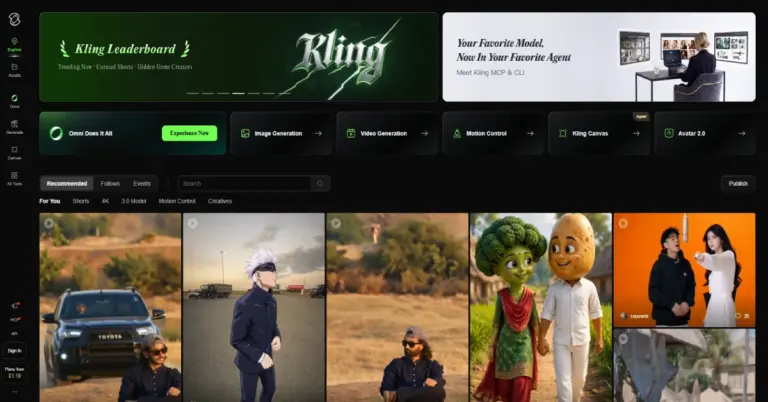

AI video and image generation platform for creating cinematic videos, realistic motion, native audio, and high-resolution visuals.
Runway reviews
4.2
No reviews yet
Review sentiment
0% Positive0% Neutral0% Negative
G2 · 143 reviews
Rating: 4.2/5
Users commonly like Runway's AI video generation and creative capabilities, while credit usage and generation consistency can be concerns
RunwayFrom $15/month
Try Runway Free