Disclosure: We may earn a commission if you buy through links on this page. It does not change our opinion.
Cursor has gone from a clever VS Code fork to one of the most talked about tools in software. Developers argue about it every week. Some say it doubled their output. Others say the bills got confusing and they went back to a simpler setup.
So is it worth your money in 2026? This review gives you a plain answer. We looked at Cursor’s own website, its docs and its changelog. We also read recent pricing breakdowns and user feedback across the web. This is a research based review. We did not run lab benchmarks, so you will not find made up speed numbers here.
The Short Version
- Cursor is an AI first code editor built on the VS Code foundation. Your extensions and settings mostly carry over.
- The free Hobby plan is good for a trial. Real daily work needs a paid plan.
- Pro costs $20 a month. Pro+ costs $60. Ultra costs $200. Teams starts at $40 per user.
- All paid individual plans have the same features. The only difference is how much AI usage you get.
- Agent mode is the main reason to pick Cursor. Tab autocomplete is the second.
- Heavy agent users can pay well above the sticker price. Watch your usage.
Our verdict: Cursor is the best pick for developers who want AI built into the editor itself. It is not the cheapest option and the credit system takes some learning. For most solo developers Pro is the right place to start.
What Is Cursor?
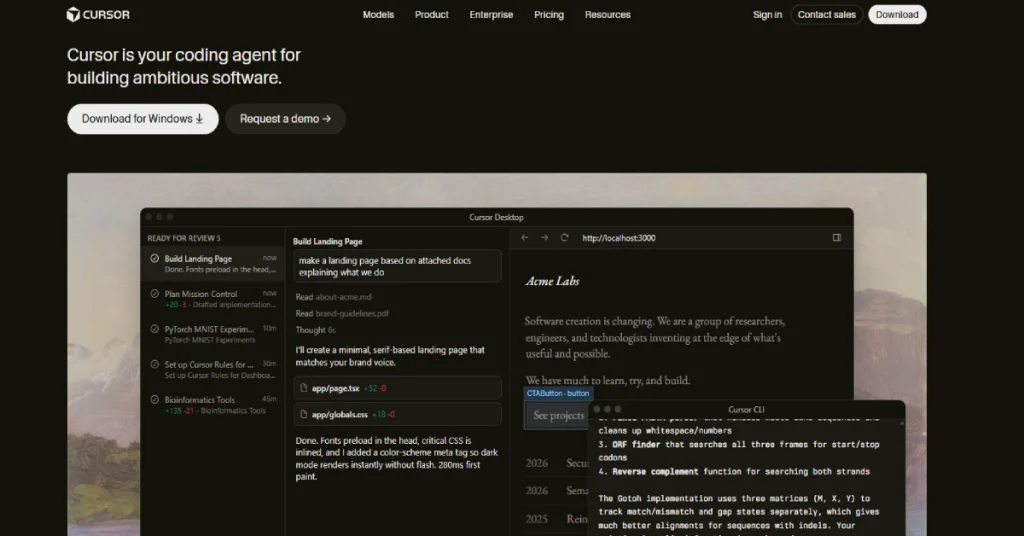
Cursor is a desktop code editor made by Anysphere. It looks and feels like VS Code because it started from the same open source base. You can import your extensions, themes and keybindings in a few clicks.
The difference is that AI is not an add-on. It sits in the center of the app. You get smart autocomplete, a chat panel, an agent that edits many files and a cloud agent that works while you do something else. You can download it for macOS, Windows and Linux from cursor.com. There are also mobile apps that let you chat with cloud agents and see their results. They are not full editors though.
Cursor lets you pick the model behind the scenes. Options include models from Anthropic, OpenAI, Google and xAI. It also has its own in-house models. Tab uses a model tuned for speed. The Composer family is built for coding agents.
Who Is Cursor For?
Cursor suits three kinds of people.
Solo developers and freelancers. You want to ship faster and you are happy to pay $20 a month for it. Startup teams. You want shared rules, shared commands and one bill. Teams gives you that. Developers who like to stay in control. Cursor shows you diffs before you accept them. You stay in the driver’s seat. It is less suited to people who only write code now and then. It is also a weaker fit for teams locked into JetBrains tools who do not want to leave their IDE.
Cursor Pricing in 2026
This is where most confusion starts, so let us slow down.
Cursor moved from a fixed number of “fast requests” to a credit pool. Each paid plan comes with a dollar based pool equal to its monthly price. Pro gives you about $20 of model usage. Pro+ gives about $60. Ultra gives about $200. Some sources describe the pools as roughly 1x, 3x and 20x of Pro. The exact multiples can shift so confirm them on the official page.
| Plan | Price | Who it is for |
|---|---|---|
| Hobby | Free | Trying Cursor out with limited usage |
| Pro | $20 per month | Most solo developers |
| Pro+ | $60 per month | Heavy users who run out of Pro credits |
| Ultra | $200 per month | Full time agent users |
| Teams | From $40 per user per month | Engineering teams that need admin controls |
| Enterprise | Custom | Large companies with compliance needs |
Annual billing saves around 20 percent according to recent breakdowns. That puts Pro near $16 a month. New users have been reported to get a short Pro trial, about a week. Check the current offer before you count on it.
Teams changed in June 2026. Cursor split Teams into Standard and Premium seats. That lets companies match the seat to how heavily each person uses AI. Look at the official pricing page for the current numbers. India pricing. In July 2026 Cursor launched a cheaper plan called Cursor Start for developers in India at ₹649 a month. If you live in India you should check whether it fits you better than local Pro.
What it really costs per year
Here is simple math based on list prices.
| Setup | Yearly cost |
|---|---|
| Solo on Pro | $240 |
| Solo on Pro+ | $720 |
| Solo on Ultra | $2,400 |
| Team of 5 on Teams at $40 | $2,400 |
| Team of 10 on Teams at $40 | $4,800 |
These are list prices before overage and before annual discounts. Heavy users often land above them. One pricing tracker estimated that realistic heavy use on Pro can reach $480 to $960 a year once overages kick in.
There is a useful rule here. If you burn through your Pro pool in two weeks, Pro+ at $60 is often cheaper than Pro plus $40 of extra usage.
Core Features
Cursor Tab
Tab is the autocomplete. It does more than finish a line. It predicts your next edit and can suggest changes across several lines. Press Tab to accept and Esc to dismiss.
Cursor’s changelog shows steady upgrades here. It can make larger edits at a time. It also got better at things like Python auto imports. You can even rebind the accept key if Tab clashes with your habits.
For many developers this is the feature they use most. It saves small moments all day. It will not make architectural choices for you though. Treat it as a very fast pair of hands.
Agent mode
Agent mode is the heart of Cursor. You describe a task in plain language. The agent reads your codebase and picks its own context. It then edits files and runs terminal commands. It can also check results and try again.
Early on Cursor had three separate things called Chat and Composer and Agent. The changelog says they were merged into one smart interface that adapts to what you ask. That made the product much easier to understand.
Good uses for Agent mode:
- Changes that touch many files, like renaming a pattern across a project
- Multi step chores such as writing a migration, updating a model, adding a test and updating docs
- Fixing a bug when you can describe the symptom clearly
Poor uses:
- Vague requests with no clear goal
- Big design decisions that need human judgment
- Anything you will not review
You see the proposed changes as diffs. Checkpoints let you roll back if the agent goes sideways. That safety net is a big reason developers trust it.
Plan Mode
Cursor added a planning step for bigger jobs. The agent first writes a plan and you can edit it before any code changes. This tends to cut wasted work. It is worth using on anything larger than a small fix.
Background agents
Background agents run in a cloud sandbox. You hand off a task and keep working on your own code. They do not touch your local git state while they work.
They suit jobs like writing a test suite for an old module while you build something new. Some third party reports say they work with GitHub repositories only and bill separately from your subscription credits at model API rates plus a surcharge. These details change often so read the Cursor docs before you rely on them. If you plan to run many background agents expect to spend more than your base plan.
Parallel agents
Cursor 2.0 arrived in October 2025. It introduced Composer, Cursor’s own coding model. It also let up to eight agents run in parallel on a single prompt. The release added a built in browser so agents can test a user interface and a sandboxed terminal. Voice input came with it too. You can picture it like a small team. One agent writes the API. Another writes tests. A third reviews. It is powerful and it can burn credits fast.
Rules, commands and memory of your project
Cursor reads rule files from a .cursor/rules folder. You write your team’s conventions once and the agent follows them. Examples are your naming style, your test framework and what to avoid. You can also save custom commands in a .cursor/commands folder. Type a slash command in chat and it runs a saved prompt. This is a quiet productivity win for teams.
Context tools
In chat you can point at things with @ mentions. Files, folders, docs, git history and the web are all available. This keeps the model focused on what matters instead of guessing.
MCP support
Cursor works as a first class MCP client. That means you can plug in servers for databases, issue trackers or internal tools. The agent then calls them as tools. If your workflow depends on connecting AI to company systems this is a real plus.
BugBot and code review
Cursor offers BugBot for automated pull request review. Some pricing guides list it as a paid extra on top of Pro. Check what your plan includes before you count on it.
Integrations
Linear is supported so you can launch agents from an issue ticket. Jupyter notebook support lets agents edit cells. Cursor also has a GitHub link for cloud work.
Ease of Use
If you already use VS Code you will feel at home in about ten minutes. The import step moves your extensions and settings. The new parts are the chat panel and the agent.
The learning curve is not the editor. It is the habit of working with an agent. You have to learn how to write clear tasks. You have to learn when to stop the agent and when to trust it. Most people get comfortable within a week or two.
The credit system is the other hurdle. Many guides say it is the most confusing part of Cursor. Different models cost different amounts per token. A cheap model can stretch your pool. A top tier model can drain it in an afternoon. Use the usage dashboard and keep an eye on it in your first month.
What We Like
- The editor feels familiar so you can start quickly
- Tab is fast and genuinely useful all day
- Agent mode handles multi file work well
- Diffs and checkpoints keep you in control
- You can choose from many top models
- Rules and commands help teams stay consistent
- MCP support opens the door to real workflows
- Frequent updates keep adding useful features
What We Do Not Like
- The credit system takes time to understand
- Heavy agent use can push bills above list price
- Pricing and plan details change often
- Background agents add separate costs
- Teams seats include Pro level credits and not more
- Support for non VS Code habits is limited if you love JetBrains
Privacy and Security
Many teams ask about code privacy. Cursor offers a privacy mode and enterprise controls. Teams adds SSO and centralized billing. Enterprise adds governance for larger companies. Teams that need regional data residency can opt in and pay a 10 percent uplift on eligible model pricing according to one recent breakdown.
Read the official security and privacy information yourself before you put sensitive code into any AI tool. Your legal team will want to see it anyway.
Cursor vs the Alternatives
Cursor vs GitHub Copilot. Copilot lives inside many editors and is usually cheaper for basic completion. Cursor goes deeper with its agent and its editor level control. If you want the most agentic experience Cursor leads. If you want simple help inside your current IDE Copilot may be enough. Many teams use both.
Cursor vs Windsurf. Windsurf is a close rival with a similar VS Code based approach and similar pricing after its 2026 restructure. Try both free tiers if you cannot decide.
Cursor vs Claude Code. Claude Code works from the terminal and suits developers who prefer the command line. Cursor gives you a full visual editor. Some developers run both and use each for what it does best.
Who Should Buy Which Plan?
Hobby: Students and people who want to explore. Expect limits.
Pro at $20: Most solo developers and freelancers. Start here.
Pro+ at $60: You hit the Pro limit before month end. You use agents daily.
Ultra at $200: You work with agents all day and speed matters more than cost. You get early access to new features too.
Teams: You need SSO and shared rules and one invoice. Pick Standard or Premium seats based on usage.
Enterprise: You have compliance demands and a procurement process.
A sensible plan for a small team is simple. Put everyone on Pro. Move only the heavy users up to Pro+. Use Teams when you actually need admin controls. One breakdown notes that teams without compliance needs can often do fine with individual Pro accounts and expense claims.
Tips to Get the Most From Cursor
- Write rules early. A short rules file saves hours of repeating yourself.
- Use Plan Mode on big tasks. It stops the agent from running in the wrong direction.
- Pick models by task. Use cheaper models for simple edits and top models for hard problems.
- Review every diff. The agent is fast and it can still be wrong.
- Commit often. Small commits make rollbacks painless.
- Watch your usage dashboard. Check it weekly in the first month.
Five Questions to Ask Before You Pay
- Do I write code most days? If yes Pro pays for itself fast. If no stay on Hobby.
- Will I use agents or just autocomplete? Autocomplete alone does not justify high tiers.
- Can my team accept the privacy setup? Ask your security lead before rollout.
- Am I ready to monitor usage? The credit model rewards people who pay attention.
- Have I tried the free plan and the trial? Test it on a real project before you commit.
Frequently Asked Questions
Is Cursor free?
Yes there is a free Hobby plan with limited usage. It is enough to try the editor and the basic AI features. Daily professional work usually needs Pro or higher.
How much does Cursor cost in 2026?
Pro is $20 a month, Pro+ is $60 and Ultra is $200. Teams starts at $40 per user per month. Enterprise is custom. Annual billing is reported to save about 20 percent. Always check the official pricing page for the latest figures.
Is Cursor worth $20 a month?
For most working developers yes. Tab and Agent mode can save real time every day. If you code rarely the free plan is the smarter choice.
What is the difference between Pro, Pro+ and Ultra?
Features are the same. The size of your monthly credit pool is what changes. Pro+ gives roughly three times the usage of Pro. Ultra gives roughly twenty times. Ultra also offers priority access to new features.
Does Cursor use my code to train models?
Cursor has privacy controls and enterprise options. The exact policy can change so read the official privacy and security pages before you use it with private code.
Which AI models can I use in Cursor?
You can choose from models by Anthropic, OpenAI, Google and xAI. Cursor also ships its own models for Tab and for agents. The list changes often as new models arrive.
Can I use my VS Code extensions in Cursor?
Mostly yes. Cursor is built on the VS Code foundation and offers an import step. A few extensions may not work so test your key ones first.
What are Cursor background agents?
They are cloud agents that work on tasks while you keep coding. They run in a sandbox and do not touch your local git state. They may bill separately from your plan credits so check the docs.
Is Cursor better than GitHub Copilot?
It depends on what you want. Cursor is stronger for agent style work and deep editor integration. Copilot is simpler and works in many editors. Plenty of teams use both.
Does Cursor work on Windows, Mac and Linux?
Yes. All three are supported. A mobile app also exists for chatting with cloud agents.
Is there cheaper pricing in India?
Cursor launched a plan called Cursor Start for India in July 2026 at ₹649 a month. Check the India pricing page for current details.
Final Verdict
Cursor earns its place as one of the best AI code editors you can buy. Tab is fast. Agent mode is strong. The control you get over diffs and models makes it feel safe to use on real projects. The weak spot is cost clarity. The credit pool is clever and also confusing. Heavy users should watch their spending closely.
Our advice: Start on Hobby for a weekend. Move to Pro at $20 if you like it. Only step up to Pro+ or Ultra when you can prove you run out of credits. For teams use Teams when you need admin controls and not before.
Ready to try it? Visit Cursor’s official site and check the latest pricing.
Related articles