Building a useful AI chatbot is no longer just about answering a few common questions. Businesses now want assistants that can understand customer requests and access company information. They also want these assistants to connect with existing tools and complete tasks without sending every conversation to a human support agent. This has created growing interest in AI agent platforms that offer more flexibility than traditional chatbot builders.
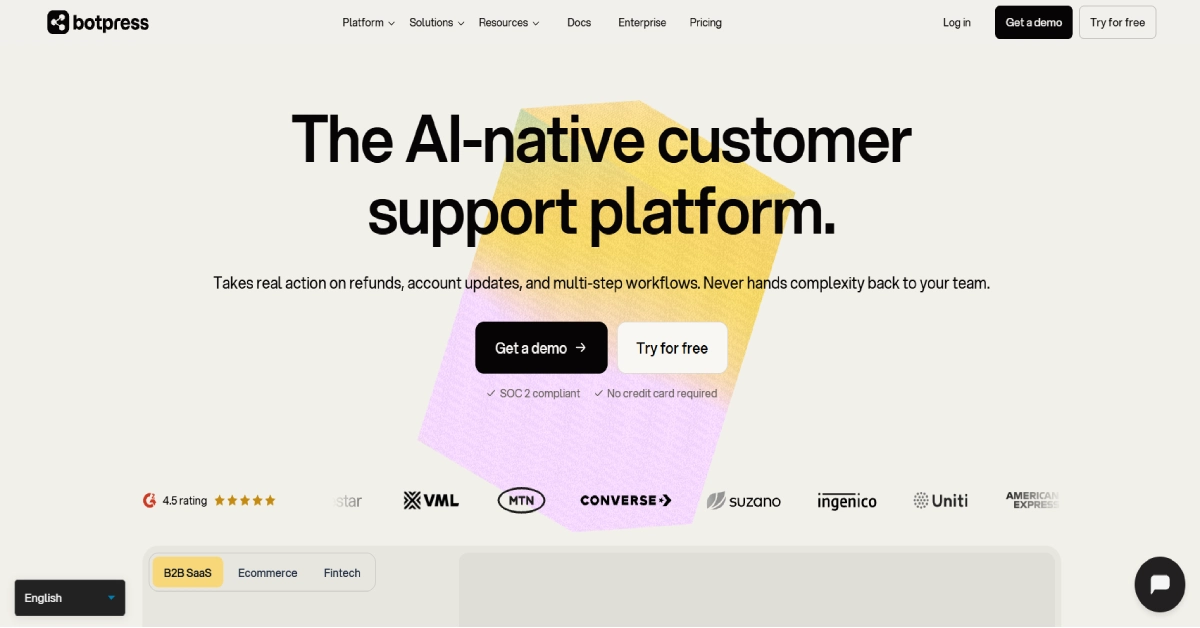
Botpress is one of the platforms designed for this kind of work. It gives businesses and developers tools to build AI agents that can answer questions and perform actions through connected applications. Users can create workflows visually and connect knowledge bases to help agents understand information about their products or services. Botpress also provides developer tools for teams that need more control over how their agents operate.
The platform has changed significantly in 2026. Botpress introduced a new pricing structure in May along with products designed for customer support operations. Its current plans focus on monthly conversations rather than the older message-based pricing model. Paid plans also include AI usage allowances and unlimited AI agents.
These changes make Botpress worth examining again. The platform offers a wide range of capabilities but its paid subscriptions may be expensive for smaller businesses. The visual builder also requires some learning when workflows become complicated. In this Botpress review we will examine its features and pricing along with its integrations and limitations. We will also compare it with Chatbase and other alternatives to help you understand where it fits. Explore AI Tools
What Is Botpress?
Botpress is an AI agent development and customer support platform that allows users to create conversational assistants for websites and business applications. It provides a visual development environment called Botpress Studio where users can configure how agents respond and what actions they can perform.
A business might use Botpress to answer product questions or help customers find information from a knowledge base. Another company could build an agent that collects leads and connects with a CRM system. More advanced agents can interact with external tools and use AI to determine which action should happen next.
Botpress now offers several products within its platform. Studio focuses on creating agents while Desk provides an AI-native helpdesk for managing customer conversations. The company also offers developer-oriented tools and managed implementation services. The important distinction is that Botpress is not simply a chatbot widget. It provides an environment for designing and operating AI agents that can be connected to broader business processes.
Botpress at a Glance
| Detail | Information |
|---|---|
| Tool Name | Botpress |
| Official Website | botpress.com |
| Tool Type | AI Agent and Chatbot Platform |
| Main Purpose | Customer Support and AI Automation |
| Free Plan | Available |
| Starting Paid Plan | Plus |
| Paid Starting Price | $150/month billed annually |
| Visual Workflow Builder | Yes |
| AI Knowledge Bases | Yes |
| Human Handoff | Supported |
| WhatsApp Integration | Supported |
| Enterprise Plan | Custom Pricing |
How Does Botpress Work?
Botpress uses a combination of workflows and AI-powered decision-making to manage conversations. Users create an agent in Botpress Studio and define its instructions. They can then connect knowledge sources and tools that the agent may use when responding to requests. The workflow builder allows users to organize conversational steps visually. Some nodes execute predefined actions while Autonomous Nodes use an AI model to decide which tools to call based on the conversation. This means a Botpress agent can combine predictable workflow logic with more flexible AI behavior.
For example, a software company could build an agent that answers setup questions using its documentation. When a customer asks about a billing problem the agent could collect relevant details and transfer the conversation to a support team. With appropriate integrations it may also retrieve information from connected business applications. Botpress supports testing inside its development environment before deployment. This is important because agents that work well with simple questions may struggle when users provide incomplete information or request actions that require additional permissions.
How to Create a Botpress AI Agent
- Create an account on the official Botpress website and open Botpress Studio.
- Create a new agent and choose an appropriate starting workflow.
- Configure the agent’s instructions and expected behavior.
- Connect knowledge sources and supported business tools.
- Test common questions and unusual conversation scenarios.
- Deploy the agent through a website or another supported channel.
These steps describe the basic process. More advanced workflows may require additional configuration and testing.
Botpress Key Features in 2026
1. Visual AI Agent Builder
Botpress Studio provides a visual environment for creating AI agents. Users can connect nodes to organize different parts of a conversation and define what happens when an agent receives information. This approach makes it easier to understand the overall structure of a chatbot compared with writing every interaction directly in code.
The builder supports workflows that include messages and actions as well as conditional logic. A customer support agent might begin by identifying the type of request before retrieving information or transferring the conversation to another workflow. The visual approach is useful for planning these interactions although complex projects can still require technical knowledge.
2. Autonomous Nodes
Autonomous Nodes are one of Botpress’s more advanced capabilities. Instead of following only a fixed sequence of instructions an Autonomous Node uses a large language model to decide which tools to execute. It can consider the conversation context and select actions from the tools and workflows available to it.
This allows businesses to create agents that handle less predictable requests. For example, a customer might ask a question that requires information from a knowledge base followed by an action in a connected application. The agent can decide which available tools are relevant. Autonomous behavior also creates additional responsibilities. Users need to define instructions and permissions carefully. Botpress documentation recommends configuring tools and exit conditions to control agent behavior.
3. Knowledge Bases
Botpress supports knowledge bases that help agents answer questions using relevant business information. Instead of relying only on general AI model knowledge a company can provide information about its own products and services.
A SaaS company might connect its documentation while an ecommerce business could provide product details and support policies. The agent can then search the available knowledge when a customer asks a question. Knowledge bases are especially useful for reducing repetitive support requests. However, businesses should maintain accurate sources and test the responses. An AI agent may still misunderstand a question or produce an incorrect answer when the source information is incomplete.
4. Botpress Desk and Human Handoff
Botpress Desk is the company’s AI helpdesk product. It allows businesses to manage customer conversations that involve AI agents and human support teams. This is useful because not every support request can be resolved through automation.
For new workspaces human handoff is managed through Botpress Desk. Existing workspaces may still use the earlier Human-in-the-Loop integration. The official documentation explains that this older integration requires a Plus subscription or higher. Human handoff is important when customers need account-specific assistance or when a problem requires judgment that an automated agent should not provide.
5. Multichannel Support
Botpress supports different channels through its integration ecosystem. Businesses can deploy agents on websites and connect them to messaging applications such as WhatsApp and Telegram. This allows customers to interact with an agent through a channel they already use. However, channel setup requirements can vary and some services may charge their own messaging fees.
6. AI Model Integrations
Botpress Hub includes integrations with several AI model providers. These include OpenAI and Anthropic along with Google AI and Mistral AI.
This gives developers flexibility when designing agents for different tasks. A model used for simple classification may not require the same capabilities as one handling complicated conversations. The available model choices and costs depend on the configuration and applicable platform limits.
7. Business App Integrations
Botpress offers integrations for CRM systems and productivity applications. An agent can interact with connected services when the integration supports the required operation. the Hub lists connections for HubSpot and Salesforce as well as Google Sheets and Slack. These can help businesses automate selected customer support and sales workflows. Users should test permissions and data handling before allowing agents to update important business records.
8. Analytics and Team Management
Botpress provides analytics capabilities for monitoring agent activity. The Team plan adds team-level analytics along with routing and role-based access control.
These features are useful for organizations operating several agents or managing customer support across multiple departments. Team management becomes especially important when different employees need different permissions.
Botpress Pricing 2026: How Much Does It Cost?
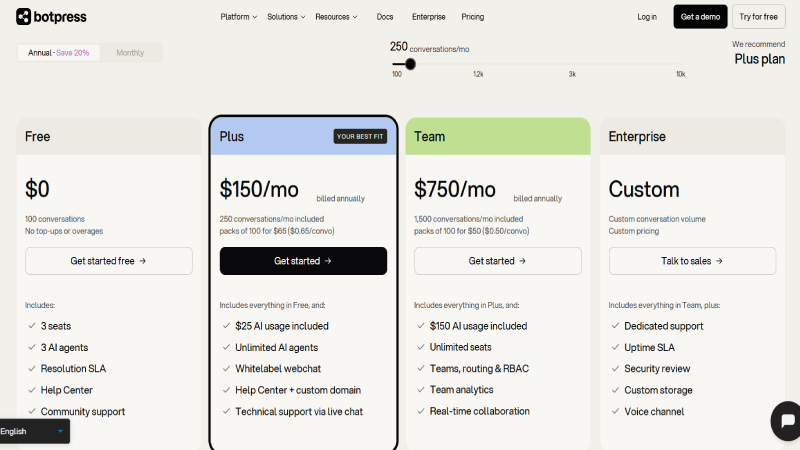
Botpress changed its pricing structure on May 14, 2026. The new model focuses on conversations rather than individual messages. The company also includes an AI usage allowance in its plans and provides unlimited AI agents on paid subscriptions.
These changes apply to workspaces created after May 14, 2026. Older workspaces may remain on their previous pricing arrangements.
Botpress Pricing Comparison 2026
| Plan | Price | Conversations/Month | AI Agents |
|---|---|---|---|
| Free | $0 | 100 | 3 |
| Plus | $150/month | 250 | Unlimited |
| Team | $750/month | 1,500 | Unlimited |
| Enterprise | Custom | Custom | Unlimited |
The Plus and Team prices above are billed annually. Botpress advertises a 20% saving for annual billing. Its current pricing page also allows customers to compare monthly billing.
Botpress Free Plan: $0/month
The Free plan is designed for people who want to learn the platform or build a small chatbot. It includes 100 conversations per month and allows users to create three AI agents. The plan also includes three workspace seats and access to Botpress Studio. Storage allowances include 1,000 table rows and 100 MB each of vector and file storage. Users can access community support and learning resources through the Botpress documentation and community.
The main limitation is conversation volume. A business receiving regular customer inquiries may exceed 100 conversations quickly. The Free plan also does not support paid overages or top-ups. For learning how Botpress works the Free plan is a useful starting point. It is less suitable for a business that needs dependable support automation at a higher volume.
Botpress Plus Plan: $150/month
Plus is the first paid subscription. It costs $150 per month when billed annually and includes 250 conversations each month. It also provides a $25 monthly AI usage allowance. One important benefit is unlimited AI agents. Users can create multiple agents without paying a separate subscription for every bot. The plan also includes three workspace seats and white-label webchat which allows businesses to remove Botpress branding from the chat widget.
Additional features include a custom-domain Help Center and technical support through live chat. Plus also supports additional conversation packs priced at $65 per 100 conversations. For a small business that needs several customer-facing agents Plus provides more flexibility than Free. However, the relatively high starting price may be difficult to justify for a website with limited support traffic.
Botpress Team Plan: $750/month
Team is designed for organizations that operate more substantial customer support workflows. It costs $750 per month with annual billing and includes 1,500 monthly conversations. The included AI usage allowance increases to $150.
The plan adds unlimited workspace seats and features for managing teams. These include role-based access control and routing rules along with team analytics and real-time collaboration in Studio. Additional conversations cost $50 per pack of 100. The plan also includes larger storage allowances with 500,000 table rows and 5 GB of vector storage along with 50 GB of file storage.
Team is more suitable for businesses where several employees need to manage agents and customer conversations together. It is not simply a higher-volume version of Plus because its organizational features are a major part of the value.
Botpress Enterprise Plan: Custom Pricing
Enterprise is intended for larger organizations with specific technical and operational requirements. The plan includes custom conversation allowances and storage limits along with dedicated support and service-level agreements.
Botpress also lists security review services and enterprise-related deployment options. Organizations should discuss their requirements directly with the company before selecting this plan. Enterprise may be appropriate for companies that need to integrate AI agents into important customer support systems while maintaining stronger operational controls.
Botpress Additional Costs
| Additional Usage | Advertised Cost |
|---|---|
| Plus: 100 extra conversations | $65 |
| Team: 100 extra conversations | $50 |
| Additional AI usage credit grant | $10 |
| Plus storage add-on | $40/month |
| Team storage add-on | $40/month |
Botpress uses automatic recharge on paid plans. Conversation packs can be added when usage approaches the plan allowance. AI usage credits can also be purchased automatically when the included balance is nearly exhausted.
This is important because businesses may spend more than their base subscription price during busy months. Unused conversation packs expire at the end of the billing month while purchased AI credit grants can carry forward for up to 12 months.
Botpress counts a conversation when there are at least two end-user messages during a billing month. A conversation continuing across two months can count in both months. The official pricing page provides the complete billing rules.
Botpress Integrations: Which Apps Does It Support?
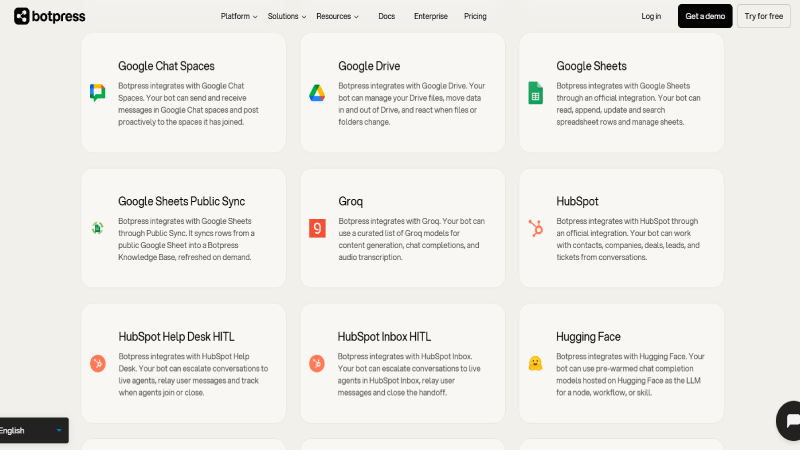
Botpress offers an extensive integration ecosystem through Botpress Hub. These connections allow agents to interact with business applications and communication platforms.
An integration can help an agent retrieve information or perform an authorized action. For example, a customer support agent could use a CRM integration to find relevant account information. Another agent could create a calendar event or update a spreadsheet.
| Integration | Main Use |
|---|---|
| Customer messaging | |
| Telegram | Conversational automation |
| Slack | Team communication |
| Gmail | Email workflows |
| Google Sheets | Spreadsheet automation |
| Google Calendar | Scheduling |
| HubSpot | CRM and customer support |
| Salesforce | CRM operations |
| Shopify | Ecommerce workflows |
| Stripe | Payment-related operations |
| Zapier | Workflow automation |
| Notion | Knowledge and content management |
| Airtable | Database operations |
| OpenAI | AI model integration |
| Anthropic | Claude model integration |
One advantage of Botpress is that its integrations can become part of an agent’s decision-making process. An agent does not always need to follow the same fixed sequence. With the right configuration it can select an available tool based on what the customer requests.
This flexibility makes Botpress useful for more sophisticated automation. However, connecting a service does not automatically give an agent permission to perform every operation. Businesses need to configure access carefully and test workflows before deployment.
Botpress Pros and Cons
| Pros | Cons |
|---|---|
| Free plan for beginners | Paid plans are expensive |
| Visual AI agent builder | Advanced workflows have a learning curve |
| Autonomous AI nodes | Conversation limits require monitoring |
| Knowledge base support | AI responses need testing |
| Extensive integration ecosystem | Additional usage can increase costs |
| Human support handoff | Some features require higher plans |
| Unlimited agents on paid plans | Configuration can become complex |
| Developer-oriented tools | Not ideal for every small website |
Real-World Botpress Use Cases
Customer Support Automation
Customer support is one of the strongest use cases for Botpress. Businesses can create agents that answer common questions using their existing documentation. This can help customers find information without waiting for a support employee to become available.
For example, a software company could build an agent that explains installation steps and account settings. When a customer asks something more complicated the agent could transfer the conversation to a human support representative through an appropriately configured workflow.
The goal is not necessarily to replace an entire support department. A better approach is to automate repetitive requests while allowing employees to focus on situations requiring judgment or personal assistance.
Ecommerce Customer Assistance
Online stores can use Botpress to provide information about products and store policies. An agent could answer questions about shipping conditions or product specifications using the store’s knowledge base.
With supported ecommerce integrations an agent may also interact with product catalogs and order information. However, account-specific actions require appropriate authentication and access controls. This can be valuable for stores with a large number of products. Customers often want quick answers before making a purchase and a well-configured assistant can help them locate relevant information.
Lead Generation
Botpress can also support lead generation workflows. A business could create an agent that asks visitors about their requirements and collects information relevant to a sales inquiry.a software company might ask visitors about their team size and intended use case. The information could then be transferred to a CRM through a supported integration.
This process can help sales teams organize incoming inquiries. Businesses should still make sure customers understand how their information will be used.
Internal Knowledge Assistants
Organizations often maintain large collections of policies and documentation. Employees may spend time searching for information that already exists in different systems. A Botpress agent can help employees find relevant answers through a conversational interface. This may be useful for onboarding or internal technical support. companies should apply access restrictions when connecting confidential documents. An employee should not automatically receive information they would not otherwise be authorized to access.
Botpress vs Chatbase vs DocsBot AI
Botpress competes with several AI chatbot platforms. Chatbase and DocsBot AI are particularly relevant because both allow businesses to create agents using company-specific information.
| Feature | Botpress | Chatbase | DocsBot AI |
|---|---|---|---|
| Free Plan | Yes | Yes | Yes |
| Visual Workflow Builder | Yes | Agent configuration and workflows | Agent configuration and actions |
| Knowledge Bases | Yes | Yes | Yes |
| Business Integrations | Yes | Yes | Yes |
| Human Handoff | Yes | Yes | Supported |
| AI Agents | Yes | Yes | Yes |
| Main Focus | Custom AI agents and support | Customer-facing AI support | Knowledge-based AI assistance |
Botpress vs Chatbase
Chatbase focuses on helping businesses create customer-facing AI agents using their existing information and connected business applications. Its setup process may be more approachable for teams that primarily want a support assistant without designing complex conversational workflows.
Botpress provides more detailed workflow-building capabilities through Studio and Autonomous Nodes. This can be useful when an agent needs to perform different actions based on customer requests. Businesses should consider how much customization they need. If the goal is mainly to answer questions from documentation Chatbase may be sufficient. If the goal is to create a more complex agent with specialized logic Botpress is worth evaluating.
Botpress vs DocsBot AI
DocsBot AI is particularly relevant for businesses that want to make documentation easier to access. It provides knowledge-based assistants along with integrations and AI Actions. Botpress also supports knowledge bases but offers a broader environment for designing conversational workflows and configuring agent behavior. The difference becomes more noticeable when a business needs an agent to perform several connected operations. Botpress may provide greater flexibility although that flexibility can require more configuration.
Botpress vs Voiceflow
Voiceflow is another platform used to design conversational AI experiences. It is especially relevant for teams that want to plan and prototype interactions.
Botpress places emphasis on building operational AI agents with connected tools and workflows. Voiceflow may appeal to teams focused on conversation design and collaborative prototyping. Both should be evaluated using actual business requirements rather than relying only on feature comparisons.
Is Botpress Easy to Use for Beginners?
Botpress offers a visual interface which makes it more approachable than building an AI chatbot application entirely through code. Beginners can create an agent and experiment with workflows without developing a complete backend system. Botpress is not necessarily the easiest chatbot platform for someone who wants a simple website assistant. Its flexibility introduces additional concepts such as nodes and variables along with integrations and knowledge configuration.
For a beginner the best approach is to start with one straightforward use case. Build an agent that answers a small collection of questions and test it thoroughly. Once the basic workflow is reliable you can introduce additional tools and actions. This gradual approach helps users understand the platform without creating unnecessary complexity.
Botpress Security and Privacy
Security becomes important when an AI agent can access customer information or interact with connected business systems. Botpress offers organizational controls on its higher plans including role-based access and team management.
Enterprise arrangements also include security-related services and customizable requirements. Businesses should review the official documentation and applicable contractual terms before connecting sensitive information. Agents should receive only the permissions required for their tasks. For example, a chatbot that needs to check order status should not automatically receive unrestricted access to modify customer records. Organizations should also test whether their agents handle private information appropriately and whether human approval is required for sensitive actions.
Who Should Use Botpress?
Botpress is particularly relevant for businesses that need more than a simple FAQ chatbot. Customer support teams can use it to build agents that retrieve information and route requests. SaaS companies may find it useful for product assistance while ecommerce businesses can connect agents to supported commerce applications.
Developers and technically confident users may appreciate the flexibility of its workflow tools. Larger organizations can benefit from team management and routing capabilities when operating multiple agents. Botpress may be less suitable for a small website that receives only a handful of questions each month. The Free plan is useful for experimentation but the starting price of Plus can be difficult to justify when support volume is low.
Is Botpress Worth It in 2026?
Botpress is worth considering when a business needs configurable AI agents that can interact with knowledge bases and external applications. Its combination of visual workflow building and autonomous AI capabilities makes it useful for more demanding customer support tasks.
The main challenge is pricing. The Free plan is accessible but limited to 100 conversations each month. Plus starts at $150 per month with annual billing and includes only 250 monthly conversations before additional packs become necessary.
For a business with meaningful support volume the subscription may still provide value. However, the cost should be compared with the number of customer requests handled successfully and the amount of work actually saved. It is also important to consider the time needed to build and maintain agents. A sophisticated workflow may require regular updates as business policies and connected applications change.
Frequently Asked Questions
1. Is Botpress free in 2026?
Yes. Botpress offers a Free plan with 100 monthly conversations and three AI agents. It also includes three workspace seats.
2. How much does Botpress cost?
Botpress Plus costs $150 per month when billed annually. Team costs $750 per month with annual billing. Enterprise pricing is customized.
3. Does Botpress require coding?
Basic agents can be created through Botpress Studio without building an application from scratch. Advanced integrations and workflows may require technical knowledge.
4. Can Botpress be used on WordPress?
Yes. Botpress provides a website chat integration that can be embedded into a WordPress website through supported embed methods.
5. Does Botpress support WhatsApp?
Yes. Botpress lists an official WhatsApp integration that allows customers to communicate with an agent through WhatsApp.
6. Can Botpress use PDF documents?
Botpress supports uploaded files as part of its knowledge capabilities. The current pricing page includes file storage allowances for different plans.
7. Does Botpress support human handoff?
Yes. New workspaces can use Botpress Desk for human support handoff. Existing workspaces may also have access to the legacy Human-in-the-Loop integration.
8. Is Botpress better than Chatbase?
Botpress may be more suitable for customized AI agent workflows. Chatbase may be easier to evaluate for straightforward customer-facing knowledge assistants. The better option depends on the required functionality.
9. Can Botpress connect to Shopify?
Yes. Botpress Hub lists Shopify integrations for ecommerce-related operations. Some implementations are provided through Botpress partners.
10. Does Botpress charge for extra conversations?
Yes. Paid plans support additional conversation packs. Plus lists $65 per 100 conversations while Team lists $50 per 100 conversations.
Final Verdict
Botpress provides a capable environment for creating AI agents that can answer questions and interact with business applications. Its visual builder and Autonomous Nodes offer flexibility for companies that want to automate more than basic customer support conversations. The platform is particularly interesting for organizations with technical resources or more complicated workflows. Knowledge bases and integrations make it possible to create agents that work with business-specific information while Botpress Desk provides options for involving human support teams.
The biggest drawback is the cost of paid plans. Although the Free plan offers a useful introduction the jump to $150 per month for Plus is substantial. Businesses should also consider conversation overages and the time required to maintain their agents.
Our verdict
Botpress is a strong platform to evaluate for custom AI agents and customer support automation. It makes the most sense when a business needs its flexibility and can justify the ongoing cost. For smaller websites with basic chatbot requirements a simpler alternative may be more economical. This review is based on official product documentation and pricing information. It does not claim independent hands-on performance testing.