Businesses are expected to answer customer questions quickly, whether those questions arrive during office hours, late at night, or over the weekend. But hiring more support agents isn’t always practical, especially for startups and growing online stores.
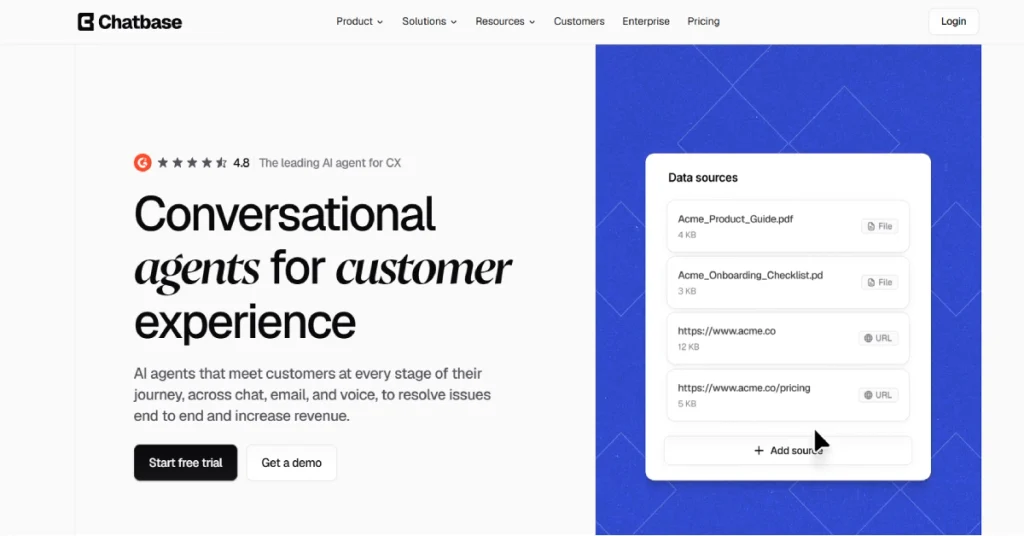
Chatbase allows businesses to build AI agents that answer questions using their own website content, documents, help articles, and connected business systems. Instead of relying entirely on traditional live chat or manually maintained FAQ pages, companies can create an assistant that responds to common requests and, with the right integrations, performs useful actions.
However, Chatbase has evolved beyond its earlier identity as a simple document-trained chatbot builder. In 2026, the platform offers AI agents for website chat, customer support workflows, messaging, email, and voice interactions. That expanded functionality also brings more complicated pricing decisions. The free plan is limited, paid plans start at $40 per month, and some advanced features require considerably more expensive subscriptions.
In this Chatbase review, we’ll examine how the platform works, its main features, current pricing, integrations, advantages, limitations, and alternatives. We’ll also explain which businesses are most likely to benefit from it.
What Is Chatbase?
Chatbase is a no-code AI agent platform designed primarily for customer-facing business interactions.
It allows companies to create AI assistants using information from their own knowledge sources. Those sources can include website pages, uploaded documents, manually entered text, FAQs, and other supported content.
The resulting agent can respond to customer questions in natural language rather than simply matching a visitor’s message to a predetermined keyword. For example, an online clothing store could train an agent using its shipping policies, sizing guide, returns information, and product documentation. When a customer asks about exchanging a product, the agent can use that information to explain the store’s policy.
With suitable integrations and permissions, an agent may also retrieve order information, interact with business applications, or escalate a conversation to a human support team. Chatbase’s official product documentation describes a platform that supports agent instructions, data sources, actions, procedures, testing, and analytics.
Chatbase at a Glance
| Detail | Information |
|---|---|
| Product | Chatbase |
| Official Website | chatbase.co |
| Software Type | AI Customer Support Agent Platform |
| Main Purpose | Customer support automation |
| Free Plan | Available |
| Paid Plans | From $40/month |
| Coding Required | Not for basic setup |
| Website Deployment | Supported |
| AI Model Options | Multiple model providers, depending on plan |
| API Access | Standard plan and above |
| Voice Support | Standard plan and above |
| Enterprise Plan | Custom pricing |
How Does Chatbase Work?
Chatbase follows a straightforward principle: provide an AI agent with relevant business knowledge, define how it should behave, and deploy it where customers need assistance.
The process can be divided into five main stages.
1. Create an AI Agent
The first step is to register for a Chatbase account and create an agent. You can then define the agent’s role, such as customer support assistant, sales assistant, product information specialist, or onboarding assistant.
An effective agent needs clear instructions. For example, a software company might tell its agent to explain product features, answer billing questions, and direct account-specific requests to the correct support workflow.
2. Add Knowledge Sources
Next, you provide information the agent should use.
Chatbase supports several knowledge-source types, including uploaded files, website URLs, text, question-and-answer content, and other supported sources. The quality of these sources matters. A chatbot trained on outdated pricing pages or incomplete return policies may provide misleading information even when its underlying AI model is capable. For that reason, businesses should review their source material before deployment.
3. Configure Instructions and Behavior
You can specify the agent’s tone, purpose, boundaries, and response preferences. A professional services company may prefer formal language, while an online fashion retailer might use a more conversational style. The important part is to tell the agent what to do when information is unavailable. A reliable customer support assistant should acknowledge uncertainty instead of inventing answers.
4. Connect Actions and Integrations
More advanced agents can interact with external business tools.
For example, an ecommerce agent connected to Shopify may be able to retrieve order information through an appropriately configured workflow. Other integrations can support scheduling, ticket escalation, CRM interactions, and related tasks. These capabilities depend on the selected plan, integration setup, and the permissions assigned to the agent.
5. Test and Deploy
Before making an agent available to customers, businesses should test common questions and unusual situations. Chatbase offers testing and simulation capabilities that can help identify problems before deployment. Once configured, the agent can be deployed through supported channels, including a website chat interface.
Chatbase Key Features in 2026
AI Agents Trained on Business Knowledge
One of Chatbase’s central features is its ability to use company-specific information when answering questions. A general-purpose AI chatbot may know broad facts about ecommerce or software, but it won’t automatically know a particular company’s refund conditions, account procedures, or internal support documentation.
Chatbase addresses this by allowing businesses to provide relevant sources.
This can be particularly useful for companies with extensive documentation, repetitive support requests, or products that require frequent explanations. However, uploading documents doesn’t guarantee perfect accuracy. Businesses still need to test responses and update their sources.
Multiple AI Model Providers
Chatbase isn’t limited to a single AI model provider.
Its pricing comparison lists support for model families from OpenAI, Anthropic, Google Gemini, DeepSeek, Meta, Mistral, and others, with availability varying by subscription.
This flexibility is useful because different models can offer different strengths in reasoning, speed, language handling, and instruction following. Users should check which models are actually available in their account rather than assuming every model is included in every plan.
AI Actions and Business Workflows
AI Actions help transform an agent from a question-answering interface into a tool that can perform certain business tasks.
For example, a connected agent could retrieve relevant information from a customer support platform, help schedule a meeting, or initiate an authorized workflow.
This is a meaningful difference between a basic FAQ chatbot and a more capable customer support agent. However, actions require careful configuration. Businesses should avoid giving an agent unrestricted access to sensitive account operations or payment-related changes.
Customizable Chat Experience
Chatbase allows businesses to adapt the customer-facing experience to their brand. This can include the agent’s instructions, visual appearance, and supported interaction elements.
A consistent interface can make the assistant feel like a natural part of a company’s website instead of a disconnected third-party widget. Advanced white-labeling is available through enterprise arrangements, while removing the Chatbase branding is also listed as a paid add-on.
Human Support Escalation
AI cannot resolve every customer issue. Complex complaints, unusual billing disputes, sensitive requests, and cases involving account security may require human review.
Chatbase supports helpdesk integrations that can route conversations to support teams. This is particularly important for businesses that want automation without completely removing human involvement.
Analytics and Conversation Insights
Understanding what customers ask is almost as valuable as answering those questions. Chatbase includes analytics capabilities, with the depth of reporting depending on the subscription plan.
Businesses can use conversation information to identify repeated questions, knowledge gaps, and opportunities to improve support documentation. The Pro plan specifically includes advanced analytics, while Hobby includes basic analytics.
Voice and Multichannel Support
Chatbase’s current platform extends beyond website text chat.
Its official website describes customer-facing agents operating across chat, email, and voice. The pricing page lists voice and telephony features under the Standard plan. For companies supporting customers across multiple channels, this can reduce the need to manage completely separate automation systems. Still, channel availability and usage costs should be checked carefully before choosing a plan.
Chatbase Pricing 2026: How Much Does It Cost?
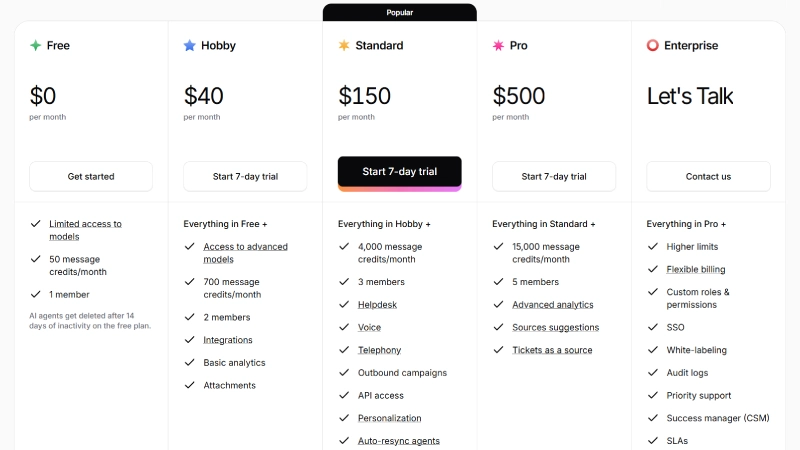
Chatbase uses a subscription model with monthly message credits, agent limits, training-content allowances, and feature restrictions.
As of October 8, 2026, the official pricing page lists four standard subscription tiers and a custom Enterprise option.
| Plan | Monthly Price | Message Credits | Team Members |
|---|---|---|---|
| Free | $0 | 50 | 1 |
| Hobby | $40 | 700 | 2 |
| Standard | $150 | 4,000 | 3 |
| Pro | $500 | 15,000 | 5 |
| Enterprise | Custom | Custom | Custom |
Annual billing is advertised with a 20% discount. Prices shown above are monthly billing rates, in USD, before any applicable taxes or add-ons.
Chatbase Free Plan — $0/month
The Free plan is intended for users who want to explore the platform before making a financial commitment.
It includes 50 message credits per month, one AI agent, one workspace member, and a 1 MB training-content limit. The free version has restricted model access and doesn’t include AI Actions.
An important limitation is that free AI agents are deleted after 14 days of inactivity.For freelancers demonstrating a chatbot to a potential client, this plan can be useful. However, 50 monthly message credits are unlikely to be sufficient for a website receiving regular customer support requests.
Chatbase Hobby Plan — $40/month
The Hobby plan is the first paid tier and is more appropriate for small businesses experimenting with customer-facing automation.
It includes 700 message credits, 200 test credits, one agent, five AI Actions per agent, a 10 MB training-content allowance, and two workspace members. It also introduces integrations, basic analytics, attachments, and access to advanced AI models.
A seven-day trial is advertised for this plan. The main drawback is that businesses needing voice, helpdesk functionality, API access, or more advanced integrations will need to consider Standard or higher.
Chatbase Standard Plan — $150/month
Standard is aimed at businesses requiring more than a basic website chatbot.
It includes 4,000 message credits, 500 test credits, eight AI Actions per agent, a 20 MB training-content allowance, and three workspace members. The plan adds features such as API access, helpdesk functionality, voice, telephony, outbound campaigns, personalization, automatic source resynchronization, and advanced integrations. For an online store that wants to automate product questions while connecting customer conversations to existing business systems, Standard may be a more realistic starting point than Hobby.
READ MORE: Reflection AI Review 2026: Features, Pricing, Benchmarks & Is It Worth It?
Chatbase Pro Plan — $500/month
Pro is designed for organizations with greater usage and reporting requirements.
It includes 15,000 message credits, 1,000 test credits, 12 AI Actions per agent, a 40 MB training-content allowance, and five workspace members. Additional capabilities include advanced analytics, source suggestions, and the ability to use tickets as a knowledge source.
The $500 monthly subscription makes Pro a substantial investment. Businesses should evaluate expected support volume and automation performance before upgrading.
Chatbase Enterprise Plan — Custom Pricing
Enterprise is intended for organizations requiring custom arrangements.
The official pricing page lists higher limits, flexible billing, custom roles and permissions, single sign-on, white-labeling, audit logs, priority support, service-level agreements, and HIPAA-eligible arrangements.
Organizations handling regulated information should confirm contractual, technical, and compliance requirements directly with Chatbase before deploying sensitive workflows.
Chatbase Add-On Costs
| Add-on | Advertised Price |
|---|---|
| Additional 1,000 message credits | $40 |
| Additional AI agent | $25/month |
| Remove “Powered By Chatbase” branding | $99/month |
The auto-recharge credits are described as non-expiring. Actual consumption and eligibility should be confirmed before purchase.
Pricing takeaway: Chatbase is accessible for experimentation, but meaningful business automation may require a Standard or higher subscription. Its pricing should be evaluated against the number of successful customer requests resolved, not just the number of messages sent.
Official source: Chatbase Pricing and Plan Comparison.
Chatbase Integrations: Which Tools Can You Connect?
Chatbase supports integrations across customer support, ecommerce, CRM, messaging, automation, and website platforms.
Some notable integrations include:
| Category | Examples |
|---|---|
| Ecommerce | Shopify, Adobe Commerce |
| Helpdesk | Zendesk, Freshdesk, Intercom, Gorgias |
| CRM | HubSpot, Salesforce |
| Messaging | WhatsApp, Messenger, Instagram, Slack |
| Automation | Zapier, Make |
| Payments | Stripe |
| Scheduling | Calendly, Cal.com |
| Website Builders | WordPress, Webflow, Wix |
| Voice | Twilio, SIP |
Not every integration is included in every subscription. Some require a higher Chatbase tier or a separate account with the third-party provider.
For WordPress website owners, Chatbase lists an official plugin integration, making it possible to add an AI agent without building a custom interface. The combination of Chatbase and workflow automation platforms is especially interesting. For example, an agent could collect information from a customer and trigger an appropriately configured automation.
Still, businesses should confirm which actions are supported and what information can be transferred between systems.
Chatbase Pros and Cons
| Pros | Cons |
|---|---|
| No-code basic setup | Only 50 free message credits |
| Custom knowledge sources | Free-agent inactivity deletion |
| Free plan available | Advanced features cost more |
| Multiple AI model providers | Paid branding removal |
| Business integrations | Usage limits need monitoring |
| Human escalation options | Requires accurate knowledge sources |
| Multichannel capabilities | Complex workflows need testing |
Is Chatbase Easy to Use for Beginners?
However, creating a reliable business assistant involves more than clicking a few setup buttons. You need to decide what information the agent can access, how it should respond to uncertain questions, when it should escalate requests, and which operations require human approval.
For a simple website FAQ assistant, the configuration process should be relatively manageable. For an agent that interacts with orders, billing records, customer accounts, and support tickets, setup becomes more demanding. This distinction matters when evaluating Chatbase’s ease of use. Building an initial demo and operating a dependable production support system are two different challenges.
Chatbase for Small Businesses and Ecommerce Stores
Small businesses are one of the clearest potential audiences for Chatbase.
Consider a store selling home appliances online. Customers may repeatedly ask about warranty coverage, delivery schedules, returns, replacement filters, and product compatibility. Instead of requiring a human agent to answer every question, the business could create an AI assistant using its product guides and support policies.
Customers would then have a way to find information outside normal business hours. For more complicated situations, such as a missing order or a disputed payment, the business could use connected workflows or human escalation. This approach may reduce repetitive support work, but savings are not automatic.
The business must consider subscription costs, setup time, knowledge maintenance, integration expenses, and the number of requests that still need human assistance. A chatbot that provides fast but incorrect answers can create more work than it saves. The most useful starting point is therefore a limited deployment focused on common, low-risk questions.
Chatbase Security and Data Privacy
Security is an important consideration when using any AI customer support platform.
Chatbase’s official website states that it uses encryption for data at rest and in transit, and that customer data isn’t used to train underlying AI models. The company also advertises SOC 2 Type II and GDPR-related compliance measures, along with HIPAA-related capabilities. These statements are useful starting points, but businesses should review the current security documentation and contractual terms rather than relying only on marketing summaries.
In particular, companies should investigate data retention, access controls, deletion procedures, subprocessors, and the handling of personal information. Businesses using AI Actions should also restrict access to sensitive operations and validate customer identity before permitting account-specific changes. For regulated industries, an Enterprise plan or additional contractual safeguards may be necessary.
Chatbase vs Alternatives in 2026
Chatbase isn’t the only option for businesses exploring AI-powered customer support.
Other platforms approach the problem differently, with varying levels of workflow control, customer service features, and technical complexity.
| Tool | Main Focus | Consider When |
|---|---|---|
| Chatbase | Customer-facing AI agents | You want knowledge-based support with business integrations |
| Botpress | Conversational AI and workflows | You need detailed chatbot logic and customization |
| Voiceflow | Conversational experience design | You want to prototype and design conversational workflows |
| Tidio | Ecommerce chat and support | You want live chat alongside automation |
| Intercom | Customer support platform | You need broader support operations and AI assistance |
Chatbase vs Botpress
Botpress may appeal to teams that want greater control over conversation logic and custom workflows.
Chatbase is particularly interesting for businesses that prioritize knowledge-based answers, connected customer support operations, and a relatively accessible agent-building experience.
The better choice depends on whether your main challenge is answering customer questions or designing more specialized conversational processes.
Chatbase vs Voiceflow
Voiceflow focuses on designing and managing conversational AI experiences.
It may be attractive to teams that need to prototype different conversation paths and collaborate on interaction design. Chatbase places strong emphasis on deploying customer-facing agents using business knowledge and integrations. Companies should compare both tools using the same real-world customer scenarios rather than selecting solely on their feature lists.
Chatbase vs Tidio
Tidio is worth considering for businesses that want a combination of traditional live chat and automated customer interactions.
Chatbase may be more appealing when the primary goal is a knowledge-grounded AI agent that connects with other business systems.
Pricing, AI usage limits, human-agent features, and supported channels should all be compared before making a decision.
Who Should Use Chatbase?
Chatbase can be a good fit for ecommerce stores, SaaS companies, online service providers, agencies, and businesses with substantial support documentation.
It is particularly relevant when customers repeatedly ask similar questions and the answers can be grounded in maintained company information.
For agencies, the platform could also provide a way to demonstrate AI customer support capabilities to clients. Businesses with larger support teams may find its helpdesk integrations and advanced plans more relevant. However, Chatbase may not be the most economical choice for every organization.
A small personal blog with only occasional visitor questions may not need a paid AI support platform. Similarly, a company requiring extensive custom logic, strict infrastructure control, or specialized compliance arrangements should evaluate alternatives and enterprise options carefully.
How to Evaluate Chatbase Before Paying
A practical evaluation should begin with real customer questions, not an impressive-looking demo. Collect around 30–50 representative support questions. Include straightforward requests, ambiguous questions, missing information, outdated policies, and cases that should be transferred to a human.
Next, upload accurate source material and configure the agent’s instructions. Test whether the responses are correct, helpful, and consistent with company policies. For integrations, verify that the agent retrieves the right records and doesn’t expose information belonging to another customer.
Then estimate your monthly usage and compare the subscription cost with the support work the agent can genuinely reduce. The most important measurements are answer accuracy, successful resolution rate, escalation quality, and total operating cost. Chatbase provides tools for testing and analytics, but businesses should validate results against their own requirements rather than assuming advertised capabilities will produce a particular outcome.
Frequently Asked Questions
1. Is Chatbase free in 2026?
Yes. Chatbase offers a free plan with 50 monthly message credits, one AI agent, one workspace member, and a 1 MB training-content limit. Free agents are deleted after 14 days of inactivity.
2. How much does Chatbase cost per month?
Chatbase’s paid plans start at $40 per month for Hobby. Standard costs $150 per month and Pro costs $500 per month on monthly billing. Enterprise pricing is customized.
3. Can Chatbase be used on WordPress?
Yes. Chatbase lists an official WordPress integration that allows website owners to add an AI agent without creating a custom chatbot application.
4. Does Chatbase support WhatsApp?
Yes. WhatsApp is listed among Chatbase’s supported messaging integrations. Availability and configuration requirements depend on the account and selected plan.
5. Can Chatbase use PDF files?
Chatbase supports uploaded files as knowledge sources. Users should check supported formats, file restrictions, and training-content limits before uploading documents.
6. Does Chatbase require coding?
Basic AI agent creation is designed to be no-code. More sophisticated integrations, custom actions, and business workflows may require technical configuration.
7. Can Chatbase connect to Shopify?
Yes. Chatbase lists a Shopify integration for ecommerce-related interactions, including product and order workflows.
Final Verdict
Chatbase has developed into a broader customer support automation platform rather than remaining a basic chatbot trained on uploaded documents.
Its strongest appeal is the combination of company-specific knowledge, configurable AI agents, business integrations, and multichannel support capabilities. For businesses that regularly handle repetitive questions, these features can make Chatbase a useful option.
The main consideration is pricing. The free plan is restrictive, Hobby has limited usage and features, and more advanced customer support capabilities require a larger monthly commitment. Our editorial assessment is that Chatbase deserves consideration for small and growing businesses that want to introduce AI into customer support without building a complete system from scratch.
Bottom line: Chatbase is a promising AI customer support platform for businesses with clear automation needs. Its value depends on how reliably it resolves actual customer requests relative to the total cost.