If you have ever written a research paper, a thesis or even a long blog post, you know the routine. PDFs live in one folder. References sit in Zotero or Mendeley. Notes are scattered across Notion, Google Docs and sticky notes. You ask ChatGPT a question, then spend twenty minutes checking whether its sources actually exist. Finally, you open Word and try to glue it all together.
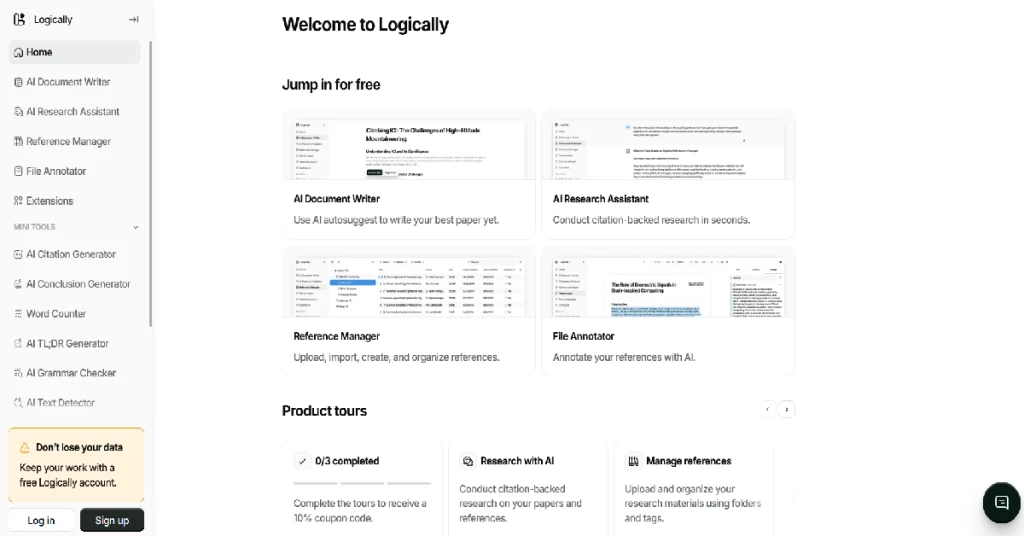
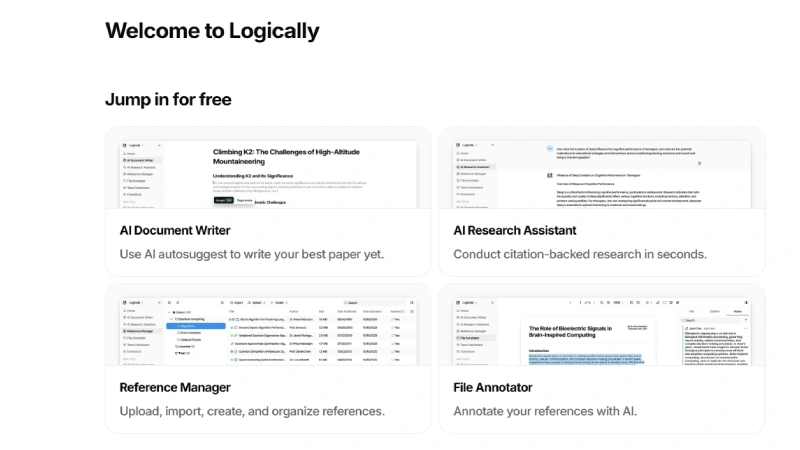
Logically.app promises to end that chaos. Its tagline says it plainly: it is “the all-in-one workspace for writing and researching.” Instead of juggling five apps, you get a reference manager, a PDF annotator, an AI research assistant and a document writer inside one browser tab.
In this Logically review, I break down what the tool actually does, how each feature works, what it costs in 2026, and where it falls short. By the end, you will know whether Logically deserves a place in your workflow or whether you should stick with your current stack.
Who this review is for: university students, PhD candidates, professors, independent researchers, content writers, consultants, lawyers and anyone who reads a lot of documents and has to turn them into well-cited writing.
Quick verdict: Logically is one of the best-value AI research workspaces available right now. It is strongest for citation-backed academic work and weakest if you only need a pure long-form writing assistant.
What Is Logically?
Logically.app (formerly known as Afforai) is an AI-powered workspace that combines reference management, file annotation, AI-assisted research and document writing in one platform. The company rebranded from Afforai to Logically, so you will still see both names in older tutorials, AppSumo listings and review sites.
According to its own listings, Logically is used by more than 100,000 students, faculty members and researchers worldwide, and several universities have partnered with it to give students access. The founder has said he built it because it was the tool he wished he had in college: something that combines the essential research tools at a price students can actually afford.
How Logically works
The workflow is simple and follows the natural order of any research project:
- Collect – Upload PDFs, Word files, EPUBs, slides, URLs or DOIs into your Reference Manager. Citations are generated automatically on upload.
- Read and annotate – Open any file in the File Annotator, highlight text, add sticky notes and ask the AI to explain difficult passages.
- Research – Ask questions to the AI Research Assistant, which answers from your own files, from Semantic Scholar’s academic database, or from Google, always with inline citations.
- Write – Draft your paper in the Document Writer, pull in AI answers and annotations with one click, cite from your library, and let Logically build the bibliography.
Because every step happens in the same workspace, nothing gets lost between tools. That connected workflow is the core selling point of Logically.
Key Features of Logically (In-Depth)
1. Logically Reference Manager
The Reference Manager is the foundation of the whole platform. It works like Zotero or Mendeley, but with AI built in.
- Many upload formats: PDF, DOCX, TXT, Markdown, EPUB and PPTX files, plus web URLs.
- Identifier import: add papers by DOI, arXiv ID, PubMed ID (PMID) or ISBN.
- Automatic citations: every reference gets its citation metadata filled in on upload.
- 10,000+ citation styles: APA, MLA, Chicago, Harvard, IEEE and thousands more.
- Folders and colour-coded tags: nest folders up to four levels deep and drag references into them.
- Easy migration: export RIS, BibTeX or CFF files from Zotero, Mendeley or EndNote and import them. Logically even searches for open-access copies of your papers and attaches them.
- Shared libraries: invite classmates or lab members, set permissions and transfer ownership when a project ends.
For anyone switching from a traditional reference manager, the migration path is painless, and the automatic PDF-finding feature is a genuine time saver.
2. Logically AI Research Assistant
This is where Logically separates itself from classic reference managers. The AI Research Assistant lets you search, summarise and compare hundreds of references at once, and every answer comes with inline citations and a list of data sources. It offers three research modes:
- Document Retrieval Mode: the AI answers only from the files you uploaded. This is the mode that most reduces hallucinations, because the model cannot invent facts outside your documents. You can choose exactly which files it looks at.
- Semantic Scholar Mode: answers are backed by a database of around 200 million peer-reviewed papers. You can filter by field of study, publication type and date, and the cited papers become new reading suggestions.
- Google Search Mode: enriches answers with web results. You can set region, language and country, and include or exclude specific domains.
Extra touches include custom instructions (tell the AI how to respond for your project), quick prompts (save repeated questions as one-click buttons) and public share links so you can send a research chat to a supervisor who does not have an account. Logically also updates its AI models regularly, and paid users get access to advanced and reasoning models.
3. Logically File Annotator
Right-click any file and choose “view file” to open the annotator. You can:
- Highlight text or an area of a page (useful for charts and tables).
- Add sticky notes attached to a spot on the page, or quick notes in the side panel.
- Tag yourself or teammates with “@” inside comments on shared files.
- Click Ask AI to summarise, explain or question the section you are reading.
- Send any highlight or comment straight into your document with Add to document.
For literature reviews, this closes the gap between reading and writing. Your best quotes and notes do not stay trapped inside a PDF.
4. Logically AI Document Writer
The Document Writer is a clean editor for anything from quick notes to a full dissertation. Key features include:
- Single-click citations pulled from your own library.
- Automatic bibliography that updates as you cite (a premium feature).
- Discover new citations for claims you have written.
- AI Autosuggest to beat writer’s block by suggesting the next sentence, with citations.
- AI commands to rewrite, expand, shorten or improve selected text.
- Support for LaTeX, tables and code blocks, which matters for STEM students.
- Export options, with watermark-free exports on the paid plan.
5. Logically Cite Extension for Microsoft Word
Not everyone wants to leave Word. The Cite extension lets you insert citations and bibliographies from your Logically library directly into Word documents, again with 10,000+ styles. You can also use the AI Research Assistant inside Word to summarise papers and compare findings.
6. Mini Tools
Logically bundles a set of small AI tools: a citation generator, word counter, grammar checker, paraphraser, conclusion generator, TL;DR generator, AI text detector, AI text humaniser, PDF and text summariser, and a title case converter. None of these is unique on its own, but having them in the same account adds value.
7. Team Dashboard (for institutions)
Organisations can create a team, invite researchers or employees, and manage billing centrally. Multi-seat purchases get tiered discounts, and there are dedicated options for universities, non-profits and enterprises.
Logically Pricing (2026)
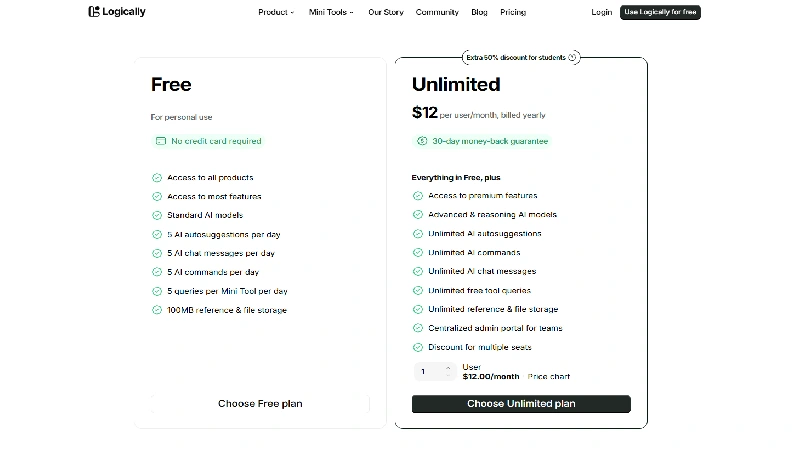
Logically’s Unlimited plan costs $12 per user per month when billed yearly, and there is a genuinely usable Free plan that needs no credit card. Here is how the two plans compare, based on the official pricing page:
| Feature | Free | Unlimited |
|---|---|---|
| Price | $0 | $12/user/month (billed yearly, 60% cheaper than monthly) |
| Products included | All four core products | All four core products |
| AI models | Standard | Standard + advanced and reasoning models |
| AI chat messages | 5 per day | Unlimited |
| AI autosuggestions | 5 per day | Unlimited |
| AI commands | 5 per day | Unlimited |
| Mini Tool queries | 5 per tool per day | Unlimited |
| Reference and file storage | 100 MB | Unlimited |
| Premium features (auto bibliography, clean exports) | No | Yes |
| Team admin portal | No | Yes, with multi-seat discounts |
Discounts and guarantees:
- Students get an extra 50% off the yearly Unlimited plan (for the first year) when signing up with a university email.
- 30-day money-back guarantee on paid plans.
- Institutions, non-profits and enterprises can request custom multi-seat pricing.
- Lifetime deal: Logically has appeared on AppSumo with a one-time lifetime plan (reported at $69 for Tier 1 in late 2025). Lifetime deals come and go, so check AppSumo before buying.
Is it good value? Yes. For the price of a single mid-range AI writing tool, you replace a reference manager, a PDF annotator, an AI chatbot and a citation generator. For Indian students, the student discount brings the yearly cost down sharply, which makes it far cheaper than paying for several tools separately.
Note: prices can change. Older reviews list the Unlimited plan at $8/month; always confirm on the official pricing page before you pay.
Pros and Cons of Logically
Pros
- True all-in-one workflow: reference management, annotation, AI research and writing live in one place, so you stop copy-pasting between apps.
- Citation-backed AI answers: every response shows inline citations and sources, which makes fact-checking fast and keeps academic integrity intact.
- Low hallucination risk: Document Retrieval Mode restricts the AI to your own uploaded files.
- Huge academic database: Semantic Scholar mode taps into around 200 million peer-reviewed papers.
- 10,000+ citation styles with automatic bibliographies.
- Easy migration from Zotero, Mendeley and EndNote, including automatic open-access PDF retrieval.
- Strong collaboration: shared libraries, @mentions in comments and public research links.
- STEM friendly: LaTeX, tables and code blocks in the writer.
- Microsoft Word add-in for people who refuse to leave Word.
- Affordable: a real free plan, a 50% student discount and a 30-day refund window.
- Privacy-minded: reviewers note that uploaded files are not used to train public AI models.
Cons
- Free plan is tight: 5 AI messages a day and 100 MB storage run out quickly during a real project.
- Cloud-first: it is primarily a web app, so plan on a stable internet connection.
- Writer is simpler than Word or Google Docs: fine for drafting, but advanced formatting may still need Word.
- Some features feel generic: the Mini Tools (paraphraser, humaniser, detector) are available free elsewhere.
- Learning curve for power users: four products and three research modes take time to master.
- Brand confusion: the Afforai-to-Logically rename means older tutorials and support links still use the old name.
- AI still needs checking: citations make verification easier, but you must still read the sources yourself.
Who Should Use Logically?
Logically is the best fit for people who read many sources and must turn them into cited writing.
- Undergraduate and master’s students writing essays, assignments and dissertations.
- PhD candidates managing hundreds of papers across a multi-year thesis.
- Professors and research labs that need shared libraries and team billing.
- Lawyers and consultants who analyse long contracts, reports and manuals.
- Content writers and marketers who need accurate, source-backed articles.
Who should skip it: if you only want an AI to write marketing copy quickly, or you already live happily inside Zotero plus Word and do not use AI, Logically may be more than you need.
Logically vs Alternatives
| Tool | Best for | Reference manager | AI research with citations | Writing editor |
|---|---|---|---|---|
| Logically | All-in-one academic workflow | Yes (10,000+ styles) | Yes (own files, Semantic Scholar, Google) | Yes |
| Zotero | Free, open-source reference management | Yes | No built-in AI | No (uses Word plugin) |
| Mendeley | Reference management and PDF reading | Yes | Limited | No |
| Jenni AI | AI-assisted academic writing | Basic | Partial | Yes |
| Paperguide | AI paper reading and research | Yes | Yes | Yes |
| ChatGPT | General AI answers | No | Web citations only | No dedicated research editor |
The main advantage of Logically over Jenni AI is depth of research: Logically is a full reference manager, so you can store, tag and organise a large PDF library for years. Over Zotero, the advantage is AI: you can question and compare your whole library instead of reading every paper line by line. Over ChatGPT, the advantage is trust: answers are grounded in real papers and your own files.
Frequently Asked Questions
1. What is Logically.app?
Logically.app is an AI-powered all-in-one workspace for researching and writing. It combines a reference manager, a PDF/file annotator, an AI research assistant and a document writer in one platform.
2. Is Logically the same as Afforai?
Yes. Afforai rebranded to Logically. Existing Afforai accounts, AppSumo deals and features carried over to the new name.
3. Is Logically free?
Yes, there is a free plan with no credit card required. It includes all core products but limits you to 5 AI chat messages, 5 autosuggestions and 5 AI commands per day, plus 100 MB of storage.
4. How much does Logically Unlimited cost?
The Unlimited plan is listed at $12 per user per month when billed yearly. Monthly billing costs more. Students can get an extra 50% off the first year.
5. Does Logically have a student discount?
Yes. Verified students can get an additional 50% discount on the yearly Unlimited plan by signing up with a university email address.
6. Can I import my library from Zotero, Mendeley or EndNote?
Yes. Export your references as RIS, BibTeX or CFF and import them into Logically. It will also try to find open-access PDFs for your papers automatically.
7. Does Logically’s AI make up fake citations?
Logically is designed to reduce this risk. Every answer includes inline citations and sources, and Document Retrieval Mode answers only from your uploaded files. You should still verify important claims yourself.
8. Which citation styles does Logically support?
More than 10,000 styles, including APA, MLA, Chicago, Harvard and IEEE.
9. Can I use Logically with Microsoft Word?
Yes. The Logically Cite extension lets you insert citations and bibliographies and use the AI assistant inside Word.
10. Is my data safe on Logically?
Reviewers report that Logically uses encryption and does not use your uploaded files to train public AI models. Check the official privacy policy for the latest details.
Final Thoughts: Is Logically Worth It?
Yes, Logically is worth it for students, researchers and professionals who work with many sources. Its biggest strength is not any single feature but the connection between them. You upload a paper, annotate it, ask the AI to compare it with ten others, drop the cited answer into your draft and let the bibliography build itself, all without leaving one tab.
The citation-backed AI and Document Retrieval Mode make it far more trustworthy for serious work than a general chatbot. The reference manager is strong enough to replace Zotero or Mendeley for most users, and the migration tools make switching easy.
The free plan is best treated as a trial, because the daily AI limits and 100 MB storage run out quickly. For regular use, the Unlimited plan at $12 a month (billed yearly), or half that for students, is excellent value compared with paying for a reference manager, a PDF tool and an AI subscription separately.
My rating: 4.5 / 5
| Category | Score |
|---|---|
| Features | 4.7 / 5 |
| Ease of use | 4.3 / 5 |
| AI accuracy and citations | 4.6 / 5 |
| Value for money | 4.8 / 5 |
| Collaboration | 4.4 / 5 |
Bottom line: if your work involves reading, citing and writing, start with Logically’s free plan today. Within a week you will know whether it can replace the five tools you are juggling now.
Call to action: Try Logically free at logically.app and share your experience in the comments below.
Sources