Running social media accounts becomes more difficult when a business starts publishing content across several platforms. Instagram might be bringing in new followers while LinkedIn generates business inquiries. TikTok may require regular videos and Facebook still needs attention. Keeping up with all these channels takes time, especially when you also need to understand which posts are actually performing well.
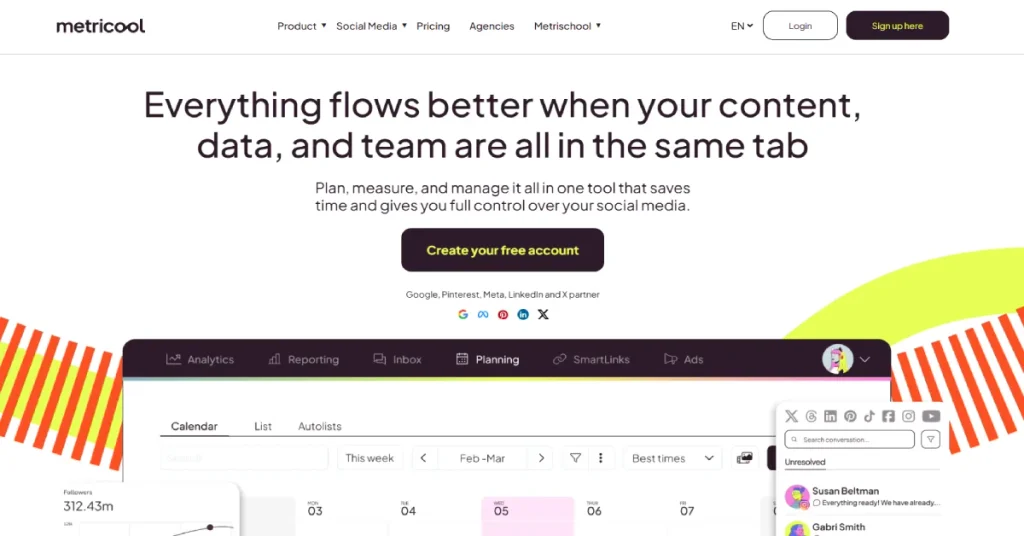
This is where social media management tools become useful. Instead of opening several applications throughout the day, businesses can plan content and review performance from a central dashboard. However, not every tool offers the same combination of scheduling and analytics. Some focus mainly on publishing while others provide more detailed reports and competitor research.
Metricool brings these activities together. It allows users to schedule social media posts and analyze account performance while also monitoring competitors and advertising results. The platform is designed for individual creators as well as marketing teams and agencies that manage several brands. One of Metricool’s biggest attractions is its free plan. It provides a way to explore scheduling and analytics without paying for a subscription. Paid plans expand the number of brands and unlock more advanced reporting and collaboration tools. The pricing structure is fairly straightforward once you understand how Metricool defines a brand.
In this Metricool review, we will look at the features that matter most in everyday use. We will also examine its 2026 pricing and limitations along with practical use cases and alternatives such as Publer, Buffer and Hootsuite. Explore AI Tools
What Is Metricool?
Metricool is a social media management and analytics platform that helps users organize their publishing activity and measure results. It combines a content planner with reporting tools and features for monitoring social media performance.
A business can connect supported social profiles and schedule upcoming posts through Metricool’s calendar. After the content is published, the same platform can help track engagement and audience growth. This makes it easier to understand whether a social media strategy is producing useful results rather than simply keeping accounts active.
Metricool also supports competitor analysis and advertising analytics. These capabilities are valuable for marketers who need to explain campaign performance to clients or business owners. Instead of collecting screenshots from several platforms, users can prepare reports that bring important information together.
The platform organizes social accounts into brands. Each brand can contain one profile from each supported social network. This is important when comparing plans because a single brand does not necessarily mean a single social account.
Metricool at a Glance
| Detail | Information |
|---|---|
| Tool Name | Metricool |
| Official Website | metricool.com |
| Tool Type | Social Media Management and Analytics |
| Main Purpose | Scheduling, Reporting and Performance Tracking |
| Free Plan | Yes |
| Paid Plans | Starter, Advanced and Custom |
| Content Calendar | Yes |
| Competitor Analysis | Yes |
| AI Writing Assistant | Yes |
| Advertising Analytics | Yes |
| Team Collaboration | Advanced and Custom |
| API Access | Advanced and Custom |
How Does Metricool Work?
Metricool works by connecting your social media accounts to a central workspace. After creating an account, you can connect supported profiles and organize them under a brand. The platform then provides access to planning and analytics features for those accounts.
For example, a small business could connect its Instagram and Facebook profiles and prepare content for the next two weeks. The owner can choose publishing dates through the calendar and review the schedule before posts go live. Once the content is published, Metricool can display available performance data so the business can identify which posts attracted attention.
The platform also provides an Inbox for managing supported messages and comments. This can be useful for businesses that receive customer inquiries through social media and want to avoid switching between applications throughout the day. Metricool is organized around several main areas including Analytics, Reporting, Inbox, Planning, SmartLinks and Ads. Each section serves a different part of the social media management process.
How to Get Started With Metricool
- Visit Metricool’s official website and create an account.
- Add your first brand and connect the supported social media profiles.
- Open Planning and create a post for one or more networks.
- Choose the date and time when the content should be published.
- Review your scheduled posts in the content calendar.
- Use Analytics to monitor available performance data after publishing.
For a beginner, it makes sense to start with one or two social networks rather than connecting everything immediately. This makes it easier to understand the planner and identify which reports are most useful.
Metricool Key Features in 2026
1. Social Media Scheduling and Content Calendar
The content calendar is one of Metricool’s most useful features. It gives users a visual overview of upcoming posts and allows them to prepare content in advance. Instead of publishing manually throughout the day, a business can create a weekly or monthly schedule and review everything from one place.
Metricool supports publishing across several social networks. Users can customize posts for different platforms and choose suitable publishing times. The planner also includes best-time-to-post recommendations based on available audience information. This can help users make more informed scheduling decisions, although publishing at a recommended time does not guarantee higher engagement.
2. Social Media Analytics
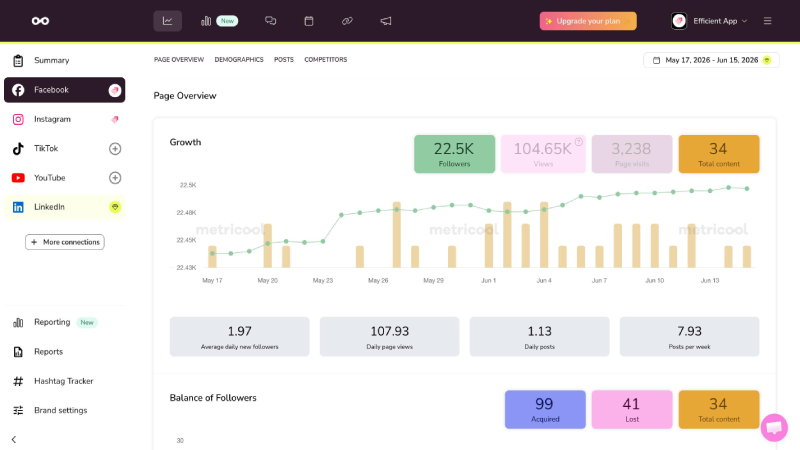
Analytics is one of the main reasons to consider Metricool instead of a basic scheduling application. The platform provides performance information for connected accounts so users can monitor audience growth and engagement. It also offers metrics for different content formats where the relevant social network makes that information available.
For example, a business could compare the performance of Instagram Reels with regular posts and identify which format attracts more attention. A marketing team could also examine performance over different periods to understand whether its strategy is improving. These insights are more useful when they lead to changes in content planning rather than simply producing reports.
The Free plan provides 30 days of analytics history. Paid plans offer access to a longer history, which is particularly useful when comparing performance across several months.
3. Competitor Analysis
Metricool allows users to monitor selected competitor profiles and review available performance information. The Free plan supports five fixed competitor profiles while paid plans allow broader competitor analysis with up to 100 competitors.
This can help businesses understand how other brands approach content publishing. For example, a company might notice that competitors receive strong engagement from educational videos and decide to test a similar format with its own original content. Competitor data should be treated as context rather than a complete explanation of performance. Public engagement numbers do not reveal every factor behind a campaign’s success.
4. AI Social Media Assistant
Metricool includes an AI assistant that can help generate social media text and content ideas. This feature can be useful when users need to create several captions or adapt the same message for different platforms.
The Free plan includes five AI text credits per month. Starter includes 20 credits per brand and Advanced includes 35 credits per brand each month. Advanced also offers additional customization options for AI instructions. The assistant can make content preparation faster but its output still requires editing. Businesses should check factual claims and make sure the writing reflects their own brand voice before publishing.
5. Social Media Reporting
Metricool provides reporting tools that help users turn performance data into information that can be shared with clients or colleagues. Starter includes PDF and PowerPoint reports while Advanced adds customizable report templates.
This is particularly useful for freelancers and agencies. A social media manager could prepare a monthly report that explains which posts performed well and how audience engagement changed. The report can help clients understand the work being done without requiring them to log in to every social platform. Advanced also includes a Looker Studio connector for teams that want to combine social media information with other reporting sources.
6. Social Media Inbox
Metricool includes an Inbox for managing supported social media messages and comments. This gives businesses a more centralized way to handle interactions without switching between every connected application.
For example, a small business might receive customer questions through Instagram and Facebook. Having supported conversations in one place can make it easier to respond consistently. However, Inbox capabilities vary by social network because each platform controls which messaging functions third-party services can access.
7. SmartLinks
SmartLinks allows users to create link-in-bio pages that direct visitors toward multiple destinations. This can be useful for creators and businesses that want to promote articles or products through a single profile link.
A blogger could use SmartLinks to highlight recent articles while an ecommerce brand might direct visitors toward product collections and special offers. SmartLinks is available on paid plans and can help make social media profiles more useful for website traffic.
8. Advertising Analytics
Metricool supports advertising analytics for services such as Meta Ads and Google Ads. It also provides tools for reviewing advertising performance alongside organic social media activity.
This can be useful for marketers who manage both paid and unpaid campaigns. Instead of reviewing organic content and advertising results separately, they can examine available information within the same platform. Metricool does not replace every capability of a dedicated advertising platform. Businesses still need to understand campaign settings and advertising costs when making decisions.
9. Team Collaboration and Approvals
The Advanced plan includes team and client management features. Users can assign roles and manage permissions while also setting up content approval workflows.
These features are especially useful for agencies where clients need to approve posts before publication. A team member can prepare content and send it for review rather than publishing immediately. Having an approval process can reduce mistakes and clarify responsibility. It also helps organizations maintain consistent messaging across several employees and social profiles.
10. Canva, Google Drive and Automation Integrations
Metricool offers integrations with Canva and Google Drive on paid plans. These connections can help users access creative assets and organize their publishing workflow.
Advanced and Custom subscribers can also use Metricool’s API and supported automation integrations such as Zapier and Make. The platform additionally offers Metricool MCP for connecting compatible AI clients, including on the Free plan.
The difference between API access and MCP is important. MCP availability on Free does not mean Free users receive the full API access included in Advanced.
Metricool Pricing 2026: Free vs Starter vs Advanced
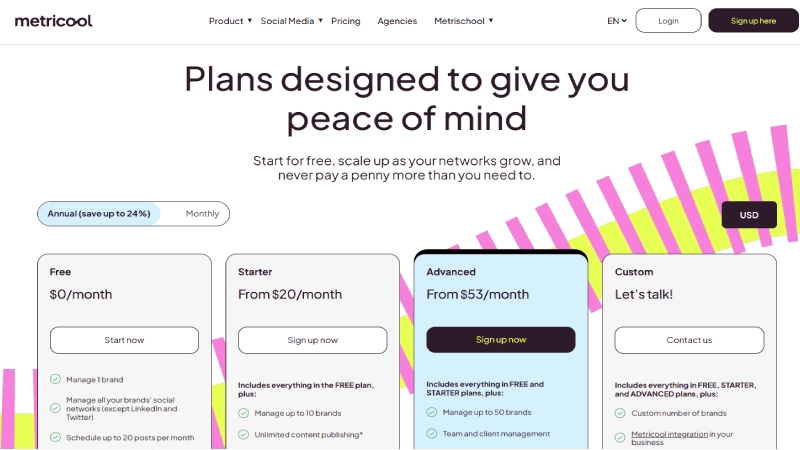
Metricool offers four plans: Free, Starter, Advanced and Custom. The main differences involve the number of brands you can manage and access to advanced reporting or collaboration features.
The official pricing page displays both monthly and annual billing options. Annual billing offers savings of up to 24%. The prices below are in US dollars and do not include applicable taxes.
Metricool Pricing Comparison
| Plan | Annual Billing Equivalent | Monthly Billing | Brand Limit |
|---|---|---|---|
| Free | $0 | $0 | 1 |
| Starter 5 | $20/month | $25/month | 5 |
| Starter 10 | $36/month | $45/month | 10 |
| Advanced 15 | $53/month | $67/month | 15 |
| Advanced 25 | $85/month | $107/month | 25 |
| Advanced 50 | $159/month | $210/month | 50 |
| Custom | Custom | Custom | 50+ |
Metricool Free Plan: $0/month
Metricool’s Free plan is suitable for beginners who want to manage one brand without paying for a subscription. It includes scheduling for up to 20 published posts per calendar month and provides access to 30 days of analytics history. Users can also monitor five fixed competitor profiles and access a limited number of AI writing credits.
The Free plan does not expire and does not require a credit card. However, it does not support LinkedIn or X connections. It also excludes downloadable PDF and PowerPoint reports along with several paid integrations.
One important detail is how Metricool counts posts. Publishing the same content to two social networks counts as two posts toward the monthly allowance. Drafts do not count until they are published. This means the 20-post limit may be reached sooner than expected when publishing across multiple channels.
Metricool Starter Plan: From $20/month
Starter begins at $20 per month with annual billing or $25 per month on monthly billing. The entry option supports up to five brands while the higher Starter option supports ten brands.
The plan removes the Free plan’s monthly scheduling cap subject to Metricool’s fair use policy. It also provides LinkedIn connections and access to more extensive analytics history. Users can generate PDF and PowerPoint reports and connect Canva or Google Drive. Starter is a good option for freelancers and small businesses that manage several social profiles but do not need advanced team approvals. It also provides access to optional X and Advanced Analytics add-ons.
Metricool Advanced Plan: From $53/month
Advanced starts at $53 per month with annual billing or $67 per month with monthly billing. The entry option supports 15 brands while larger configurations allow 25 or 50 brands.
This plan includes everything in Starter along with team and client management features. It adds role permissions and content approvals as well as customizable reporting templates. Users also gain access to Metricool’s API and Looker Studio connector.
Advanced is particularly relevant for agencies managing multiple clients. The ability to organize team responsibilities and share reports can make a difference when several people contribute to the same social media campaigns.
Metricool Custom Plan
Custom is designed for organizations that need more than the standard brand allowances or require additional business capabilities. It offers customized brand limits and options such as white-label reporting and dedicated account management.
The exact cost depends on the organization’s requirements. Large agencies and enterprise teams should contact Metricool directly to discuss their needs.
Metricool Add-On Pricing
Some features are billed separately from the main subscription. This is important when calculating the total cost of using Metricool.
| Add-On | Price |
|---|---|
| X/Twitter connection | $10 per account/month |
| Advanced Analytics on Starter | From $12/month |
| Advanced Analytics on Advanced | From $36/month |
The X add-on is available on Starter and higher plans. Each purchased add-on covers one X account per brand. Advanced Analytics is charged at account level and follows the billing cycle of the main plan.
someone using Starter 5 with annual billing pays a base equivalent of $20 per month. Adding one X account at its listed $10 monthly rate increases the indicative cost to $30 per month before taxes. The exact checkout total can vary according to billing arrangements.
Which Social Media Platforms Does Metricool Support?
Metricool supports a broad range of social media platforms and advertising services. This allows businesses to plan content and monitor performance across several channels.
| Platform | Main Use |
|---|---|
| Posts, Reels and analytics | |
| Page publishing and performance | |
| Professional content and analytics | |
| TikTok | Video publishing and insights |
| YouTube | Video content and analytics |
| Visual content planning | |
| Threads | Social publishing |
| Bluesky | Social posts and analytics |
| X/Twitter | Publishing and analytics through paid add-on |
| Google Business Profile | Business updates |
| Twitch | Streaming performance analytics |
| Meta Ads | Advertising analytics |
| Google Ads | Advertising analytics |
| TikTok Ads | Advertising analytics |
Metricool also provides web and blog-related analytics features. The exact functionality varies by platform and account type. Some content formats may require notification-based publishing instead of direct automatic publication.
For businesses using LinkedIn, the Starter plan or higher is required. X also requires a separate paid add-on. These restrictions are worth checking before choosing a subscription.
Metricool Pros and Cons
| Pros | Cons |
|---|---|
| Free plan without expiration | Free plan limited to 20 published posts |
| Scheduling and analytics together | LinkedIn unavailable on Free |
| Competitor analysis | X requires an additional payment |
| PDF and PPT reporting on paid plans | Advanced collaboration requires a higher plan |
| Multiple brands under one subscription | Add-ons increase total cost |
| AI writing assistance | Limited AI credits on lower plans |
| Canva and Google Drive integrations | Some platform features depend on API restrictions |
| Advanced team approvals | Reporting features take time to learn |
Real-World Metricool Use Cases
Social Media Management for Small Businesses
A small business often needs to maintain several social accounts without employing a dedicated marketing team. Metricool can help by providing a content calendar and performance information in one dashboard. A business owner could prepare posts at the beginning of the week and review how they performed at the end.
The advantage is that publishing and measurement become part of the same routine. Instead of posting content without knowing what happens afterward, the business can use analytics to identify topics and formats that attract attention.
Content Marketing for Bloggers
Bloggers can use Metricool to organize the promotion of new articles. For example, a publisher could prepare several social media posts for an educational article and schedule them across different days.
Metricool’s reporting tools can also help identify which social platforms generate engagement. However, engagement is not the same as website traffic or conversions. Publishers should use website analytics alongside Metricool when evaluating the business value of their content.
Freelancers Managing Client Accounts
Freelancers often need to manage different brands while keeping each client’s content organized. Metricool’s brand structure allows users to separate social profiles into different workspaces.
Starter can be suitable for freelancers who mainly need scheduling and reports. Advanced becomes more useful when several employees or clients need access to content approvals and team management.
Social Media Agencies
Agencies may benefit from Metricool’s reporting and collaboration capabilities. A marketing agency could manage several brands and generate regular performance reports without manually collecting every metric from different applications.
The Advanced plan provides features such as role permissions and customizable report templates. These are particularly useful when multiple people contribute to a client’s social media strategy.
Ecommerce Marketing
Ecommerce businesses can use Metricool to schedule product content and monitor social media engagement. They can also review advertising analytics alongside organic performance.
For example, a store could compare engagement on product demonstrations with promotional posts and use the findings to plan future campaigns. However, Metricool should not be treated as a replacement for ecommerce sales analytics or advertising conversion tracking.
Metricool vs Publer vs Buffer vs Hootsuite
Metricool competes with several social media management tools. Each platform approaches scheduling and reporting differently.
| Tool | Main Strength | Best For |
|---|---|---|
| Metricool | Scheduling plus detailed analytics | Marketers and agencies |
| Publer | Flexible social media scheduling | Creators and small businesses |
| Buffer | Simple publishing experience | Individual creators |
| Hootsuite | Broad social media management | Larger marketing teams |
Metricool vs Publer
Publer focuses on social media scheduling and content organization. It provides features such as recurring posts and AI-assisted writing along with a calendar for managing different platforms. Metricool offers a stronger emphasis on analytics and competitor research. It is particularly interesting for people who want to understand social media performance and prepare reports for clients.
For someone whose main requirement is scheduling posts, Publer may be worth evaluating first. For businesses that want scheduling and performance reporting together, Metricool deserves consideration.
Metricool vs Buffer
Buffer is known for its straightforward approach to social media publishing. It can be a good option for creators who want to plan content without learning a complicated reporting system.
Metricool provides a broader combination of analytics and scheduling tools. It may be more useful for marketers who need competitor tracking and downloadable reports. The right choice depends on how much reporting is required. A simple scheduling workflow does not always need an extensive analytics platform.
Metricool Vs Hootsuite
Hootsuite provides social media management capabilities aimed at businesses and marketing teams. It offers publishing and reporting tools alongside broader operational features.
Metricool may be a more accessible option for freelancers and smaller agencies because it offers a Free plan and several brand-based paid subscriptions. Larger organizations should compare team permissions and reporting needs along with the total subscription cost.
Is Metricool Easy to Use for Beginners?
Metricool is relatively approachable for beginners who start with its core scheduling features. The content calendar provides a familiar way to organize posts and the main dashboard separates planning from analytics and other activities. Metricool includes more reporting capabilities than a basic scheduler. Someone new to social media analytics may need time to understand the available metrics and decide which information is useful.
The Free plan is a practical way to learn the platform. Users can connect one brand and experiment with scheduling and analytics before upgrading. Starting with a small number of profiles also makes it easier to identify whether the interface fits their working style.
Is Metricool Safe to Use?
Metricool connects to supported social networks and business applications through authorized integrations. Users should review the permissions requested during account setup and avoid granting unnecessary access to shared business accounts. For teams, access management becomes especially important. Advanced includes role management and approval features that help organizations control who can review or publish content.
Businesses should also maintain good account security practices and regularly review connected applications. When an employee leaves a company, their access should be removed from relevant tools. Metricool’s features can help organize social media operations but they do not remove the need for responsible account management.
Is Metricool Worth It in 2026?
Metricool is worth considering for businesses that want social media scheduling and analytics in one platform. It provides more than a calendar and offers tools for understanding audience engagement and competitor performance. The Free plan is useful for learning and managing a small social media presence. Starter is attractive for freelancers who need more brands and downloadable reports. Advanced becomes more relevant for agencies that require collaboration and approval workflows.
The main limitation is that some important features are restricted to paid plans. LinkedIn requires Starter while X connections require a separate add-on. Businesses should calculate the complete subscription cost before choosing a plan. Metricool is particularly useful when performance reporting matters as much as scheduling. If you only need to publish a few posts each week, a simpler tool may be sufficient.
Frequently Asked Questions
Is Metricool free in 2026?
Yes. Metricool offers a Free plan that does not expire. It includes one brand and up to 20 published posts per month.
How much does Metricool cost?
Starter begins at $20 per month with annual billing or $25 with monthly billing. Advanced begins at $53 per month with annual billing or $67 with monthly billing.
Can Metricool schedule Instagram posts?
Yes. Metricool supports Instagram scheduling for eligible account types and content formats.
Does Metricool support LinkedIn?
Yes. LinkedIn connections are available on Starter and higher plans. They are not included in Free.
Can Metricool schedule X posts?
Yes. X connections are available through a paid add-on on Starter and higher plans.
Does Metricool offer analytics?
Yes. Metricool provides social media analytics and performance reporting. Free includes 30 days of analytics history.
Can Metricool analyze competitors?
Yes. Free allows five fixed competitor profiles. Paid plans offer broader competitor analysis.
Does Metricool have an AI assistant?
Yes. Metricool includes an AI social media assistant with monthly credit allowances that vary by plan.
Final Verdict
Metricool combines several important social media management tasks in one platform. Its content calendar helps users plan publishing while its analytics tools provide information about performance. Competitor analysis and reporting add further value for businesses that want to make more informed marketing decisions. The platform is particularly interesting for freelancers and agencies that manage several brands. Starter provides useful scheduling and reporting capabilities while Advanced adds team collaboration and customizable reports.
Its Free plan is a strong starting point but the restrictions on LinkedIn and X may matter to some users. Add-ons also increase the total cost when more advanced features are required.
Our verdict
Metricool is a useful option for businesses that want both scheduling and analytics. It is especially worth evaluating if you manage multiple social platforms and regularly prepare performance reports. Start with Free and move to a paid plan when your publishing volume or reporting requirements justify the cost.
This review is based on official product information and does not claim independent hands-on testing.