If you have ever tried to run sales from a spreadsheet, you know how it ends. A deal goes quiet, a follow-up gets forgotten and somebody asks who actually called that customer last week. Pipedrive was built to fix exactly that kind of mess. It is a CRM that treats your sales pipeline as the main screen and everything else as supporting cast.
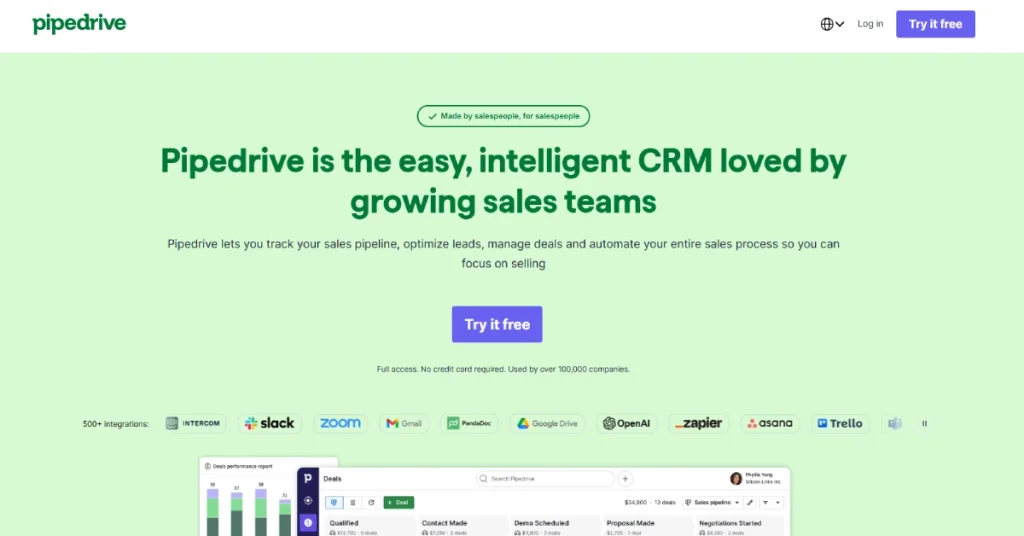
The company started in 2010 and says more than 100,000 businesses use it. That is a long run in a category full of heavy, confusing software. But 2026 has been a strange year to shop for it. Plans were renamed and merged, different websites quote different prices, and a few add-ons can quietly push your bill much higher than the number on the pricing page.
We went through Pipedrive’s own pricing and product pages, checked them against several independent pricing trackers and read through recent user reviews on G2 and Capterra. Here is what you should know before you start the free trial.
Quick answer: Pipedrive is one of the easiest and best-value CRMs for small and mid-sized sales teams that live inside a deal pipeline. It is a weaker choice if you need built-in marketing, calling or a free plan, because those things either cost extra or are not there.
What Pipedrive Actually Is
Pipedrive is a sales CRM. That means it is built to help people sell, not to run your whole company. You see your deals as cards moving through stages such as “Contacted,” “Demo booked,” “Proposal sent” and “Won.” Each card holds the contact, the company, the notes, the emails and the next task.
That sounds basic, and that is the point. Many CRMs try to be a marketing platform, a help desk and a project tool all at once. Pipedrive stays narrow. It does one job, which is to keep deals moving, and it tries to make that job feel light.
It runs in the browser and has mobile apps for iPhone and Android. It also connects to hundreds of other tools through its marketplace. Sources list anywhere from 400 to more than 500 integrations, depending on when the count was taken, so treat that as a rough range and not an exact figure.
The Features That Matter
Let’s skip the long feature list and talk about the parts you will actually use.
The visual pipeline
This is the heart of the product and the reason most people choose it. You drag a deal from one stage to the next, and the whole team sees the change at once. You can run several pipelines if you sell different things, for example one for new customers and another for renewals.
The big benefit is clarity. A manager can open one screen and see where the money is stuck. A new rep can understand the process in about ten minutes. Reviewers on both G2 and Capterra keep coming back to this point. They describe the interface as easy, quick to learn and pleasant to use every day.
Activities and reminders
Pipedrive pushes you to schedule the next step on every deal. Call tomorrow. Send the quote on Friday. If a deal has no next activity, the system flags it. This sounds small, but it is the habit that stops deals from dying quietly.
Email sync and templates
On the Growth plan and above, you can sync your inbox so emails show up on the deal automatically. You also get templates, group emailing and a meeting scheduler. The Lite plan does not include full email sync, which is one of the biggest reasons people end up upgrading.
Automation
Automation is where you stop doing the boring work by hand. For example, when a deal moves to “Proposal sent,” Pipedrive can create a follow-up task for three days later and notify a manager. Automation starts on Growth. Lite has none.
There are also usage limits. One pricing guide lists about 150 automations per seat on Growth and about 250 on Ultimate. If you plan to automate a lot, check the current limits for your plan before you commit.
AI features
Pipedrive now markets all four plans as “Now with AI.” In practice, the AI is spread across the tiers. AI-powered report creation reaches even the cheapest plan, and an AI sales assistant, which was still labelled beta in some places, is available across plans. AI email writing tools show up from the Premium plan upward.
Our honest view is that these features are helpful but not the reason to buy. They save a few minutes on reports and emails. They do not turn a messy sales process into a good one. Treat them as a bonus.
Reporting and forecasting
You get dashboards for deal value, win rates and activity. Deeper reporting and forecasting improve as you move up the plans. For a small team, the basics are enough. For a team with a sales manager who lives in reports, you will probably want Premium.
Mobile app
The mobile apps cover the essentials: viewing deals, logging calls and checking your day. They are not a full replacement for the desktop view, but they work well for reps who are often out of the office.
Ease of Use: The Real Reason People Pick It
Ask a Pipedrive user why they chose it and the answer is almost always the same. It was simple. Many reviewers on Capterra say it felt natural from day one, and that their teams actually used it. That matters more than people admit. The best CRM in the world is useless if the team refuses to log in.
Setup is also light. You can import contacts from a spreadsheet, build your stages and start working in an afternoon. Bigger CRMs often need weeks of setup and sometimes a consultant.
The flip side is that simplicity has limits. One long-time user on Capterra mentioned that the product has not changed much over several years. If you want a platform that is constantly adding big new modules, Pipedrive may feel quiet. If you want stability, that is a plus.
Pipedrive Pricing in 2026
This is the part that confuses people, so let’s go slowly.
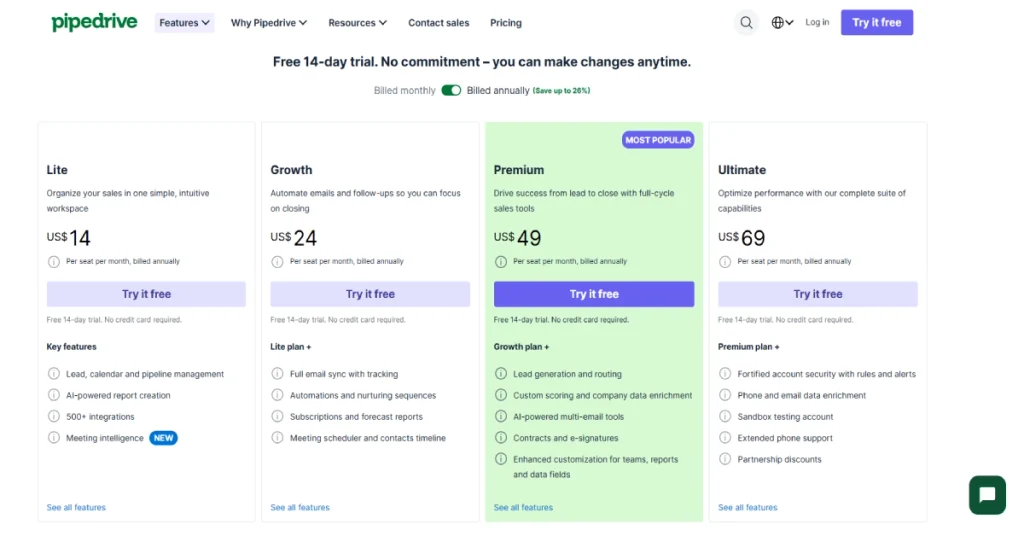
Pipedrive charges per user, per month. Over the last year the company reshaped its plans. The old names such as Essential, Advanced and Professional were replaced by Lite, Growth, Premium and Ultimate. If you read an older review that uses the old names, the prices in it are likely out of date.
| Plan | Annual billing (per user/month) | Monthly billing (per user/month) | Best for |
|---|---|---|---|
| Lite | $14 | $24 | Solo sellers and very small teams |
| Growth | $39 | $49 | Small teams that need email sync and automation |
| Premium | $59 | $79 | Growing teams that want AI email tools and deeper reporting |
| Ultimate | $79 | $99 | Larger teams that need higher limits, security and extra support |
A few things to keep in mind.
There is no permanent free plan. You get a 14-day free trial and then you pay. If a free CRM is a must for you, look at the alternatives section below.
The Premium price is not consistent online. Pipedrive’s own pricing page was reported at $59 per user per month on annual billing in recent checks, but some sources still show $49. That gap seems to come from an earlier price level. We use $59 here because it matches the most recent checks of the official page. Always confirm on Pipedrive’s site before you buy.
Prices may look different where you live. Pipedrive uses regional pricing and may show your local currency. Taxes are usually added on top. The numbers above are in US dollars.
Annual billing saves real money. Moving from monthly to annual saves about $10 per user on Lite and Growth and about $20 per user on Premium and Ultimate. The trade-off is that you are locked in for a year.
What this looks like in real life
- A solo freelancer on Growth: $39 a month, or $468 a year. This is the point where automation and email sync unlock, so most solo users who sell regularly end up here and not on Lite.
- A 10-person team on Growth: $390 a month, or $4,680 a year.
- The same 10-person team on Ultimate: $790 a month, or $9,480 a year. That is roughly double, so you should only go there if you truly need the higher limits and security.
The add-ons are where the bill grows
Pipedrive sells several extras that are priced per company, not per user. That is good news for big teams, because the price does not multiply with every seat.
| Add-on | What it does | Starting price (per month) |
|---|---|---|
| LeadBooster | Chatbot, live chat, web forms and lead finding | From $32.50 |
| Web Visitors | Shows which companies visit your website | From $41 |
| Campaigns | Email marketing | From $13.33 |
| Smart Docs | Quotes, proposals and contracts | From $32.50 |
| Projects | Light project management | From about $16 (listed lower in some places) |
Take a five-person team on Growth. The base cost is $195 a month. Add Campaigns and Smart Docs and you are at about $241. Add Web Visitors and you are past $280. None of that is outrageous, but it is no longer the “$14 CRM” you saw in the headline. Several independent reviewers make the same point: the entry price is low, but the real cost depends on what your process needs.
One more detail worth knowing is that some add-ons are bundled into higher plans. Smart Docs, for example, has been listed as included on upper tiers. Check the plan you are buying so you do not pay for something you already get.
Support and Common Complaints
No honest review of a popular CRM can ignore the unhappy users, so here they are.
Customer support is the most mixed area. Many reviewers praise the helpful team, but a noticeable number describe slow replies or frustrating chat experiences. A few mention billing problems after canceling. These are individual reports and not proof of a pattern, but the theme is common enough that we would not ignore it. If support matters to you, the Ultimate plan adds extended support, and that may be worth the price.
Email marketing is not a strength. Campaigns works, but reviewers who compared it with dedicated email tools were not impressed. If email marketing is central to your business, pair Pipedrive with a proper email platform.
No built-in calling on the standard plans. Teams that cold-call all day often need an outside dialer or a telephony integration, which adds cost. Some competitors include calling by default.
Costs rise as you scale. Transparent pricing is great, but the jump from Growth to Premium or Ultimate is big, and add-ons stack up.
Who Should Use Pipedrive
Small and mid-sized sales teams. If you have 2 to 50 reps and a clear sales process, Pipedrive fits well. The pipeline view and the low learning curve do most of the work.
Solo sellers, freelancers and consultants. The Lite plan is cheap, and Growth is still affordable. You get structure without paying for features you will never use.
Teams moving off spreadsheets. If your current system is a shared sheet and a lot of memory, Pipedrive is a gentle first step into proper CRM.
Managers who want visibility. If you mainly need to see where deals are and who is falling behind, this is a very direct tool for that.
Who Should Skip It
Anyone who needs a free plan. There is none. A 14-day trial is not a free tier.
Teams that want sales, marketing and service in one platform. Pipedrive is deliberately focused on sales. If you want everything under one roof, a bigger suite will fit better.
Phone-heavy outbound teams. Without built-in calling on standard plans, you will be stitching tools together.
Large enterprises with complex needs. If you need very deep customization, complicated approval flows or heavy compliance tooling, a larger platform will probably serve you better.
Pros and Cons
| Pros | Cons |
|---|---|
| One of the easiest CRMs to learn and actually use | No permanent free plan, only a 14-day trial |
| Clear visual pipeline that shows where every deal stands | Email sync and automation need Growth or higher |
| Low entry price, with Lite from $14 per user on annual billing | Add-ons can raise the total cost a lot |
| Add-ons are priced per company, not per user | Support gets mixed feedback |
| Strong integration library and mobile apps | Email marketing and calling are weaker than in some rivals |
| Solid ratings from real users on both G2 and Capterra, generally around 4.3 to 4.5 out of 5 | Pricing information online is inconsistent, so you must verify it yourself |
How Pipedrive Compares
Pipedrive sits in the middle of a crowded field. Here is a fast look at how it stacks up against the names you will probably consider.
Pipedrive vs HubSpot. HubSpot offers a free CRM tier and a wide marketing and service suite. That makes it a better pick if marketing is as important to you as sales, or if you need to start at zero cost. The downside is that HubSpot’s price can climb steeply as you add paid hubs. Pipedrive is more focused, simpler to set up and often cheaper for pure sales teams.
Pipedrive vs Zoho CRM. Zoho tends to be cheaper and packs more features into lower plans. In return, it can feel busier and take longer to configure. Pipedrive wins on simplicity. Zoho wins if you like to tinker and want more for less.
Pipedrive vs Salesforce. Salesforce is the heavyweight. It can do almost anything, but it needs more money, more setup and often a dedicated admin. For a small team, it is usually overkill.
Pipedrive vs Close. Close includes calling and SMS as part of its core offer, which makes it attractive for outbound teams that live on the phone. If dialing is your main activity, compare the two carefully, because Pipedrive’s calling setup may cost extra.
Our Verdict
Pipedrive does what it says. It gives sales teams a clear, friendly place to manage deals, and it keeps the learning curve low. For many small and mid-sized teams, that is exactly what a CRM should be.
It is not perfect. The pricing looks cheaper than it often turns out to be once you need email sync, automation and a couple of add-ons. Support opinions are split. And if you want marketing, calling and service in the same tool, you will either pay extra or look elsewhere.
Our advice: Start the 14-day free trial and set up one real pipeline with real deals, not dummy data. Watch whether your team uses it without being nagged. If you need automation or email sync, price out Growth from the start and skip Lite. Add extras only when you feel the pain, not before. And before you pay, check the live pricing page, because this is a product whose plans and prices have been moving.
Frequently Asked Questions
Is Pipedrive worth it?
Yes for small and mid-sized sales teams that want a simple, visual CRM. The base plans are affordable and the product is easy to adopt. It is less worth it if you need free software, built-in marketing or heavy calling features.
How much does Pipedrive cost per month?
On annual billing, the four plans are about $14 (Lite), $39 (Growth), $59 (Premium) and $79 (Ultimate) per user per month. On monthly billing the same plans are about $24, $49, $79 and $99. Add-ons cost extra, and some sources still show older numbers, so confirm on the official site.
Does Pipedrive have a free plan?
No. There is a 14-day free trial, after which you need a paid plan.
Which Pipedrive plan should I choose?
Most small teams do best on Growth, because that is where email sync and automation begin. Choose Lite only if you just need basic deal tracking. Consider Premium or Ultimate if you need deeper reporting, higher limits or more support.
Is Pipedrive good for small businesses?
Yes. It is quick to set up, easy to learn and priced per user, which keeps costs predictable for small teams.
Does Pipedrive have AI features?
Yes. Pipedrive now includes AI tools such as report creation and a sales assistant, and AI email tools on higher plans. They are useful helpers but not the main reason to choose the product.
What are the best Pipedrive alternatives?
HubSpot CRM, Zoho CRM, Salesforce and Close are the most common ones. HubSpot is strong if you want a free start and marketing tools. Zoho is a budget-friendly option. Close suits phone-heavy outbound teams.
Can I cancel Pipedrive anytime?
Monthly plans can generally be canceled at the end of the billing cycle. Annual plans may have different terms, so read the details before you commit.
Sources
- Pipedrive official pricing page
- Capterra: Pipedrive reviews and pricing
- SaaS Switcher: Pipedrive pricing in 2026
- Axis Consulting: Pipedrive pricing plans
Note: Pipedrive changes its plans, limits and add-on prices often, and prices vary by region. Treat the figures above as a snapshot from October 2026 and check the official site before you subscribe.