 USD
 INR
 EUR
 GBP
 AED
 AUD
 CAD
 SGD
 JPY
 CNY
 CHF
 SAR
 NZD
 ZAR
 BRL
 MYR
 IDR
 PHP
 THB
 PKR
 BDT
 NPR
 LKR
 KRW
 HKD
 SEK
 TRY
 NGN

Clayzo is a free animation engine made for coding agents such as Claude Code, Codex and Cursor. You describe the motion you want, the agent writes it as code, reviews its own frames, and you export a video or play it live on your site. It is new, fast to set up and impressive for what it tries to do. It is best for developers, design engineers and agencies already working with AI agents. It is not a replacement for a visual timeline editor.

What Is Clayzo?
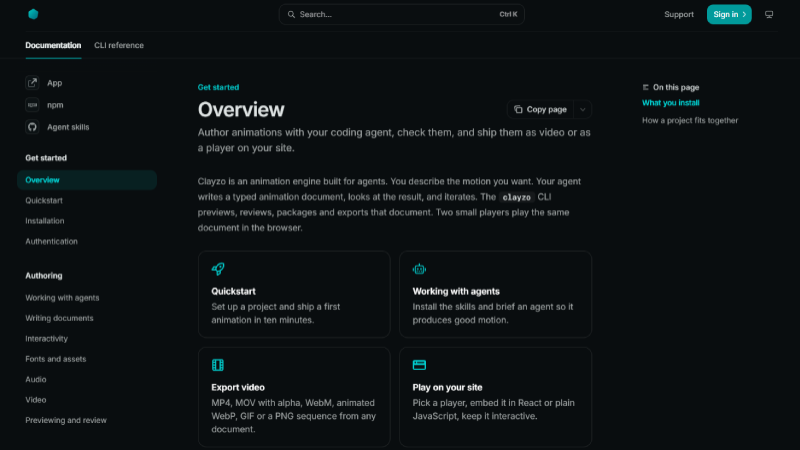
Clayzo is an animation engine and SDK designed to be driven by AI coding agents. Most animation tools assume a human sits in front of a timeline, dragging keyframes. Clayzo flips that. You talk to your coding agent in plain language make a hero section with glass shapes that float and react to the cursor, and the agent writes the animation as code against Clayzo’s document format. The agent then previews frames, checks them, fixes what looks wrong, and repeats until it looks right.
The official description is: author animations with your coding agent, check them, and ship them as video or as a player on your site. In short, it is animation built for coding agents.
The team says they built it to solve their own problem as design engineers and video editors: creating good motion graphics and animations with agents was hard. Agents are good at writing code, but they are weak at judging motion, timing and composition. Clayzo tries to fix that with a purpose-built motion engine, built-in effects, and a review loop.
A note on names: Clayzo is not Clay (clay.com), the sales data enrichment tool. Some review sites also list an earlier Clayzo positioning as a tool for prototyping on a live codebase, which was launched in March 2026. This review covers the animation engine for coding agents, launched on Product Hunt on 2 November 2026.
Who Is Behind Clayzo?
Clayzo says it is backed by Afore Capital. On X, the team announced a Q1 2026 Products That Count award. Early public users include Olostep, which says it used Clayzo to build its website animations, and several creators have shared work made with Clayzo and Claude on X. One user on Product Hunt describes the team as great to work with and constantly improving.
Since the product is only weeks old at the time of writing, there is not yet a large pool of independent reviews. Product Hunt shows a 5.0 rating based on one review, which is a good sign but too small a sample to draw conclusions from. Treat any very high rating figures on aggregator sites with caution unless you can trace them to a real review platform.
How Clayzo Works
The workflow has five steps:
- Install Clayzo into your project with one command.
- Brief your agent using the Clayzo skills, which teach it the format and motion design basics.
- The agent writes the animation as a typed document in TypeScript.
- The agent reviews frames, using Clayzo’s CLI to render frame sheets and review packets, then fixes problems.
- You ship it as a video (MP4, MOV, WebM and more) or as a live player embedded in your site.
The key idea is the loop between writing and reviewing. As the docs put it, a document that validates is not a document that looks right. Clayzo gives the agent tools to look at the output instead of guessing.
Why code instead of a timeline?
There are real advantages to animation as code:
- Version control: Animations are text files. You can diff them, review them in pull requests and roll them back.
- Repeatability: An agent can regenerate or tweak an animation consistently.
- Speed of revision: Changes are requested in plain language and land in minutes as reviewable text.
- Fits developer workflows: CI checks, packaging and automation work naturally.
The tradeoff is that you lose the direct manipulation of a visual editor. You steer through conversation, not by dragging things.
Setup: Getting Started in Minutes
Setup is deliberately short. According to the official site and launch page:
- Run
npx clayzo@latest initin your project. The initializer installs the Clayzo packages and the agent skills. - Run
clayzo loginto sign in. - Use the skills with your agent:
/clayzo-animation-authoringto create the animation/clayzo-authoring-shippingfor preview and fast export
The docs also cover installation requirements, installing by hand, and a doctor command that shows what is installed. There is an update command to bring everything up to date. For automated pipelines, Clayzo supports CI tokens so you can run commands without an interactive login.
Which commands need sign-in? Based on the documentation, authoring, types and validation work offline with no account. Preview, rendering, review, packaging and export need you to be signed in. Browser playback of a finished animation on your site never contacts Clayzo servers. This matters if you work in locked-down environments, so read the Authentication page before you plan a CI pipeline.
Key Features in Detail
1. A purpose-built motion engine
Clayzo’s document format covers shapes, text, keyframes, springs, custom effects and shaders, camera moves, audio, and interactive states like hover, press and drag. Built-in effects include glass, blur, masks and a 2.5D camera. This is the big difference from asking an agent to build everything from scratch in React and CSS. The agent doesn’t have to reinvent glass or blur every time, so results are more consistent from run to run.
2. Agent skills that teach motion taste
Clayzo ships skills for agents. The team says these teach motion design taste: timing, easing, typography and composition. This matters because a coding model can write valid animation code that still looks clumsy. The skills push the agent towards polished results. You can also point your agent at your existing assets and skills to keep animations consistent across a project.
3. Typed authoring with validation
Documents are written in TypeScript with types and validation built in. Mistakes are caught early rather than showing up as a blank screen later.
4. Fonts, assets, audio and video
The docs have dedicated pages for these:
- Fonts and assets: how text finds its font, how images are referenced, and how to make a document portable.
- Audio: add a soundtrack or sound effects to a document.
- Video: put footage inside a document with animation layered on top.
5. Bundles (.clayzo)
You can package a document with its fonts, images and audio into a portable .clayzo bundle so it plays anywhere without missing files. The package command builds it.
6. Multiple platforms
Clayzo supports the web (including React and Next.js), and native playback on iOS and macOS through a Swift package of about 1.4 MB with no web view. More platforms are listed as coming soon.
7. A full CLI
The CLI includes init, preview, render-frame, review, package, export, doctor, update, and login/logout/token. Everything an agent needs to work on its own is exposed as commands.
Previewing and the Review Loop
This renders six frames spread evenly across the animation and lays them out as one labelled sheet. It costs about as much as rendering a single frame and quickly shows whether anything moves. You can also render one exact frame with -tick. Clayzo’s time unit is the tick, conventionally 240 ticks per second, so at 30 fps one frame equals 8 ticks.
The commands print JSON with the output path, the ticks rendered, the dimensions and a diagnostics count. A count above zero is worth a look, because a frame that renders is not always a frame that rendered correctly.
This serves a page where the animation plays, can be scrubbed, and has an export panel. Controls include Space to play or pause, arrow keys to step one frame, dragging the timeline to scrub, and Shift-drag to set an export range. It also stops itself after ten minutes with no browser attached. The preview is the fastest way to export anything with glass, refraction or custom shaders, because frames render on your GPU instead of being interpreted per pixel in Node.
For looping animations, this puts the last frame beside the first and reports the difference compared with a normal frame step. A visible seam in the sheet will be visible in the loop.
This writes a packet with review.json, a contact-sheet.png and a frames/ folder. Frames are sampled across the timeline and rendered on checker, light and dark backgrounds. They are then checked for blank frames, clipping, contrast and motion. It is heavier than a frame sheet, so it is best run before shipping, not after every edit. The packet records the exact document revision it reviewed, so a review is a statement about one specific version.
Together, these tools let an agent catch problems like empty frames, clipped text or low contrast by itself. That is the main reason Clayzo’s output tends to be more reliable than a raw “write me an animation” prompt.
Exporting: Every Format Explained
The export command renders every frame with the same renderer used by the CanvasKit player, so a video is pixel-identical to full-fidelity playback. Supported formats:
| Format | Transparency | Sound | Best use |
|---|---|---|---|
| MP4 | No | Yes | Social, ads, slides, email fallbacks |
| MOV | Yes | Yes | Overlays and compositing in video tools |
| WebM | Yes | Yes | Transparent video on the web (Safari plays it without transparency) |
| Animated WebP | Yes | No | Animated images with transparency that play everywhere |
| GIF | No | No | Places that only accept GIF |
| PNG sequence | Yes | No | Compositing or your own encoder |
| SVG | Yes | No | Vector motion at any size |
Quality controls
tierselects an encoder preset: draft, review, final or master.qualitysets quality from 0 to 100 (default 85).supersample 2renders at double size and downsamples, sharpening thin strokes and small text at four times the pixel cost.alpha preservekeeps transparency,--alpha flattencomposites onto a colour.- You can export a tick range, bound the longer side with
--max-dimension, or change frame stepping.
Things to watch
- Draw a background. Frames are transparent wherever nothing is drawn. Without a full-canvas background rectangle, an MP4 exports on black and a MOV exports with nothing behind it.
- SVG has limits. An exported SVG is one file animated with CSS, with text drawn as outlines. If your document has something SVG can’t draw, such as a shader effect or a camera, nothing is written and the command lists the offending nodes.
- Interactions don’t export. Interaction bindings never run during export. Video shows the timeline as authored.
- Speed depends on layers. Export cost is per layer, not per second. Opacity below 1, isolated groups, drop shadows and effects each add passes per frame, and glass, refraction and shaders are evaluated per pixel. Exports use your GPU when that is faster, in a headless Chrome, Edge, Brave or Chromium. Without one of those or a hardware GPU, frames render on the CPU. You can force
--backend gpuor--backend cpu, though the two are not bit-identical. - Verification: The result is decoded after encoding to confirm it plays, and a progress sheet of the first twelve frames is written beside the output.
Playing Animations on Your Site: The Two Players
If you want animations live on a page rather than as video, Clayzo offers two players with the same API. You pick one at integration time and ship only that one.
WebGL player (lightweight)
The docs describe this as the lightweight player with no setup and nothing to serve, about 290 KB compressed. A launch-page comment from the team mentions the engine being around 350 KB with brotli compression, so the exact size likely depends on how it is measured and bundled. Either way, it is small. The team says it shows a poster image right away and only fetches the engine once the animation is about to scroll into view, and that it handles multiple animations on one page. Clayzo’s own website uses this player.
CanvasKit player (full fidelity)
This is the same renderer the export uses, so playback cannot drift from the video. It is heavier but covers everything.
Coverage check
Some constructs such as mattes, nested clips and colour-space intrinsics in custom shaders need the CanvasKit player. The docs warn that an unsupported construct is not an error at play time; the node simply isn’t drawn. Clayzo provides a checkCoverage function in the WebGL player package that tells you whether your document is supported, and the docs recommend running it in CI over everything you ship. This is an important practical tip.
React, Next.js, iOS and macOS
A ClayzoPlayer component and a useClayzoPlayer hook work with either player package in React and Next.js. For Apple platforms, a Swift package plays documents natively.
Interactivity
Clayzo supports pointer behaviour, host inputs and triggers. Animations can react to the cursor, including hover, press and drag states. The team’s showcase includes cursor-driven motion on live sites. This sets it apart from tools that only produce video, and from Lottie, which mainly plays pre-made animations.
Remember that interactivity runs in players, not in exports. If you need both an interactive web version and a video for social media, author with that in mind.
Clayzo Pricing: Is It Really Free?
At the time of writing, Clayzo presents itself as free, and the Product Hunt launch text says “And it’s free!” Third-party listings repeat this and describe a free model covering the core engine, the agent workflow and deployment options.
A few cautions:
- Preview, render, review, package and export need sign-in. Free does not mean anonymous.
- An older listing on Toolradar, for the earlier prototyping version of Clayzo, showed a free plan and a custom-priced Pro plan with team features. That may not apply to the animation engine.
- Early-stage products often change pricing. Check the official site and docs before you commit a client project.
For comparison, check Rive’s own site for current plans, since third-party sources list different starting prices and some describe Rive’s pricing as sales-led.
Clayzo Pros and Cons
| Pros | Cons |
|---|---|
| Free to start, low risk to try | Very new, few independent reviews so far |
One-command setup (npx clayzo@latest init) | Needs a coding agent (Claude Code, Codex, Cursor) and terminal comfort |
| Built for agents: skills, typed format and CLI | No visual timeline editor |
| Self-review loop: frame sheets, loop seam check, review packet | Preview, render, review and export need sign-in |
| Built-in effects: glass, blur, masks, shaders, 2.5D camera | “Free” is a launch-stage position, pricing may change |
| Many export formats: MP4, MOV, WebM, WebP, GIF, SVG, PNG sequence | Lightweight WebGL player can silently skip unsupported constructs |
| Small WebGL player (about 290 KB compressed) plus a full-fidelity CanvasKit player | Interactions (hover, press, drag) don’t carry into exported video |
| Interactive output for live sites | Heavy effects export slowly without a GPU |
| Text-based files that work with Git, code review and CI | Output quality depends on your agent and how well you brief it |
| Native iOS and macOS playback (Swift package, about 1.4 MB, no web view) | Platform support still growing (web, iOS, macOS today) |
| Active team with frequent updates | Long-term reliability is unproven |
Clayzo vs Rive, Remotion and Lottie
| Clayzo | Rive | Remotion | Lottie | |
|---|---|---|---|---|
| Main approach | Agent-written code animation | Visual editor plus runtime | Video built in React | Playback of designed animation files |
| Best for | Developers using AI agents | Designers shipping interactive animation to apps | Programmatic video in React | Simple designed animations from After Effects |
| Editing style | Prompts and code | Visual interface | React code | After Effects export |
| Interactivity | Yes (hover, press, drag) | Yes (state machines) | Limited | Limited |
| Built-in agent review loop | Yes | Has AI agent tooling | No | No |
Clayzo vs Rive: Rive is a mature, designer-friendly editor used to ship interactive animation into apps and games. Clayzo is a code and agent-first alternative. If your team lives in a visual editor, Rive is the safer fit. If your team already works with coding agents, Clayzo may feel faster.
Clayzo vs Remotion: Remotion builds videos with React. A comment on the launch page compares Clayzo to it, saying setup may be easier and that Clayzo gives agents a dedicated motion engine and motion-design skills, whereas with Remotion agents build each animation from scratch in React and CSS. That is the team’s framing, so test both on a real project before deciding.
Clayzo vs Lottie: Lottie mainly plays pre-designed animations. Clayzo creates animations from text prompts and supports interactivity and effects.
Who Should Use Clayzo (and Who Should Not)
Good fit:
- Front-end developers who want animated landing pages without learning After Effects
- Design engineers who work with AI agents daily
- Startups wanting polished hero animations and product videos quickly
- Agencies that already brief coding agents and want revisions to land in minutes
- Marketers with developer support who need short ads, social clips and overlays
Not a good fit:
- Motion designers who need a timeline-based editor and fine hand control
- Teams without access to a coding agent
- Projects that need guaranteed long-term pricing and enterprise support from day one
- People who want a no-code drag-and-drop experience
Tips for Getting Better Results
- Brief like a designer. Describe mood, speed, colours, typography and what should react to the cursor.
- Use the skills. Always start from
/clayzo-animation-authoringand use/clayzo-authoring-shippingfor preview and export. - Start small. Get one scene right before building a full sequence.
- Ask the agent to check frames. Frame sheets are cheap, so use them after each change.
- Draw a background. Add a full-canvas rectangle so exports are not black or empty.
- Run the coverage check. Use
checkCoveragein CI if you use the WebGL player. - Check loops. Use the
--seamoption for looping animations. - Use a GPU for heavy effects. Preview on a machine with a GPU or a Chromium browser for faster export.
- Package for portability. Bundle fonts, images and audio into a
.clayzofile. - Keep assets consistent. Point the agent at existing brand assets so all animations match.
Common Problems
The docs include a troubleshooting page, and a few issues are predictable from the documentation:
- Black or empty export: Missing background rectangle.
- Something doesn’t appear on the live site: The WebGL player may not support a construct. Run the coverage check or switch to the CanvasKit player.
- Slow export: Many layers, shadows or shader effects on CPU. Use a GPU or a headless Chromium browser.
- Fonts look wrong: Check the fonts and assets guidance and package the document.
- Preview won’t start or exports are refused: Check you are logged in.
- Interactions missing from video: This is expected; exports only contain the timeline.
My Experience (add your own before publishing)
Google rewards first-hand experience, so add a short section here. Try Clayzo on one real task, for example a hero animation or a 10-second product clip. Note how long setup took, what prompt you used, how many revisions were needed, and which export format worked best. Add one or two of your own screenshots and the result. Even 150–200 words of honest personal experience will make this article stronger than copies of the official pages.
Final Verdict
Clayzo is one of the more interesting entries in the new wave of AI-native creative tools. Instead of generating a flat video, it gives coding agents a proper engine, a skills layer for motion taste, and a review loop to check their own work. The result is animation that is versioned, repeatable and easy to revise.
It is also young. Reviews are limited, pricing is only described as free for now, and some steps require sign-in. The lightweight player has coverage gaps you must test for. If you want a visual editor, Rive or After Effects will suit you better.
For developers and design engineers already working with Claude Code, Codex or Cursor, Clayzo is worth trying today. It is free, takes one command to set up, and the review loop addresses a real weakness of AI-generated motion. Try it on a small project first and scale up once you trust it.
Rating: 4 / 5. Strong idea, smooth setup, thoughtful tooling; held back by its early stage and limited track record.
FAQ
What is Clayzo?
Clayzo is a free animation engine that lets coding agents like Claude Code, Codex and Cursor create web animations and motion graphics as code, review every frame, and export video or play it live on a site.
Is Clayzo free?
It is presented as free, and the launch says so. Some features need sign-in, and pricing may change, so check the official site.
Is Clayzo the same as Clay?
No. Clay is a sales data enrichment platform. Clayzo is an animation engine.
Which coding agents work with Clayzo?
Claude Code, Codex and Cursor are named, and the team says other agents work too.
Do I need to know how to code?
You don’t write the animation code yourself, but you need to be comfortable with a terminal and a coding agent.
Does Clayzo have a timeline editor?
No. You describe motion in plain language and the agent writes it. A preview page lets you play and scrub the result.
What export formats does Clayzo support?
MP4, MOV, WebM, animated WebP, GIF, PNG sequence and animated SVG.
Can Clayzo animations be interactive?
Yes, on live players. Hover, press and drag states are supported, but interactions don’t run in exported video.