
Taking notes during a meeting sounds simple until you’re the person expected to participate in the conversation and remember everything afterward. Someone mentions a deadline. A colleague suggests changing the project scope. Another person asks a question that needs a follow-up. By the time the call ends, you’ve probably remembered the general discussion but missed a few details that matter.
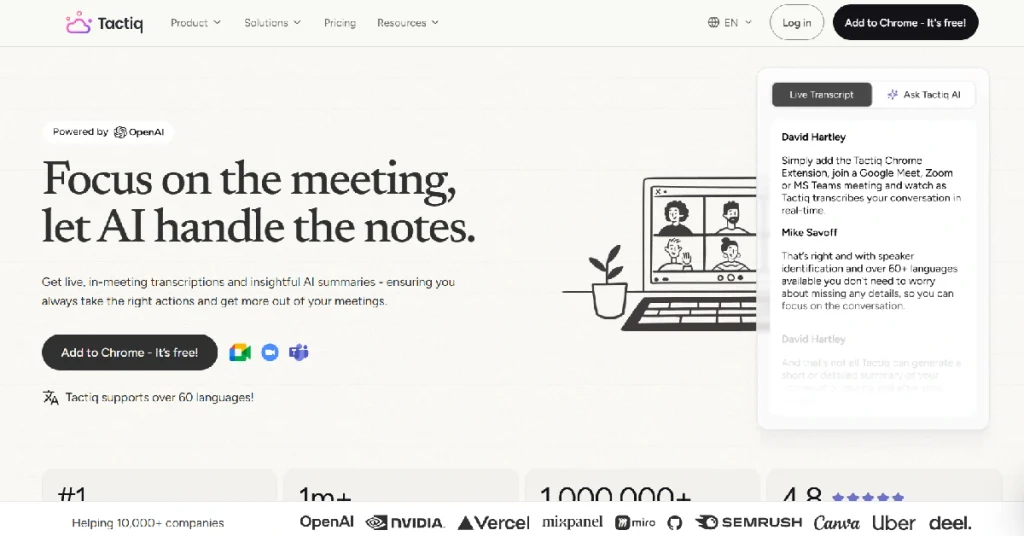
AI meeting assistants promise to solve this problem. Some join meetings as recording bots, while others focus on capturing conversations directly through the browser. Tactiq belongs mainly to the second group.
Tactiq Review is a meeting transcription and AI notetaking tool that works with Google Meet, Zoom and Microsoft Teams. It provides live transcripts, meeting summaries and tools for turning discussions into useful notes. Unlike many meeting assistants, its browser extension does not need to send a separate bot into the call. That sounds convenient, but convenience alone isn’t enough reason to pay for another subscription. The real question is whether Tactiq saves enough time to justify its price, especially when the free plan already includes basic transcription.
This review looks at the features that matter, the restrictions you should know about and the situations where upgrading makes sense.
What Is Tactiq?
Tactiq is an AI-powered meeting notetaker that captures spoken conversations and turns them into searchable text. It works primarily through a browser extension, allowing users to follow live transcripts during online meetings.
The software also generates AI summaries, identifies action items and helps prepare follow-up messages. For people who attend frequent meetings, this can reduce the amount of information they need to write down manually. One of Tactiq’s main selling points is its bot-free approach. The extension runs in the user’s browser rather than inviting a separate AI participant into the meeting. This can make it less disruptive than recording assistants that appear as an additional attendee.
Tactiq currently supports transcription in more than 60 languages. It also offers integrations with applications such as Slack, Notion, Google Docs and HubSpot. Tactiq+1
Tactiq at a Glance
| Detail | Information |
|---|---|
| Tool | Tactiq |
| Category | AI Meeting Assistant |
| Free plan | Yes |
| Starting price | $0 |
| Pro plan | $8/user/month, billed annually |
| Team plan | $16.67/user/month, billed annually |
| Main platforms | Google Meet, Zoom, Microsoft Teams |
| Live transcription | Yes |
| AI summaries | Yes |
| Meeting bot required | No, for supported browser capture |
| Languages | 60+ |
| Chrome extension | Yes |
| Mac application | Beta, Zoom desktop calls |
| Official website | Tactiq |
How Does Tactiq Work?
Getting started with Tactiq is fairly straightforward. You install its browser extension, sign in and join a supported meeting through Google Chrome or Microsoft Edge. When transcription is enabled, the Tactiq widget appears alongside the meeting and displays the conversation as text.
Once the meeting ends, the transcript is saved to your Tactiq account. From there, you can review what was discussed, search for specific information or use AI features to generate a summary.
Consider a freelance designer discussing website changes with a client. The client requests a new homepage layout, changes the launch date and asks for an additional contact form. Instead of interrupting the discussion to write everything down, the designer can use the transcript afterward to check the exact requests.
This is where Tactiq becomes useful. It doesn’t replace the conversation. It helps preserve the details that might otherwise disappear between meetings.
There is one important technical limitation. The browser extension works with supported meetings opened in the browser, not every native desktop meeting application. Tactiq also offers a Mac app in beta, but its documented desktop support currently focuses on Zoom calls. Chrome extension & Mac app+1
Tactiq Features: What Do You Actually Get?
1. Live Meeting Transcription
Live transcription is the main reason to consider Tactiq. As participants speak, the extension captures their words and displays a running transcript.
This is especially useful during interviews, project discussions and customer calls where small details can become important later. The transcript includes speaker identification, making it easier to understand who said what.
Tactiq’s website advertises support for more than 60 languages, which makes it relevant to international teams. However, the platform uses one active transcription language at a time. If a meeting switches languages, the user may need to change the setting manually. Earlier parts of the transcript are not automatically reprocessed when the language changes. Tactiq Help Center
Accuracy is another consideration. Background noise, unfamiliar names and overlapping speakers can affect transcription quality. For important financial figures or contractual commitments, checking the transcript remains necessary.
2. AI Meeting Summaries
Nobody wants to read a forty-minute transcript just to remember the three decisions made during a meeting. Tactiq addresses this with AI-generated summaries.
After a conversation, users can ask the software to identify key points, prepare meeting notes or extract action items. This is helpful for people who attend several calls each day and need a quick way to organize the information.
A project manager, for example, might use a summary to prepare an update for colleagues who missed a planning session. A salesperson could use it to draft a follow-up email after speaking with a potential customer.
The important limitation is that an AI summary is still an interpretation of the conversation. It may miss a qualification or misunderstand an unclear statement. The transcript should remain the reference point when accuracy matters.
3. Ask Tactiq AI
Tactiq allows users to ask questions about meeting information instead of manually searching through every line of text.
You might ask which deadlines were discussed, what concerns a customer raised or which tasks need attention before the next meeting. This makes meeting history more useful than a collection of documents stored somewhere and rarely opened.
The feature is particularly valuable when you’re returning to a conversation several days later. Rather than trying to remember the exact phrase someone used, you can ask a question and inspect the relevant information.
However, AI actions consume credits on the Free and Pro plans. Users who frequently generate summaries, ask questions and prepare follow-up content should pay attention to those limits.
4. AI Workflows and Integrations
Tactiq offers workflow automation that helps move meeting information into other applications. Supported integrations include Slack, Notion, Google Docs, HubSpot, Asana, ClickUp, Jira and other productivity tools. Tactiq
This matters because meeting notes are most useful when they reach the place where work actually happens. A project team might want action items in its task manager. A sales representative may need customer information in a CRM.
For a small team, this can reduce repetitive copying and pasting. Instead of preparing the same meeting summary in several formats, users can build workflows around their normal process.
Still, automated workflows should be checked before they become part of an important business operation. An incorrectly identified action item or incomplete customer note can create confusion when shared without review.
5. Meeting Search and Sharing
Tactiq stores transcripts so users can return to earlier discussions. Its search features make it easier to locate specific information without opening every meeting individually.
This is particularly helpful for consultants and customer-facing teams. A client may refer to something discussed several weeks earlier, and a searchable transcript can provide more reliable context than memory alone.
Team plans add collaboration features such as automatic transcript sharing and centralized administration. These are useful when several employees need access to meeting information.
Privacy settings still deserve attention. Not every meeting should be shared automatically, especially when it contains confidential business or personal information.
Tactiq Pricing 2026: Free vs Pro vs Team
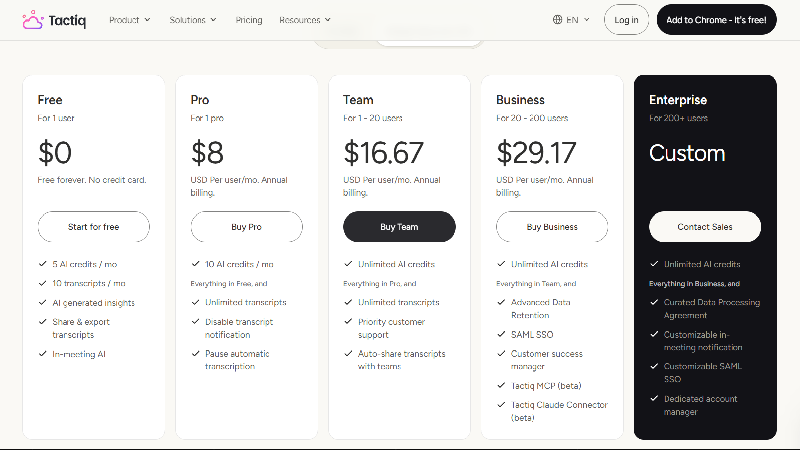
Tactiq offers a free plan and several paid subscriptions. Its official pricing documentation lists the following rates.
| Plan | Monthly billing | Annual billing, per month |
|---|---|---|
| Free | $0 | $0 |
| Pro | $12/user | $8/user |
| Team | $20/user | $16.67/user |
| Business | $40/user | $29.16–$29.17/user |
| Enterprise | Custom | Custom |
Annual plans are billed upfront. The official pricing page and help center show a minor rounding difference for Business.Tactiq Help Center+1
Is the Tactiq Free Plan Enough?
The Free plan includes 10 transcripts and 5 AI credits per month. It also supports AI-generated insights, transcript sharing and exports.
For someone attending a handful of meetings each month, this is a reasonable starting point. You can evaluate the transcription experience without entering payment details.
The restriction becomes noticeable when meetings are frequent. Ten transcripts may disappear quickly for a consultant or remote worker who attends several calls each week.
Five AI credits also provide limited room for experimentation. According to Tactiq, a single AI action such as generating a summary or asking a question uses one credit.
Is Tactiq Pro Worth $8 Per Month?
Pro is the most practical option for an individual who uses Tactiq regularly. It includes unlimited transcripts and 10 AI credits per month.
The annual rate of $8 per user per month works out to $96 for a year. Monthly billing costs $12, so users who expect to continue using Tactiq may save money with annual billing.
There is one drawback: unlimited transcription does not mean unlimited AI usage. If you generate several summaries and ask frequent questions, 10 credits may feel restrictive.
For users who mainly need transcripts and occasional summaries, Pro can still be good value. Heavy AI users may need to consider Team.
Who Needs Tactiq Team or Business?
Team costs $16.67 per user per month with annual billing. It includes unlimited AI credits, automatic sharing and additional collaboration features.
Business is designed for larger organizations and adds capabilities such as advanced data retention, SAML SSO and additional administrative controls.
These plans are useful when meeting information needs to be organized across several employees. An individual freelancer probably doesn’t need them.
The right plan depends less on the number of meetings alone and more on how frequently AI features are used and whether colleagues need shared access.
Tactiq vs Fireflies AI: Which Is Better?
Tactiq and Fireflies solve similar problems, but their approaches are different.
Tactiq is particularly appealing to people who want live transcription without a separate meeting bot. Its browser-based workflow feels focused on capturing text and turning it into useful notes.
Fireflies offers a broader meeting intelligence platform with recording options, conversation analytics and additional features for sales and customer-facing teams.
| Feature | Tactiq | Fireflies AI |
|---|---|---|
| Live transcription | Yes | Yes |
| AI summaries | Yes | Yes |
| Bot-free capture | Core browser workflow | Available through selected capture methods |
| Searchable transcripts | Yes | Yes |
| CRM integrations | Yes | Yes |
| Conversation intelligence | More limited focus | Broader analytics |
| Free plan | Yes | Yes |
| Best suited for | Simple meeting documentation | Recording and meeting intelligence |
A freelancer who wants straightforward notes may prefer Tactiq. A sales team that wants to analyze conversations across multiple employees may find Fireflies more useful.
Neither is automatically better. The decision depends on whether you need a lightweight notetaker or a more extensive meeting management platform.
What I Like About Tactiq
Tactiq’s biggest advantage is that it doesn’t make meeting documentation unnecessarily complicated. The extension captures conversations in the browser, and users can turn those transcripts into notes without changing their entire workflow.
The bot-free approach is another practical benefit. Some people dislike having a separate AI participant appear in every meeting, especially during client conversations. Tactiq offers an alternative for supported browser meetings.
The free plan is also useful. It gives occasional users enough access to understand the product before paying, while Pro offers a relatively affordable upgrade for frequent transcription.
Where Tactiq Could Be Better
The AI credit allowance on Pro is probably the most noticeable limitation. Unlimited transcripts sound generous, but someone who relies on AI summaries and follow-up generation may find 10 monthly credits insufficient.
Platform support also requires attention. The browser extension is designed for supported web meetings, while the Mac application is still in beta and currently focuses on Zoom desktop calls. Users who rely heavily on other native desktop meeting applications should confirm compatibility before subscribing.
Finally, Tactiq is not a complete replacement for a dedicated recording and conversation intelligence platform. If your organization needs detailed video archives, advanced coaching analytics or extensive sales intelligence, other products may be a better fit.
Tactiq Pros and Cons
| Pros | Cons |
|---|---|
| Live transcription without a separate bot | Browser-based capture has compatibility limits |
| Supports 60+ languages | One active transcription language at a time |
| Free plan available | Limited to 10 transcripts per month |
| Affordable Pro annual pricing | Pro includes only 10 AI credits monthly |
| AI summaries and action items | Important notes still need verification |
| Integrations with popular work tools | Advanced team features cost more |
| Searchable meeting history | Not a full meeting video archive |
Who Should Use Tactiq?
Tactiq makes sense for freelancers, consultants, remote employees and small teams that spend a significant amount of time in online meetings. It is especially useful when the goal is to remember decisions and prepare follow-up work rather than record every call as video.
Students and educators may also find transcription helpful for online discussions, provided the meeting platform is supported and the participants are aware of the transcription.
It is less compelling for people who rarely attend meetings or already have a notetaking system that works well. Adding another subscription only makes sense when it solves a recurring problem.
Is Tactiq Worth It in 2026?
For someone who attends frequent meetings and regularly forgets small but important details, Tactiq is worth trying. Its main value comes from preserving conversations and making them easier to review afterward.
The Free plan is enough for occasional use. Pro is a sensible upgrade when 10 monthly transcripts are no longer sufficient, although the limited AI credits are worth considering.
Team is more attractive when several employees need shared meeting information and unlimited AI actions. Tactiq isn’t the most comprehensive meeting assistant available, but that can be part of its appeal. Not everyone needs advanced sales analytics or a large recording system. Sometimes a reliable transcript and a useful summary are enough.
Final Verdict
Tactiq is a practical AI meeting notetaker for people who want to spend less time writing notes and more time participating in conversations. Its bot-free browser workflow, live transcription and straightforward interface make it particularly suitable for individuals and smaller teams.
The biggest limitations are its AI credit allowances and compatibility requirements. Users should also remember that automated notes are not guaranteed to be perfectly accurate.
Final verdict: Tactiq is worth using if you want a lightweight meeting transcription tool. Start with Free, choose Pro for regular transcription and consider Team only when you genuinely need more AI usage and collaboration features.
Official website: Visit Tactiq
Frequently Asked Questions
Is Tactiq free?
Yes. The Free plan includes 10 transcripts and 5 AI credits per month.
How much does Tactiq Pro cost?
Pro costs $8 per user per month with annual billing or $12 with monthly billing.
Does Tactiq record meetings?
Its main browser workflow captures transcripts without requiring a separate recording bot or video recording.
Does Tactiq work with Google Meet?
Yes. It supports Google Meet through its browser extension.
Is Tactiq better than Fireflies?
Tactiq is a good fit for simple bot-free transcription. Fireflies may be better for teams needing broader meeting intelligence.
Can Tactiq transcribe different languages?
Yes. It supports more than 60 languages, although one transcription language is active at a time.


1 comment