
There is a particular kind of frustration that comes from finishing a productive meeting and realizing you cannot remember half of what was agreed. Someone suggested changing the launch date. A customer mentioned an issue that needed investigating. Your manager asked for an update by Friday. You remember the general conversation, but the details have already started to blur. By the time you open a blank document to write everything down, you are trying to reconstruct a discussion rather than recording what actually happened.
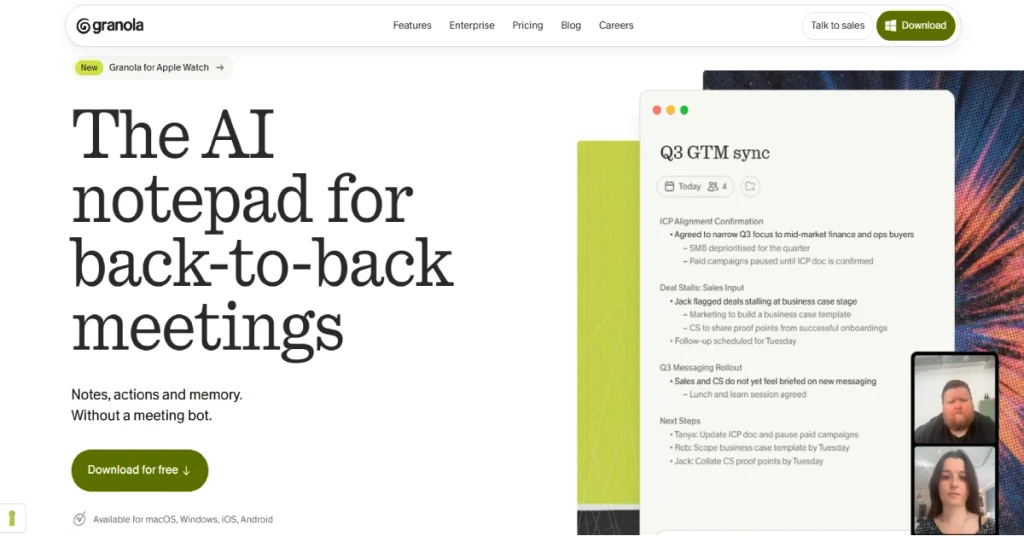
AI meeting assistants were supposed to solve this problem. Many of them do a reasonable job of producing transcripts and summaries, but they introduce their own complications. Some require a bot to join every video call. Others generate lengthy notes that still need substantial editing. You can end up spending almost as much time organizing the summary as you would have spent writing it yourself.
Granola AI Review takes a different approach. It is designed as an intelligent notepad that works alongside your meetings rather than appearing as another participant. You can write a few rough thoughts during a conversation, and Granola uses the meeting transcript to turn those notes into something more useful afterward. It also supports people who prefer not to type during meetings, making it a flexible option for different working styles.
What makes Granola particularly interesting in 2026 is how much the product has expanded beyond its original desktop experience. It now supports Windows, macOS, iOS, Android and Apple Watch. Its newer features include meeting briefs, AI chat across previous conversations, workflow integrations and a connector that makes meeting information accessible to other AI applications.
The question is whether those additions make Granola a genuinely useful productivity tool or simply another subscription to manage. This review examines its features, current pricing, free plan restrictions, privacy considerations and the situations where an alternative might make more sense.
What Is Granola AI?
Granola AI is a meeting notetaking application that captures conversations and turns them into organized notes, summaries and action items. Unlike tools that send an automated participant into a Zoom or Google Meet call, Granola uses audio available through your device. This means there is no additional meeting bot appearing in the participant list, although everyone should still be informed when transcription is taking place.
The application is built around the idea that good meeting notes should reflect what matters to the person attending the conversation. If you write a short reminder about a customer’s budget concern, Granola can use the surrounding discussion to develop that reminder into a clearer note. If you do not write anything, it can still generate a summary based on the conversation. This combination makes it more adaptable than a conventional transcription tool that simply converts speech into text.
Granola works with popular meeting platforms such as Zoom, Google Meet and Microsoft Teams. It also supports in-person conversations through its mobile applications. The software connects to Google Calendar and Microsoft calendars to recognize upcoming meetings and provide relevant context.
Its current product positioning is broader than transcription. Granola is increasingly focused on what happens before and after a meeting, including preparing briefs, finding previous decisions, drafting follow-up emails and connecting meeting information to other business tools.
Granola AI at a Glance
| Feature | Details |
|---|---|
| Product | Granola AI |
| Category | AI Meeting Notetaker |
| Platforms | macOS, Windows, iOS, Android, Apple Watch |
| Free plan | Yes |
| Starting price | $0 |
| Business plan | $14/user/month |
| Enterprise plan | $35/user/month |
| Free meeting notes | Unlimited |
| Free history access | Last 30 days |
| Meeting bot required | No |
| AI meeting summaries | Yes |
| Calendar integrations | Google Calendar, Outlook |
| Supported languages | 32, announced September 2026 |
| SOC 2 Type II | Yes |
| Official website | granola.ai |
How Does Granola AI Work?
Granola is relatively straightforward to understand because it does not ask users to change how they normally attend meetings. After installing the application and connecting a calendar, upcoming meetings can appear in the app. When it is time to join a conversation, the user starts Granola to capture the meeting audio. The application does not automatically join meetings or begin recording without being started.
During the meeting, Granola transcribes the conversation and allows the user to take notes in a familiar document-style interface. There is no requirement to write everything down. You might type a customer’s concern, highlight an important deadline or simply listen to the discussion. When the meeting ends, Granola combines the available transcript with the notes you entered and generates a more organized record of the conversation.
This is an important difference from a basic transcription service. A transcript preserves what people said, including interruptions, repeated points and incomplete sentences. Meeting notes need to do something else: identify the decisions, questions and commitments that are worth remembering. Granola attempts to bridge that gap by using AI to interpret the discussion rather than treating every spoken sentence as equally important.
The finished notes can be edited, shared or explored through Granola Chat. Users can ask questions about previous conversations, retrieve information from multiple meetings and create follow-up material. On supported plans, notes can also move into applications such as Notion, HubSpot and other tools through direct integrations or Zapier.
There is one distinction worth understanding about how the software handles audio. Granola’s desktop applications transcribe meeting audio during the session, while its mobile applications may temporarily cache audio before processing it. According to the company’s security documentation, the source recordings are not retained after transcription, although transcripts and meeting notes may be stored.
Granola AI Features: What Makes It Different?
1. Bot-Free Meeting Transcription
One of Granola’s most recognizable features is its ability to capture meetings without sending a separate AI participant into the call. If you have used traditional meeting assistants, you may be familiar with the automated attendee that appears in the participant list and announces that it is recording or transcribing the discussion. This approach works, but it is not always welcome, particularly during customer interviews, executive conversations or meetings involving people outside your organization.
Granola avoids that particular interaction by working through the user’s device audio. You can join a meeting normally, start the application and let it capture the conversation in the background. The absence of a bot can make the experience feel less disruptive because participants do not have to accommodate an additional attendee. It also means Granola is not restricted to video platforms that support bot-based integrations.
However, bot-free does not mean invisible or exempt from consent requirements. Granola provides transparency features such as meeting chat notifications and visual watermarks for supported video platforms. Users should tell participants when transcription is active and follow the privacy and recording rules that apply to their meetings.
For people who regularly speak with customers, candidates or external partners, this design may be a major reason to choose Granola. It preserves a more conventional meeting experience while still providing automated documentation afterward.
2. AI Notes That Work With Your Own Thoughts
Many AI notetakers produce a summary after the meeting and expect users to accept whatever the model considers important. Granola takes a more personal approach by incorporating the notes you write during the conversation. This can be useful because the most important part of a meeting is not always the topic discussed most frequently. A short comment about a customer’s hesitation or an unresolved technical concern may be more valuable than ten minutes of general project updates.
Imagine attending a product feedback call where a customer spends most of the conversation discussing features they enjoy. Near the end, they mention that their team cannot complete onboarding because a particular permission setting is confusing. You might write only a few words about that problem while the customer continues speaking. Granola can use the surrounding transcript to expand your rough note into a more complete explanation of the issue.
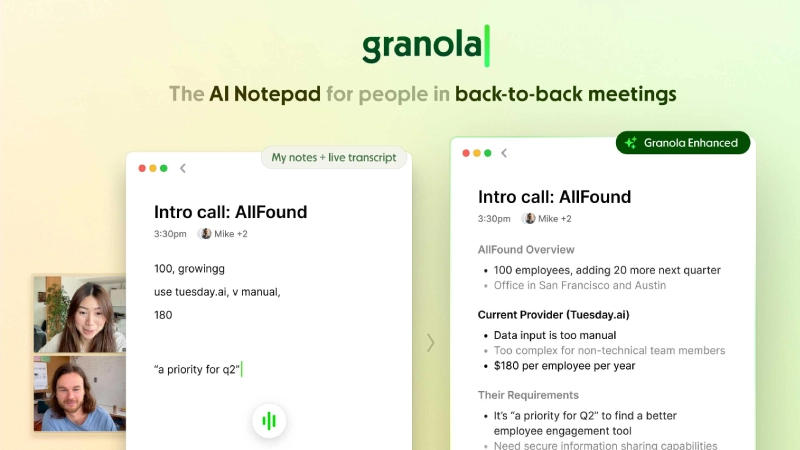
The feature is especially relevant to product managers, consultants and founders who want their notes to reflect their priorities rather than a generic meeting structure. It also encourages users to remain engaged in the conversation instead of constantly trying to capture complete sentences.
There are limitations. AI-generated notes can still misunderstand context, assign a statement to the wrong person or make an uncertain decision sound final. Important commitments should be checked against the transcript before being shared with customers or used as the basis for significant business decisions. Granola can reduce the effort involved in writing notes, but it should not be treated as an infallible record of every conversation.
3. Granola Chat and Search Across Meetings
A collection of meeting summaries becomes much more useful when you can ask questions about it. Without search and analysis, even well-organized notes eventually turn into another archive that people rarely revisit. Granola Chat addresses this problem by allowing users to interact with their meeting history using natural-language questions.
Instead of opening several documents to remember what a client said about pricing, you can ask Granola to find the relevant discussion. You could also ask which action items remain outstanding, what concerns appeared across recent customer interviews or how a project’s priorities changed over several meetings. The ability to search across conversations is particularly valuable when the answer is spread across multiple discussions rather than contained in one meeting.
In April 2026, Granola announced improvements to its chat experience, including more capable reasoning across notes and shared team information, inline citations and reusable prompts called Recipes. The citations are useful because they help users trace an answer back to its source rather than relying entirely on a generated response. Recipes can make repeated tasks easier, such as reviewing customer feedback or extracting action items in a consistent format.
The effectiveness of this feature depends on the quality and completeness of the underlying notes. If a meeting was not captured or a critical point was misunderstood during transcription, Granola Chat cannot reliably reconstruct information that was never recorded correctly. It works best as a searchable memory of documented conversations, not as a substitute for careful recordkeeping.
4. Pre-Meeting Briefs
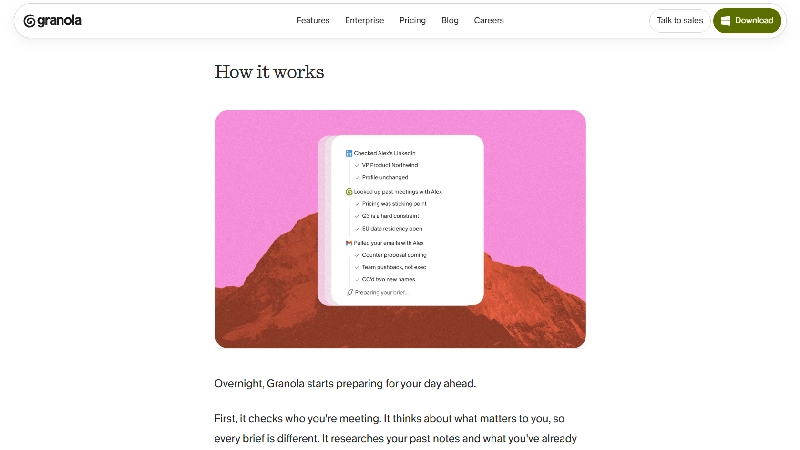
Preparing for a meeting often requires more effort than the meeting itself. Before speaking with a customer, you might need to review previous notes, check unresolved questions and remember what was promised during the last conversation. When meetings are scheduled close together, there is rarely enough time to search through several applications for that information.
Granola’s pre-meeting Briefs feature is designed to reduce that preparation work. Introduced in May 2026, it brings relevant context into the meeting workflow, including information about attendees, previous conversations and important topics that may need attention. The feature is available on Mac and Windows and is included in paid plans.
This could be particularly helpful for account managers and consultants who work with the same customers over several months. A brief reminder about an unresolved contract question or a previously discussed delivery date can make the next conversation more productive. It may also help prevent the awkward situation where a customer has to repeat information they already shared.
The feature becomes more useful as Granola accumulates relevant meeting history. New users should not expect it to know everything about a relationship immediately. Its preparation capabilities depend on the information already available to the application and the context it can access.
5. Automatic Action Items and Follow-Up Emails
Meeting notes are useful, but the real work usually begins after the conversation ends. Someone needs to update a project, send a proposal, investigate a problem or confirm a deadline. If those responsibilities remain buried in a transcript, the meeting may be documented without producing meaningful progress.
Granola can identify action items from conversations and help turn them into follow-up material. Its product experience includes the ability to draft follow-up emails, making it easier to communicate decisions while the discussion is still fresh. For a consultant finishing a client call, this could mean reviewing a prepared summary of commitments instead of reconstructing the conversation from memory.
This does not remove the need to verify what was agreed. A statement such as “we should look at this next week” is not necessarily a firm commitment, and AI tools can sometimes interpret suggestions as decisions. Users should review action items carefully before assigning responsibilities or sending them to external contacts.
The feature is most valuable when paired with a consistent workflow. If the notes identify a task but nobody moves it into the team’s project management system, the information may still be forgotten. Granola’s integrations help close that gap, particularly for teams that already manage their work in dedicated applications.
6. Integrations With Notion, HubSpot, Slack and Other Tools
A meeting assistant becomes more valuable when its output can be used without copying information between applications. Granola offers direct integrations with several business tools and supports additional workflows through Zapier. Its current integration directory includes HubSpot, Attio, Affinity, Notion, Slack, Google Calendar, Outlook and Gmail, along with project management and CRM connections through automation.
For a sales team, a useful workflow might involve sending meeting notes to the relevant HubSpot contact or deal. A product team could organize customer feedback in Notion, while a project manager could use Zapier to create tasks in ClickUp or Asana. These workflows reduce the risk of valuable information remaining in a personal notes application where nobody else can act on it.
Granola also supports AI-oriented integrations. Its MCP connector can make meeting context available to applications such as Claude and ChatGPT, subject to the relevant plan and access permissions. This opens up possibilities beyond conventional meeting summaries. For example, a user could bring information from previous conversations into a separate research or planning workflow without manually pasting transcripts.
Not every integration is available on the free plan. The Business plan unlocks broader integrations and API access, while some advanced enterprise integrations require the Enterprise tier. Users should check the specific connection they need rather than assuming every integration shown on the website is included in every subscription.
7. Granola MCP: Using Meeting Notes With Other AI Tools
One of Granola’s more interesting developments in 2026 is its support for the Model Context Protocol, commonly known as MCP. The company introduced Granola MCP in February 2026, allowing compatible AI applications to access meeting information as part of their own workflows.
The practical appeal is that meeting notes no longer need to remain isolated inside the notetaking application. A developer working in an AI coding environment might want to reference product requirements discussed during a customer call. A consultant using Claude could ask questions about earlier project meetings. A founder preparing a business update might want to combine meeting decisions with other information already available in an AI workspace.
This is different from simply exporting a transcript. The goal is to make meeting context accessible when another application needs it. That can save time, particularly for people who regularly move between conversations, documents and AI assistants throughout the day.
There are also privacy implications. Connecting meeting history to another application expands the number of places where sensitive business context may be processed. Granola provides different MCP access capabilities across its plans, including administrative controls for enterprise users. Anyone using the connector with confidential information should understand exactly which notes are accessible and how the connected application handles that data.
8. Mobile Apps and In-Person Meetings
Granola is no longer limited to conversations taking place on a desktop computer. Its mobile applications allow users to capture in-person meetings, including discussions that happen away from a laptop. The Android application launched in July 2026, and the company also introduced a redesigned Apple Watch experience later that month.
This matters because not every important conversation happens in a scheduled video call. A consultant may meet a client for coffee, a manager may discuss a project while walking between offices or a founder may have an important conversation at an industry event. Traditional meeting bots cannot easily participate in these situations, but a mobile notetaking application can be more practical.
The experience is not identical to desktop capture. Mobile audio handling, background activity and device permissions may affect how a meeting is recorded and processed. Users should test the application in their normal environment before depending on it for important conversations, especially when multiple people are speaking in a noisy location.
The Apple Watch application is an interesting addition for people who want to capture ideas or conversations without reaching for their phones. However, a wearable device is not necessarily the best microphone for every meeting. Audio clarity, distance from speakers and environmental noise can still influence transcription quality.
9. Multilingual Meeting Support
International teams rarely conduct every meeting in English. Customers may switch languages during conversations, colleagues may use regional terminology and global organizations often work across several language groups. A useful meeting assistant needs to handle more than straightforward English-language discussions.
Granola announced support for 32 languages in September 2026, expanding its usefulness for international teams. This is relevant for organizations that work with customers across different regions or regularly conduct meetings in languages other than English.
Language support should not be confused with identical transcription accuracy across every language. Accents, technical terminology, overlapping speech and mixed-language conversations can all influence the quality of generated notes. The official announcement confirms the expanded language coverage, but it does not establish that every supported language performs equally well in every setting.
For teams working in multiple languages, the best evaluation is to test Granola using real examples of their normal conversations. A short meeting containing familiar terminology will reveal more about practical suitability than a generic claim of multilingual support.
Granola AI Pricing 2026: How Much Does It Cost?
Granola’s pricing is easier to understand than many AI productivity subscriptions because the main differences between plans involve meeting history, advanced features, integrations and administrative controls. The free plan already includes unlimited meeting notes, so users do not need to purchase a subscription simply to capture more conversations. The main restriction is how far back they can access their meeting history.
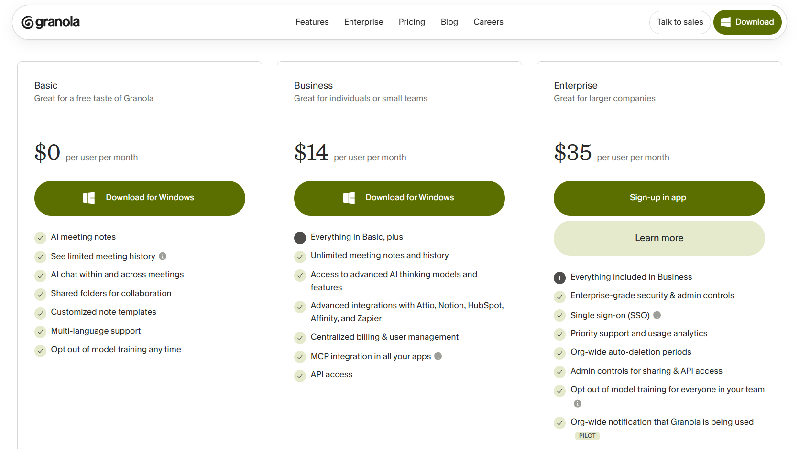
According to the official pricing page, Granola currently offers three plans: Basic, Business and Enterprise. The listed prices are in US dollars per user per month. The website does not clearly advertise an annual discount, so the monthly rates should not be presented as discounted annual prices.
OFFICIAL LISTED PRICING · OCTOBER 2026
Basic offers unlimited meeting capture with 30-day history access. Business adds unlimited history, advanced integrations and API access. Enterprise adds security and administrative features.
Check official Granola pricing
Granola Basic: Is the Free Plan Enough?
The Basic plan is unusually generous in one respect: it does not impose a fixed limit on the number of meetings you can capture. You can use Granola for regular calls without worrying about a monthly meeting quota. The plan also includes AI-generated notes, custom templates, shared folders, multilingual support and AI chat capabilities.
The restriction is meeting history. Free users can access notes from the most recent 30 days. Older notes are not available for normal use unless the account is upgraded. This distinction is easy to miss because unlimited meeting notes sounds similar to unlimited note storage, but the two are not the same.
For freelancers, students or professionals who mainly need summaries of recent conversations, the free plan could be sufficient. Someone who frequently refers to customer discussions from several months earlier will find the history limitation more restrictive.
Granola Business: Who Should Pay $14?
The Business plan costs $14 per user per month and removes the meeting history restriction. It also provides access to advanced AI models and features, broader integrations, centralized billing, user management and API access.
This is likely the most relevant plan for consultants, founders, sales professionals and small teams that use meeting information as part of their daily work. The value comes from being able to retrieve older conversations and connect meeting notes to the applications where work actually happens.
For a five-person team, the listed price works out to $70 per month, or $840 over twelve months at the same monthly rate. Whether that is worthwhile depends on how often the team uses its meeting history and integrations. A company that conducts occasional internal meetings may not need the additional features, while a client-facing team handling several conversations every day could have a stronger case for upgrading.
Granola Enterprise: Is $35 Worth It?
Granola Enterprise costs $35 per user per month and focuses on organizational security, administration and compliance requirements. It includes single sign-on, priority support, usage analytics, organization-wide retention settings and administrative controls over sharing and integrations.
Enterprise also supports HIPAA-compliant workspaces and more centralized control over model-training preferences. These features may be important for larger organizations that cannot allow employees to choose their own data-handling settings independently.
The Enterprise plan is not automatically necessary because a company has many meetings. Its value depends on whether the organization requires centralized governance, advanced access controls or specific compliance arrangements.
Granola AI Free vs Paid: Feature Comparison
| Feature | Basic | Business | Enterprise |
|---|---|---|---|
| Unlimited meeting notes | Yes | Yes | Yes |
| Bot-free transcription | Yes | Yes | Yes |
| Meeting history | 30 days | Unlimited | Unlimited |
| Custom note templates | Yes | Yes | Yes |
| AI chat | Limited model choice | Advanced | Advanced |
| Shared folders | Yes | Yes | Yes |
| Pre-meeting briefs | No | Yes | Yes |
| Follow-up emails | No | Yes | Yes |
| Advanced integrations | No | Yes | Yes |
| API access | No | Yes | Yes |
| SSO | No | No | Yes |
| Organization-wide controls | No | Limited | Yes |
Is Granola AI Safe? Privacy and Security Explained
Privacy is one of the most important considerations when choosing an AI meeting assistant. Meetings often contain information that would never be published openly, including customer concerns, internal financial discussions, product plans, hiring decisions and confidential project details. A convenient notetaking tool is not worth much if employees cannot understand where that information goes or how it is processed.
Granola states that it does not retain meeting audio after transcription. On desktop, audio is transcribed during the meeting, while mobile applications may temporarily cache audio for processing. The company stores transcripts and notes rather than keeping the original audio recordings. This reduces one category of retained information, but it does not mean meeting content disappears after the conversation ends.
Granola uses external transcription and AI service providers. Its security documentation identifies services such as Deepgram and AssemblyAI for transcription and providers including OpenAI and Anthropic for AI processing. The company states that its agreements prohibit these external model providers from using customer data for model training. Separately, Granola says it may use anonymized data to improve its own models unless the user opts out, with model training disabled by default for Enterprise users.
The company also maintains a Trust Center and reports SOC 2 Type II certification. Enterprise customers receive additional options for retention policies, administrative controls and compliance-oriented workflows. These are meaningful considerations for business adoption, but they should not be interpreted as a guarantee that every organization can use the application without further legal or security review.
SE Ranking Review 2026: Is It Worth the Money for SEO Professionals?
Another important issue is consent. Granola does not join calls as a visible bot, which can make the experience less disruptive, but participants still deserve to know when their conversation is being transcribed. Granola offers meeting chat messages and visual watermarks for supported platforms to help communicate that information. Organizations should establish clear policies for when transcription is permitted and how participants are informed.
For personal productivity, the privacy settings may be manageable with careful configuration. For regulated industries or organizations handling sensitive customer information, the decision should involve a review of the current data processing agreement, retention controls, integration permissions and applicable consent requirements.
Granola AI vs Otter.ai : Which Is Better?
Granola and Otter.ai solve similar problems but approach them from different directions. Granola emphasizes a personal notetaking experience where the user’s own thoughts can influence the finished summary. Otter.ai has traditionally focused more heavily on transcription, searchable conversations and collaborative meeting records.
For someone who regularly takes a few notes during calls, Granola’s approach may feel more natural. It allows the user to preserve their own priorities while the AI fills in supporting context. The absence of a meeting bot is also an important distinction for people who prefer not to introduce an additional participant into external calls.
Otter.ai may appeal more to teams that place greater emphasis on transcript-centered workflows and established collaboration features. However, the better choice depends on current product capabilities and the organization’s requirements, rather than a simple assumption that one tool is universally more accurate.
| Comparison | Granola AI | Otter.ai |
|---|---|---|
| Main approach | AI-enhanced notepad | AI transcription and notes |
| Meeting capture | Bot-free device audio | Multiple capture workflows |
| Personal notes influence | Core design | Different workflow |
| Meeting summaries | Yes | Yes |
| Searchable conversations | Yes | Yes |
| Free plan | Yes | Yes |
| Best fit | Individual productivity | Transcript-focused collaboration |
The most useful way to compare them is to run the same type of meeting through both products, with appropriate participant consent, and examine the resulting notes. Look for missing decisions, incorrect speaker attribution, unnecessary detail and how much editing is required before the summary becomes useful.
Granola AI vs Fireflies.ai
Fireflies.ai is another established option in the AI meeting assistant market. It focuses on recording, transcribing, summarizing and analyzing conversations, with features aimed at individuals and teams that want structured meeting information.
Granola’s main appeal is its notepad-style experience and bot-free capture. It is particularly suitable for someone who wants AI assistance without turning every meeting into a formal recording workflow. Fireflies.ai may be more attractive to organizations that prioritize conversation intelligence, team analytics and meeting-centric automation.
Neither approach is automatically superior. A consultant who wants concise personal notes may prefer Granola, while a sales organization with a more structured conversation analysis process may find Fireflies.ai worth evaluating.
The decision should also consider privacy expectations. Some organizations are comfortable with visible meeting assistants because participants can clearly see that transcription is active. Others prefer device-based capture accompanied by explicit disclosure. The appropriate workflow depends on the people involved and the organization’s policies.
Granola AI Alternatives in 2026
Granola is not the only product worth considering if you want AI assistance with meeting notes. Different applications place greater emphasis on transcription, team collaboration, searchable recordings or integrations.
Otter.ai is worth considering if searchable transcripts and collaborative meeting records are central to your workflow. Fireflies.ai is another option for teams interested in meeting documentation and conversation analysis. Fathom is particularly relevant to users who want automated meeting summaries and follow-up workflows, while tl;dv is worth evaluating when video meeting recordings and reviewable conversation moments are important.
The right alternative depends on what you want to keep after a meeting. Some users need a detailed transcript that can be searched later. Others need a short summary with clearly assigned responsibilities. A sales team may want conversation insights connected to its CRM, while an independent consultant may simply want reliable notes without spending another fifteen minutes editing them.
Granola stands out most clearly when the user wants a lightweight personal notepad that can grow into a searchable record of conversations. Its appeal is less about replacing every meeting platform and more about making the information from those meetings useful afterward.
Who Should Use Granola AI?
Founders and Startup Teams
Founders often spend much of their working day moving between investor conversations, customer interviews, product discussions and internal planning meetings. These conversations may be individually important but difficult to organize into a coherent picture of what is happening across the business.
Granola can help by keeping a searchable record of decisions and recurring concerns. A founder could use previous notes to identify which customers raised similar objections or review commitments made during earlier partnership discussions. The ability to retrieve information across meetings may be more useful than the summary of any single call.
The application is especially relevant to small teams that want better documentation without introducing a complicated meeting management process.
Sales Professionals and Account Managers
Sales conversations generate valuable information that is easy to lose. A prospect may mention a purchasing deadline, describe an objection or identify a stakeholder who needs to approve the deal. These details can influence what happens next, but they do not always make it into the CRM.
Granola’s integrations with systems such as HubSpot and Attio make it possible to move meeting information closer to the customer record. This can reduce manual administrative work and help teams preserve useful context between conversations.
The limitation is that AI-generated notes still need to be reviewed. Sales teams should verify important commercial commitments before relying on a summary or transferring information into a customer-facing workflow.
Consultants and Freelancers
Independent professionals frequently handle several clients at once, each with different priorities and ongoing projects. Remembering every discussion becomes difficult when the same person is responsible for delivering the work, managing the relationship and handling follow-up communication.
Granola could be useful in this situation because it combines personal notes with automated summaries. A consultant can keep track of client feedback, retrieve earlier decisions and prepare for the next meeting without searching through scattered documents.
For someone managing only a few recent conversations, the free plan may be sufficient. Professionals who need to revisit notes from several months earlier will have a stronger reason to consider the Business plan.
Product Managers and Researchers
Product managers and user researchers often conduct interviews where small details matter. A participant might describe a confusing workflow or mention a problem that has not appeared in previous feedback. Capturing those observations accurately is important because they can influence future product decisions.
Granola allows the person conducting the interview to focus on the conversation while preserving a record for later analysis. Its chat features may also help identify repeated themes across multiple discussions.
AI summaries should not replace the original evidence when conducting formal research. Researchers should distinguish direct participant statements from AI-generated interpretations, particularly when preparing findings that influence product strategy.
What Granola AI Does Well
Granola’s strongest quality is that it understands the difference between recording a conversation and creating useful notes. A full transcript may be accurate but difficult to read, while an overly short summary may leave out the details that matter. Granola attempts to occupy the space between those extremes by combining AI-generated context with the user’s own observations.
The bot-free design is another meaningful advantage. It makes the application suitable for a broader range of meeting situations without requiring an automated participant to join every call. This does not eliminate the need for transparency, but it changes how the software fits into the meeting experience.
The free plan is also attractive. Unlimited meeting capture gives users a genuine opportunity to decide whether the application fits their routine before paying for unlimited history or advanced integrations. With desktop and mobile support, Granola can serve as a consistent notetaking environment across different types of conversations.
Its growing integration ecosystem makes the product more useful for people who want meeting notes to become part of their broader workflow. Features such as pre-meeting briefs and MCP support suggest that Granola is moving toward becoming a practical source of meeting context rather than remaining a simple summary generator.
Where Granola AI Falls Short
The biggest restriction in the free plan is the 30-day history window. For occasional users, that may not be a problem. For anyone who wants to build a long-term archive of customer conversations or project decisions, it creates a reason to upgrade. The application can still capture unlimited meetings, but the ability to revisit older information is part of what makes a meeting archive valuable.
Granola also depends on AI interpretation, which means the finished notes are not guaranteed to be perfectly accurate. A summary may overlook an important qualification or present a tentative suggestion as a definite decision. Users who need exact wording for legal, contractual or formal research purposes should not rely exclusively on an AI-generated summary.
Another consideration is the cost of expanding the application across a team. At $14 per user per month, the Business plan may be reasonable for a small group of frequent meeting participants, but the total increases as more employees need access. Organizations should consider whether everyone requires the paid features or whether some employees can remain on the free tier.
Finally, integrations and advanced AI features add convenience but also complexity. Connecting meeting notes to external applications requires careful permission management, especially when conversations contain confidential information. Teams should understand which notes are being shared and who can access them.
Granola AI Pros and Cons
| Pros | Cons |
|---|---|
| No meeting bot required | Free history limited to 30 days |
| Unlimited notes on free plan | AI notes require verification |
| Personalized AI summaries | Advanced integrations need paid plan |
| Desktop and mobile support | Per-user pricing adds up for teams |
| Useful AI chat and search | Privacy settings require attention |
| Growing integration ecosystem |
Is Granola AI Worth It in 2026?
Granola is worth considering if meetings are a regular part of your work and you frequently find yourself trying to remember what happened afterward. Its appeal is not that it can generate a transcript, because plenty of other applications can do that. The more interesting feature is its ability to turn conversations into notes that reflect what the user considers important, while keeping previous discussions available for later reference.
The free plan makes the decision easier for individuals. You can capture unlimited meetings and evaluate the quality of the notes without immediately committing to a subscription. If you mainly need recent summaries and rarely revisit older conversations, the Basic plan may be enough. There is little reason to pay simply because the software offers a premium tier.
The Business plan becomes more attractive when meeting information is part of an ongoing professional workflow. Consultants who revisit previous client discussions, salespeople who connect notes to CRM records and managers who need to search older decisions have a clearer reason to pay $14 per month. The value comes from maintaining continuity across conversations, not merely saving a few minutes after each meeting. Granola is less compelling for people who rarely attend meetings or already have a documentation process that works well. It also may not be the best choice for organizations whose main requirement is detailed conversation analytics rather than personal notes. In those situations, comparing it with established meeting intelligence platforms would be sensible.
Final Verdict
Granola AI has developed into more than a basic AI meeting notetaker. Its bot-free capture, personalized summaries, cross-meeting search and expanding integrations make it an interesting option for professionals who want to spend less time managing meeting information. The addition of pre-meeting briefs, mobile applications and MCP support gives the product a broader role in everyday productivity.
Its strongest advantage is the way it fits into normal conversations without requiring a separate meeting bot. Its main limitations are the free plan’s history restriction, the need to verify AI-generated notes and the additional cost of advanced integrations.
For individuals and small teams that regularly attend meetings, Granola is a strong candidate to evaluate. Start with the free plan, review the quality of its notes across several real conversations and consider upgrading only when longer history or additional workflow features become necessary.
Official website: Visit Granola AI
Frequently Asked Questions
Is Granola AI completely free?
Granola has a permanent free Basic plan with unlimited meeting notes. Access to meeting history is limited to the most recent 30 days.
How much does Granola AI cost?
Business costs $14 per user per month, while Enterprise is listed at $35 per user per month.
Does Granola AI record meetings?
Granola captures meeting audio for transcription but states that it does not retain the source audio after processing. It stores transcripts and notes.
Does Granola AI work with Zoom and Google Meet?
Yes. It works with Zoom, Google Meet, Microsoft Teams and other meeting applications through device-audio capture.
Is Granola AI available for Windows?
Yes. Granola supports Windows and macOS, along with iOS, Android and Apple Watch.
Is Granola AI better than Otter.ai?
Granola may be a better fit for personalized, bot-free notes. Otter.ai is worth comparing if transcript-centered collaboration is your priority.
Does Granola AI support multiple languages?
Yes. Granola announced support for 32 languages in September 2026.
Can Granola AI connect to Notion and HubSpot?
Yes. Granola supports integrations with Notion, HubSpot and other tools. Availability depends on the subscription plan.


2 comments