Customer support is one of those business activities that becomes harder as a company grows. More customers mean more questions, more support tickets, and more time spent explaining information that may already exist in a help center or documentation library.
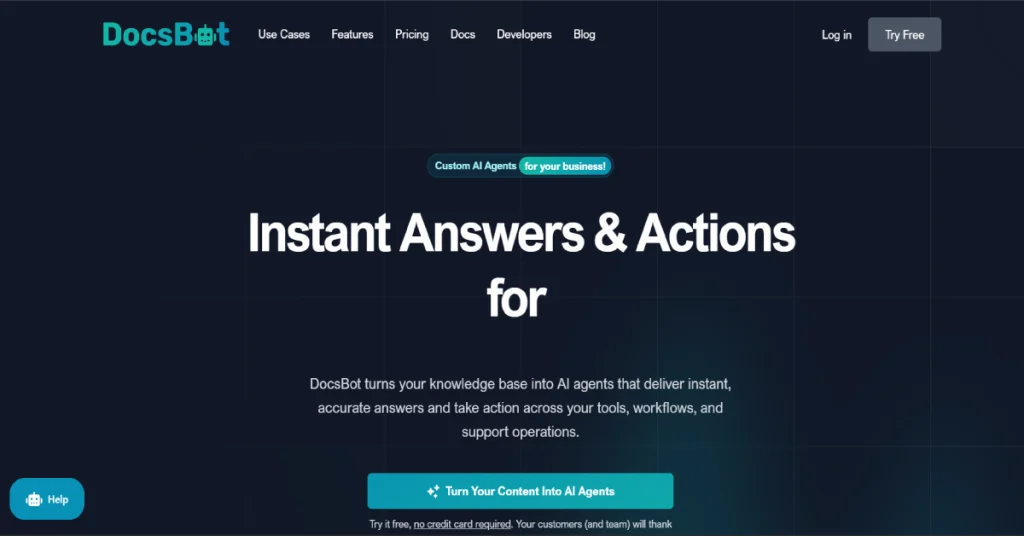
This is the problem DocsBot AI is designed to address.
DocsBot is an AI agent platform that turns existing business content into a searchable, conversational assistant. Instead of asking customers to navigate lengthy documentation, businesses can provide an AI chatbot that answers questions using their own knowledge sources. But DocsBot is no longer just a simple documentation chatbot. Its current platform includes AI Actions, workflow integrations, lead collection, messaging channels, and advanced reporting capabilities.
The question is whether these features justify the subscription cost.
In this DocsBot AI review, we’ll examine the platform’s features, pricing, integrations, strengths, limitations, and alternatives. We’ll also explain which businesses are likely to benefit most and what you should test before paying.
What Is DocsBot AI?
DocsBot AI is a platform for creating AI-powered assistants that answer questions using company-specific information.
Businesses can connect documentation, websites, files, and other supported knowledge sources to create an assistant that responds to customer or employee questions.a SaaS company could use DocsBot to help customers understand software features, troubleshooting instructions, subscription policies, and account setup procedures.
An ecommerce business could use it to explain shipping information, return policies, and product documentation. DocsBot was founded in 2023 by Aaron Edwards and is operated by UglyRobot, LLC, based in Delaware, United States.
DocsBot AI at a Glance
| Detail | Information |
|---|---|
| Tool Name | DocsBot AI |
| Official Website | docsbot.ai |
| Tool Type | AI Agent and Chatbot Platform |
| Founded | 2023 |
| Main Use | Customer Support and Knowledge Assistance |
| Free Plan | Yes |
| Starting Paid Price | $49/month |
| No-Code Setup | Yes, for basic chatbots |
| AI Actions | Available on paid plans |
| API | Supported |
| Website Embedding | Supported |
| Enterprise | Custom pricing |
DocsBot is particularly relevant for organizations that already have useful documentation but need a more convenient way for people to access it.
How Does DocsBot AI Work?
DocsBot uses connected information sources to provide relevant answers through an AI-powered conversational interface.
The basic process is relatively straightforward.
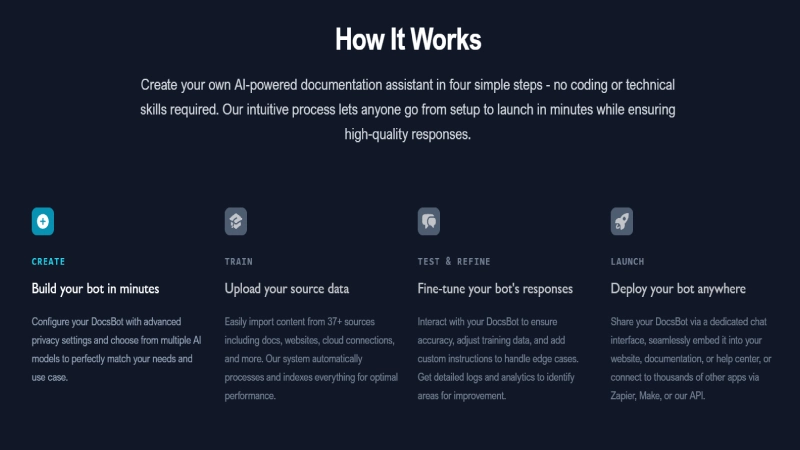
Step 1: Create Your DocsBot Account
Begin by visiting the official DocsBot website and creating an account.
The free plan allows you to explore basic functionality without providing a credit card.
Once registered, you can create your first bot and start configuring its knowledge sources.
Step 2: Add Your Knowledge Sources
DocsBot’s main purpose is to help AI agents answer questions based on relevant information.
Depending on supported source types and plan limits, this can include websites, documentation, files, and other connected content.
The quality of the source material is important. Outdated instructions or incomplete documentation can lead to poor chatbot responses.
Step 3: Configure Your Bot
After connecting your sources, configure the bot’s instructions and behavior.
For example, you could instruct a customer support bot to answer questions using official documentation and avoid guessing when information is missing.
Businesses can also adjust how the chatbot is presented to visitors.
Step 4: Test the Responses
Before deployment, ask your bot questions that real customers would ask.
Check whether it understands different ways of phrasing the same question, gives correct answers, and handles situations where information is unavailable.
You should also test whether the bot can recognize questions that need human assistance.
Step 5: Publish and Integrate
Once testing is complete, you can deploy the bot through a supported website or integration.
More advanced plans provide additional actions, messaging connections, automation options, and customer support features.
DocsBot AI Key Features in 2026
DocsBot provides several capabilities designed to make business information easier to access and customer support workflows more efficient.
1. AI Chatbots Powered by Your Content
The central feature of DocsBot is the ability to create AI assistants using existing company knowledge.
Instead of writing hundreds of individual chatbot responses, businesses can supply documentation and allow the AI agent to use that information when answering questions.
This is useful for software companies, online stores, educational platforms, and service businesses.
However, businesses should not assume that an AI chatbot will always produce the correct answer. Testing and ongoing knowledge maintenance remain necessary.
2. No-Code Chatbot Creation
DocsBot promotes a setup process that does not require programming for basic use cases.
Businesses can connect their knowledge sources, configure their assistant, and embed a chatbot without developing an AI application from scratch.
This makes it accessible to nontechnical business owners and support teams.
More advanced actions and integrations may still require additional configuration.
3. AI Actions
AI Actions allow DocsBot agents to do more than answer questions.
Depending on the plan and connected services, bots can support lead collection, scheduling, workflow automations, and other business operations.
The Personal plan includes three actions per bot, Standard includes eight, and Business includes twelve.
Actions can make an AI assistant more useful, but they should be configured with appropriate permissions and safeguards.
4. Lead Collection
DocsBot supports collecting information from potential customers during chatbot interactions.
For example, a visitor interested in a product demonstration could provide contact information through the assistant.
The Standard plan includes custom lead fields and native CRM lead delivery.
This can be useful for businesses that want their chatbot to support both customer service and lead generation.
5. Website Chatbot Embedding
DocsBot allows businesses to provide AI assistance directly on their websites.
A visitor can ask a question through the chat interface instead of navigating through multiple documentation pages.
This is particularly useful for websites with detailed technical guides or frequently asked questions.
6. Workflow Automation
DocsBot supports automation through tools such as Zapier and other supported workflow integrations.
These connections can help move information between the chatbot and external business applications.
For example, a business might configure a workflow that sends captured leads into its existing CRM.
The exact workflow depends on the connected tools and the permissions available.
7. Conversation Analytics
Analytics help businesses understand how people interact with their AI assistants. DocsBot offers different levels of reporting across its paid plans. Standard includes conversation and question analytics, while Business adds capabilities such as conversation topic reports, sentiment analysis, AI question reports, and a data explorer. These features can help identify missing documentation, recurring support problems, and opportunities to improve customer assistance.
8. Messaging Platform Integrations
DocsBot supports integrations with messaging services including WhatsApp, Messenger, Telegram, and Slack. This allows businesses to make their AI assistant available beyond a traditional website chat widget. messaging services may have their own requirements, fees, and account restrictions.
9. AI Skills and Advanced Workflows
DocsBot’s Standard plan includes the ability to build, validate, and publish Skills. This extends the platform beyond simple document-based question answering. For businesses requiring more sophisticated workflows, Skills and Actions may offer additional flexibility. These features should be tested carefully before being used in important customer-facing processes.
DocsBot AI Pricing 2026: Free vs Paid Plans
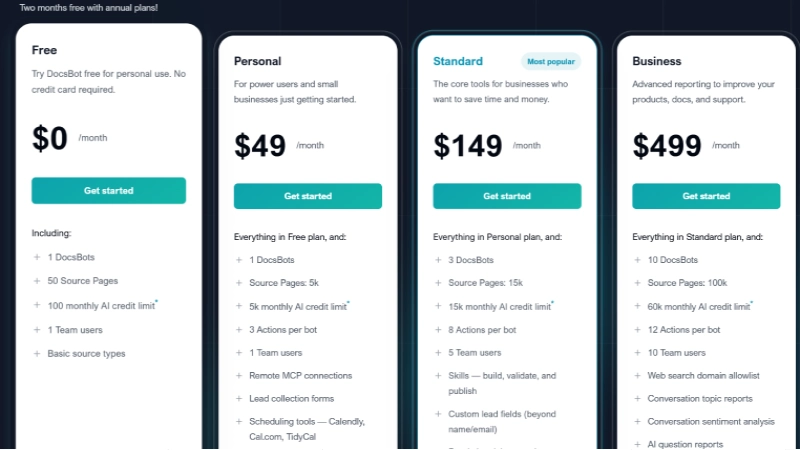
DocsBot offers four publicly priced plans and a custom Enterprise option.
Unlike some chatbot tools that charge only for the number of conversations, DocsBot uses AI credits. Credit consumption can increase when using more resource-intensive AI models or Actions.
DocsBot Pricing Comparison
| Plan | Monthly Price | AI Credits/Month | Bots |
|---|---|---|---|
| Free | $0 | 100 | 1 |
| Personal | $49 | 5,000 | 1 |
| Standard | $149 | 15,000 | 3 |
| Business | $499 | 60,000 | 10 |
| Enterprise | Custom | Custom | Custom |
DocsBot advertises two months free with annual billing and a 14-day money-back guarantee. These are the monthly USD prices listed on the official website as of October 8, 2026.
DocsBot Free Plan — $0/month
The Free plan is suitable for experimenting with a basic knowledge-based chatbot.
It includes one bot, 50 source pages, 100 monthly AI credits, one team member, and basic source types. This is enough to explore how DocsBot works with a limited set of information. However, advanced integrations, AI Actions, lead collection, and analytics are unavailable on the Free plan.
DocsBot Personal Plan — $49/month
Personal is the first paid subscription and targets individuals and smaller businesses. It includes one bot, 5,000 source pages, 5,000 monthly AI credits, three Actions per bot, and one team member.
Important additions include lead collection, scheduling tools, Slack integration, messaging integrations, workflow automation, basic analytics, and premium embedding models. For a small business that wants an AI assistant on its website, Personal is a reasonable plan to evaluate first.
DocsBot Standard Plan — $149/month
Standard is aimed at businesses that need more capable customer support automation. It includes three bots, 15,000 source pages, 15,000 monthly AI credits, eight Actions per bot, and five team members.
Additional features include AI Skills, escalation tickets, web search, native CRM lead delivery, Help Scout integration, and conversation analytics. Standard also includes voice-related capabilities and additional source-processing features. For a growing SaaS company or an ecommerce business with multiple support requirements, this plan offers substantially more functionality than Personal.
DocsBot Business Plan — $499/month
Business targets organizations that need more capacity and advanced reporting.
It includes ten bots, 100,000 source pages, 60,000 monthly AI credits, twelve Actions per bot, and ten team members. Its additional features include conversation sentiment analysis, topic reports, AI question reports, client-side PII redaction, unbranded widgets, and rate limiting. Business also provides more options for managing multiple bots and departments.
DocsBot Enterprise — Custom Pricing
Enterprise is designed for organizations with custom security, deployment, and usage requirements.
DocsBot lists options such as Azure OpenAI Service, self-hosting, single sign-on, custom retention policies, priority support, service-level agreements, and custom data residency arrangements. Companies with specific compliance requirements should contact DocsBot to verify availability, contractual coverage, and implementation details.
Additional DocsBot Costs
| Add-on | Monthly Price |
|---|---|
| Extra 5,000 AI credits | $49 |
| Additional bot | $19 |
| Extra 10,000 source pages | $29 |
| Additional team member | $19 |
The additional team member option is listed for Business and Enterprise plans.
Important: 5,000 AI credits do not necessarily mean 5,000 conversations. More demanding models and Actions can consume additional credits.
DocsBot AI Integrations
DocsBot supports connections with customer support tools, messaging platforms, scheduling applications, and workflow automation services.
These integrations help businesses use their AI assistants across different processes.
| Integration | Purpose |
|---|---|
| Zapier | Connect automated workflows |
| Slack | Team communication and AI assistance |
| Customer messaging | |
| Messenger | Facebook messaging |
| Telegram | Messaging automation |
| Help Scout | Customer support workflows |
| Calendly | Appointment scheduling |
| Cal.com | Booking and scheduling |
| TidyCal | Appointment scheduling |
| Stripe | Billing-related support Actions |
| MCP | Connect compatible external tools |
For example, a business could use DocsBot to collect information from a prospective customer and pass it to another system through an automation. Another business could connect its support workflow so that requests requiring human intervention are escalated appropriately.
However, each integration should be tested before deployment. The presence of an integration doesn’t guarantee support for every possible action. The official documentation provides setup instructions for several of these connections.
DocsBot AI Pros and Cons
| Pros | Cons |
|---|---|
| Easy basic setup: You can create a knowledge-based AI assistant without building your own AI application. | Limited free usage: The Free plan includes only 100 monthly AI credits. |
| Free plan available: Users can explore basic functionality before subscribing. | Advanced features require paid plans: Some integrations and reporting capabilities are unavailable on lower tiers. |
| Flexible knowledge sources: Useful for businesses with existing documentation. | Credit consumption varies: More advanced models and Actions may increase usage. |
| Business integrations: Supports messaging, automation, scheduling, and helpdesk workflows. | Higher plans are expensive: Standard costs $149/month and Business costs $499/month. |
| AI Actions: Allows more advanced business interactions. | Documentation quality matters: Inaccurate sources can produce incorrect answers. |
| Multiple pricing tiers: Businesses can select plans according to usage and feature requirements. | Complex automation requires configuration: No-code doesn’t mean every workflow is effortless. |
| Advanced analytics: Higher plans offer detailed information about customer questions and conversations. |
DocsBot AI vs Chatbase: Which Is Better?
Both DocsBot and Chatbase help businesses create AI assistants using company-specific knowledge. they have different plan structures, usage allowances, and feature combinations.
| Feature | DocsBot AI | Chatbase |
|---|---|---|
| Free Plan | Yes | Yes |
| Starting Paid Price | $49/month | $40/month |
| Knowledge-Based Answers | Yes | Yes |
| AI Actions | Yes | Yes |
| Website Chatbot | Yes | Yes |
| Business Integrations | Yes | Yes |
| Enterprise Options | Yes | Yes |
Chatbase may appeal to businesses seeking a customer-facing AI agent platform with broad channel and support automation capabilities. DocsBot is particularly interesting for organizations that want to make existing documentation accessible through AI while also adding Actions, Skills, and workflow integrations.
Neither platform should be selected based on subscription price alone. one provider may offer a lower starting price but fewer included resources or different feature restrictions. The better approach is to test both platforms with identical documents and customer questions, then compare response accuracy, configuration effort, and expected monthly cost.
Who Should Use DocsBot AI?
DocsBot can be useful for several types of organizations.
SaaS Companies
Software businesses often maintain large documentation libraries.
DocsBot can help customers locate setup instructions, troubleshooting information, and product explanations without manually searching multiple pages.
READ MORE: Chatbase Review 2026: Features, Pricing, Pros & Cons
Ecommerce Businesses
Online stores can use AI agents to explain shipping policies, product information, returns, and common customer questions.
More advanced workflows may require external integrations.
Customer Support Teams
Support teams can use DocsBot to make knowledge easier to access and automate selected repetitive requests.
Human escalation remains important for unusual or sensitive cases.
Agencies
Agencies managing several clients may find DocsBot’s multi-bot functionality useful.
The Business plan includes ten bots and additional management capabilities.
Internal Knowledge Teams
Companies can use knowledge-based assistants to help employees find information from internal resources. Appropriate permissions and access controls are essential when dealing with confidential material.
Is DocsBot AI Secure?
DocsBot offers security and compliance-related capabilities, particularly in its higher-priced subscriptions. The Business plan lists client-side PII redaction and several compliance features, while Enterprise includes additional deployment and contractual options.
Businesses handling personal information should review the current security documentation, applicable data-processing agreements, and access controls. Before connecting sensitive knowledge sources, organizations should confirm how data is stored, which external AI services process it, and how long conversations are retained. They should also test whether the bot prevents unauthorized users from retrieving restricted information.
A chatbot’s usefulness does not eliminate the need for proper data governance.
Is DocsBot AI Worth It in 2026?
DocsBot is worth considering when a business already has valuable documentation and wants to make that information easier for customers or employees to access. Its no-code setup, AI Actions, integrations, and reporting tools make it more versatile than a basic FAQ widget.
However, value depends on usage. For a personal project with only occasional questions, the Free plan may be sufficient. For a small business needing integrations and lead collection, Personal may be a reasonable starting point. Organizations requiring multiple bots, advanced analytics, and support escalation should examine Standard or Business.
Before subscribing, estimate how many questions the chatbot will handle, how many credits those interactions may consume, and how often a human will still need to intervene. The goal should be reliable assistance rather than simply automating as many conversations as possible.
Frequently Asked Questions
Is DocsBot AI free?
Yes. DocsBot offers a free plan with one bot, 50 source pages, and 100 monthly AI credits.
How much does DocsBot AI cost?
DocsBot paid plans start at $49 per month. Standard costs $149 per month, and Business costs $499 per month on monthly billing.
Can DocsBot AI read PDF documents?
DocsBot supports document-based knowledge sources. Available file types and processing features depend on the selected plan and source configuration.
Does DocsBot require coding?
Basic chatbot creation is designed to be no-code. Advanced workflows and custom integrations may require technical configuration.
Can DocsBot connect with WhatsApp?
Yes. DocsBot lists WhatsApp among its messaging integrations, available from the Personal plan.
Does DocsBot support multiple languages?
Yes. DocsBot states that its agents can understand and respond in more than 100 languages.
Final Verdict
DocsBot AI provides a practical way for businesses to turn documentation into conversational assistance.
Its main strengths are knowledge-based responses, straightforward basic setup, business integrations, and the ability to extend chatbot functionality through Actions and Skills. The Free plan offers a useful introduction, while paid subscriptions provide the capabilities needed for more serious customer support deployments.
The biggest limitation is that higher-level automation and reporting features come at a substantial cost. AI credit consumption also requires monitoring. For SaaS companies, support teams, and organizations with extensive documentation, DocsBot is a platform worth evaluating.
For small websites with minimal support traffic, the cost of a paid subscription may be harder to justify. Our conclusion: DocsBot AI is a capable option for documentation-based customer support and knowledge assistance, but its value should be measured through actual response quality, customer outcomes, and operating costs. This assessment is based on official product documentation and pricing, not an independent hands-on performance benchmark.