Most people do not struggle to remember what a meeting was about. They struggle to remember the details that matter afterward. A client mentions a change to the project timeline. Someone agrees to prepare a proposal. A colleague raises a concern about the budget, but the conversation moves on before anyone writes it down. By the end of the day, the meeting is still fresh enough to remember the general discussion, yet the smaller decisions have already become difficult to reconstruct.
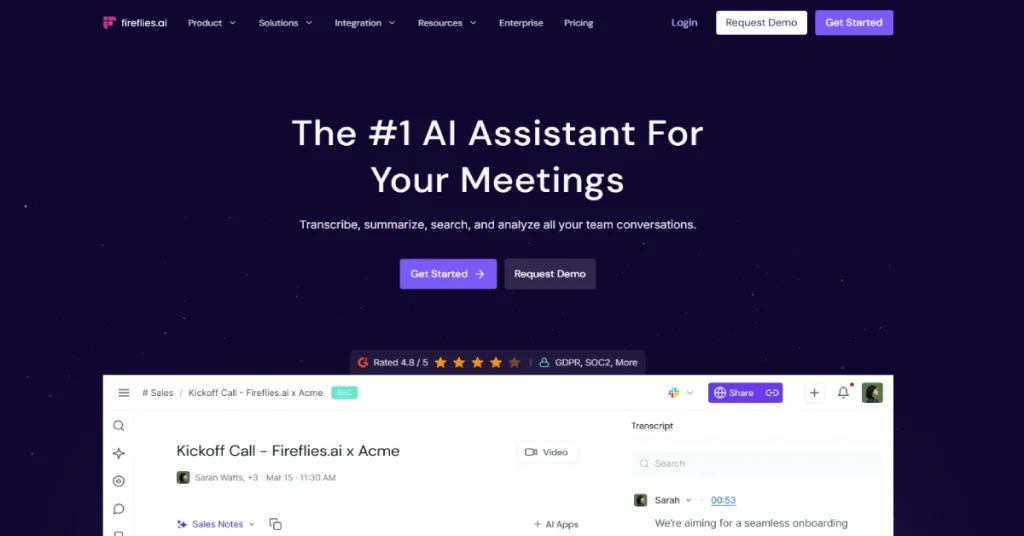
That is where AI meeting assistants such as Fireflies.ai have found a place in everyday work. Instead of asking participants to write everything down, Fireflies captures conversations, produces transcripts and organizes the discussion into summaries that can be searched later. It also offers integrations that help move meeting information into customer relationship management systems, project management applications and collaboration tools.
Fireflies has grown beyond its original role as a transcription assistant. In 2026, the platform includes real-time notes, an AI assistant called AskFred, conversation intelligence, task management features and additional AI capabilities that use a credit-based system. Those additions make it more appealing to teams that want to do something useful with their meetings rather than simply store recordings.
But the pricing deserves attention. Fireflies has a free plan, yet some of its more useful features require a paid subscription. Advanced AI functionality can also introduce additional costs through AI credits. A team that initially signs up for meeting summaries may discover that the total cost depends on how many people need access and which features they use regularly.
This Fireflies AI review examines what the software offers, how its pricing works, where the free plan falls short and whether the Pro or Business subscription makes sense. It also looks at privacy, integrations and competing meeting assistants to help determine who will benefit most from the platform.
What Is Fireflies AI?
Fireflies.ai is an AI-powered meeting assistant designed to record, transcribe, summarize and analyze conversations. It works with popular video meeting services such as Zoom, Google Meet, Microsoft Teams and Webex. Users can also capture meetings through its desktop and mobile applications or upload existing audio and video files for transcription.
The central idea is simple: meetings contain information that should not disappear when everyone leaves the call. Fireflies creates a searchable record so participants can return to specific discussions, review decisions and identify tasks without listening to an entire recording again. It can also help teams share information with colleagues who could not attend. Fireflies supports several ways to capture conversations. Its meeting bot can join scheduled calls, but the platform also offers a Chrome extension for recording supported Google Meet conversations without the bot. Desktop and mobile applications provide additional options for capturing system audio and in-person discussions. This flexibility matters because not every organization wants to use the same recording method.
What separates Fireflies from a basic speech-to-text application is what happens after transcription. Its workspace includes meeting summaries, searchable topics, speaker-related insights and tools for turning conversations into follow-up activities. On higher plans, organizations can use conversation intelligence and team analytics to understand patterns across multiple meetings.
Fireflies AI at a Glance
| Detail | Information |
|---|---|
| Software | Fireflies.ai |
| Category | AI Meeting Assistant |
| Free plan | Yes |
| Starting price | $0 |
| Pro plan | $10/user/month annually |
| Business plan | $19/user/month annually |
| Enterprise plan | $39/user/month annually |
| Transcription | Unlimited, subject to plan conditions |
| Supported languages | 100+ |
| AI meeting summaries | Yes |
| Meeting video recording | Paid plans |
| AskFred AI assistant | Yes |
| Mobile applications | Android and iOS |
| Desktop application | Available |
| Integrations | CRM, project management and collaboration tools |
| Official website | fireflies.ai |
How Does Fireflies AI Work?
Fireflies begins by capturing a conversation. For scheduled online meetings, users can connect their calendar and configure the assistant to join eligible calls. Once a meeting begins, the Fireflies bot can participate as a recording assistant and process the conversation. Users who prefer not to invite a bot have other capture options, including its browser extension and desktop application.
After a conversation is captured, Fireflies generates a transcript and organizes the information into a meeting record. The transcript can be searched for specific words, topics and moments. Depending on the subscription and available features, users can also review AI-generated summaries, identify action items and explore insights about the discussion. This is different from taking ordinary meeting notes. A person writing notes usually captures what seems important at that moment, while a transcript preserves a much broader record of the conversation. Fireflies attempts to combine those two approaches by keeping the original discussion searchable while also producing shorter summaries for everyday use.
The value becomes clearer when meetings are frequent. Imagine a customer success manager attending six calls in one day. Each conversation may contain commitments, questions and customer concerns that need to be recorded in a CRM. Without an automated workflow, the manager must either write detailed notes during every call or spend additional time updating records afterward. Fireflies can reduce part of that administrative work by creating meeting summaries and supporting integrations with business applications. The process is not completely automatic in every situation. Users still need to configure recording preferences, manage access permissions and review important information before sharing it. AI-generated notes can misunderstand a statement or overlook a qualification, especially when participants interrupt one another or use specialized terminology. Fireflies can make meeting documentation easier, but it does not remove the responsibility to verify important details.
Fireflies AI Features Explained
1. Automatic Meeting Transcription
Automatic transcription is the foundation of Fireflies. Instead of asking someone to document every sentence, the application converts spoken conversations into text that can be reviewed after the meeting. This is useful for interviews, sales calls, project discussions and other conversations where participants need to concentrate on what is being said rather than continuously writing notes.
Fireflies supports transcription in more than 100 languages, making it relevant to international teams and businesses that communicate with customers in different regions. The platform also provides timestamps and transcript editing, which help users locate important moments and correct mistakes. For longer meetings, this can be more practical than repeatedly playing a recording to find a particular statement.
The quality of transcription will depend on the meeting environment. Clear microphones and limited background noise generally make speech recognition easier, while overlapping conversations and unfamiliar terminology create additional challenges. Fireflies advertises broad language support, but that does not mean accuracy will be identical across every language, accent or recording condition.
For users evaluating the software, the most useful test is not a short demonstration with perfect audio. It is a normal meeting involving the same microphones, terminology and speaking styles that appear in everyday work. The resulting transcript should be checked for names, numbers, dates and commitments before it becomes part of an official business record.
2. AI Meeting Summaries and Smart Notes
A complete transcript is valuable when exact wording matters, but it is rarely the most convenient format for reviewing a meeting. A forty-minute conversation can contain repeated explanations, unrelated comments and several changes of direction. Reading everything afterward may take more time than most participants can spare.
Fireflies addresses this problem through AI-generated summaries that organize the discussion into more manageable information. Instead of working through every sentence, users can review the main topics and action items. This can help someone who missed a meeting understand what happened without asking a colleague to repeat the entire conversation.
The usefulness of a summary depends on whether it captures the right details. A customer call may involve twenty minutes of general discussion followed by a short but important change in requirements. If the summary gives too much attention to the general discussion and overlooks the change, it may appear complete while failing to communicate the most important outcome.
That is why summaries should be treated as working documents rather than unquestionable records. Fireflies can reduce the time needed to prepare notes, but important decisions should still be checked against the transcript. Teams that establish this habit are more likely to benefit from automated documentation without allowing small transcription errors to become larger operational problems.
3. AskFred: AI Assistant for Meeting Questions
AskFred is one of the features that moves Fireflies beyond traditional transcription. It allows users to ask questions about meeting information rather than manually searching through every transcript. This can be useful when the answer is buried inside a long conversation or spread across several discussions.
a project manager might want to know which deadlines were discussed during a planning meeting. A salesperson may need to recall a prospect’s objections before preparing a follow-up email. Instead of searching for individual keywords, the user can ask a more natural question and receive an AI-generated response based on the available meeting content.
This approach becomes more useful as an organization accumulates meeting history. A searchable collection of conversations can help people understand how decisions developed over time. It can also reduce the frustration of trying to remember which meeting contained a particular discussion.
AskFred is subject to Fireflies’ AI credit system for relevant advanced operations. Users should understand that having unlimited transcription or summaries does not necessarily mean unlimited access to every AI-powered function. More demanding AI tasks may consume additional credits, making usage patterns an important part of the purchasing decision.
4. Real-Time Notes and Live Transcription
Some meeting assistants focus almost entirely on what happens after a call. Fireflies also supports real-time notes and live transcription, allowing users to follow captured information while the discussion is taking place.
This can be helpful when someone needs to confirm a detail during the meeting rather than afterward. A participant might want to check the exact wording of a requirement or revisit a point made earlier in the conversation. Having live text available can reduce the need to interrupt the discussion and ask another person to repeat something.
Real-time transcription may also help participants who find it easier to follow written information alongside spoken conversation. However, it should not be confused with a guaranteed accessibility solution. Accuracy, latency and language support can vary, and organizations with formal accessibility requirements should evaluate whether the application meets those needs. The feature is most useful when it supports the conversation rather than distracting from it. Constantly reading a live transcript can make participants less engaged, so some users may prefer to rely on the final notes instead.
5. Meeting Search and Conversation History
A meeting assistant becomes more valuable when the information it captures can be found later. Fireflies includes search tools that help users locate discussions, topics and relevant moments within their meeting history. Consider a consultant working with a client over several months. During the first meeting, the client explains a particular business constraint. Weeks later, the project team proposes a solution that may conflict with that requirement. If the original discussion is searchable, the consultant can review the earlier statement rather than relying on memory.
Search is also useful for managers who need to understand decisions made across several projects. Instead of asking colleagues to summarize old conversations, they can look for the relevant meeting records, provided they have permission to access them. The practical limitation is organization. A large archive is only helpful when recordings are captured consistently and access permissions are managed correctly. Teams should establish clear naming, sharing and retention practices so that meeting history remains useful rather than becoming an unstructured collection of transcripts.
6. Action Items and Task Management
Many meetings end with a familiar problem: everyone understands what needs to happen, but nobody has clearly documented who is responsible. Tasks are mentioned during the conversation, yet they remain in personal notes or are forgotten when the next meeting begins.
Fireflies includes action-item extraction and task management capabilities that help identify follow-up work from meeting discussions. The platform can also connect with project management applications, allowing information to move into systems where teams already track assignments and deadlines.
a product team discussing a software release might identify a testing issue, a documentation update and a customer communication task. Instead of manually reviewing the entire meeting afterward, the team can use the generated action items as a starting point for assigning work. These suggestions still need review. A statement such as “we could investigate this next month” is not the same as an approved task with an assigned owner. Teams should confirm responsibilities and deadlines before treating AI-extracted action items as final commitments.
7. Conversation Intelligence and Team Analytics
Fireflies becomes more interesting for managers and sales teams when it moves beyond individual meeting summaries. Its Business plan includes conversation intelligence and team analytics, which are designed to help organizations identify patterns across meetings.
The platform offers capabilities such as speaker talk-time analysis, sentiment analysis, question detection and topic tracking. These features can help teams examine how conversations unfold rather than simply preserving what was said.
A sales manager, for example, may want to understand whether representatives are asking enough questions during discovery calls. A customer success team might want to identify recurring concerns across account reviews. Conversation intelligence can provide a starting point for investigating those patterns. the interpretation requires care. Speaking for a large percentage of a meeting does not automatically mean someone performed poorly, and sentiment analysis cannot reliably capture every nuance of human communication. A difficult customer conversation may contain negative language while still producing a successful outcome.
The most responsible way to use these insights is as supporting evidence rather than as an automatic judgment of employee performance. Managers should combine analytics with context, direct review and clear expectations.
8. Fireflies Integrations With Business Software
Integrations are one of the strongest reasons to consider Fireflies for team use. Meeting notes become more valuable when they can move directly into the applications where employees manage customers, projects and internal communication.
Fireflies supports integrations across CRM, project management and collaboration categories. Its product documentation highlights platforms such as Salesforce, HubSpot, Asana, Trello, Slack and Microsoft Teams, along with other business applications. These connections can reduce the need to copy notes manually between tools.
Granola AI Review : Is This Bot-Free AI Notetaker Worth Using?
For sales teams, CRM integrations are particularly relevant. A representative can spend less time documenting calls and more time following up with prospects. Project teams may prefer sending action items into task management applications, while internal teams can share meeting summaries through collaboration channels.
The integration itself does not guarantee that every record will be accurate or correctly associated with the intended customer or project. Organizations should test field mapping, access permissions and automation rules before enabling workflows across an entire team.
9. AI Skills, Voice Agents and Advanced Automation
Fireflies’ paid plans now include features beyond ordinary meeting transcription, such as AI Skills, Voice Agents and additional assistant capabilities. These are part of the platform’s broader effort to turn meeting information into automated work.
The appeal is easy to understand. A meeting might produce a list of tasks, a customer update and a follow-up email. If the software can help generate or organize those outputs, users may spend less time moving between applications after every conversation.
These advanced features also make the pricing model more complicated. Fireflies uses AI credits for certain AI operations, and additional credits may need to be purchased when the included allocation is exhausted. As a result, teams should not assume that every advanced AI capability is available without usage-related limits simply because they have purchased a paid subscription. Before relying on these tools, businesses should test the specific workflows they need and understand which operations consume credits. A feature that looks inexpensive during a short trial may have a different cost when used across hundreds of meetings.
Fireflies AI Pricing 2026: Free vs Pro vs Business vs Enterprise
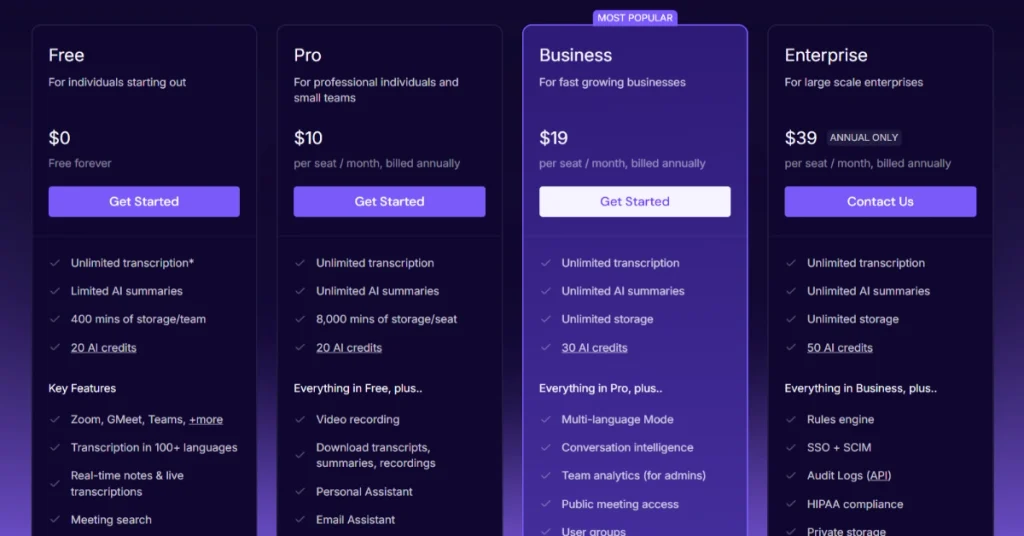
Fireflies offers four subscription tiers. The main differences involve storage, AI summaries, video recording, conversation intelligence and enterprise administration. The pricing page also distinguishes between monthly billing and annual billing, which matters because the advertised starting prices are lower when customers commit to a full year.
| Plan | Monthly billing | Annual billing (per month) |
|---|---|---|
| Free | $0 | $0 |
| Pro | $18/user | $10/user |
| Business | $29/user | $19/user |
| Enterprise | Annual only | $39/user |
Annual prices require annual billing. Extra AI credits may cost more.
Fireflies Free Plan: Is It Actually Useful?
The Free plan offers unlimited transcription under the applicable capture conditions, limited AI summaries and 400 minutes of meeting storage per team. It supports popular video conferencing platforms, mobile and desktop applications, file uploads and basic meeting search. Fireflies also provides an initial allocation of AI credits for trying advanced functionality.
The word “unlimited” needs some explanation. The company’s free-plan documentation distinguishes between a small included meeting allowance and unlimited transcription through automatic meeting joining. That means the capture method and account configuration can affect the experience. Free users should also consider the storage restriction, which can become noticeable when recording lengthy conversations regularly.
For someone attending a few meetings each week, the free plan provides a useful opportunity to evaluate transcription quality and the interface. It is less suitable for people who need substantial storage, frequent exports or access to the broader paid automation features.
Fireflies Pro: Is $10 Per Month Worth It?
Pro is the most logical upgrade for an individual professional who uses meeting notes frequently. At $10 per user per month when billed annually, it adds unlimited AI summaries, 8,000 minutes of storage per seat, video recording, downloads and broader integrations. It also includes access to features such as AI Skills, personal assistant capabilities and action-item management, subject to applicable usage rules.
For a freelancer, consultant or independent salesperson, the decision depends on how much time is currently spent documenting meetings. Someone who conducts multiple client calls every day may benefit from having summaries and recordings organized in one place. Someone who attends two short internal meetings each month may not need the additional features.
The monthly billing option costs $18 per user, which makes annual billing significantly cheaper for people who expect to use Fireflies throughout the year. However, paying annually is only sensible after confirming that the software works well with your normal meeting environment.
Fireflies Business: Is $19 Per Month Worth It?
The Business plan is aimed at teams that want more than personal meeting notes. It costs $19 per user per month with annual billing or $29 with monthly billing. In addition to the Pro features, it includes unlimited storage, conversation intelligence, team analytics and additional organizational capabilities.
A sales team may benefit from being able to examine patterns across customer calls. Managers can use conversation analytics to investigate recurring objections or identify areas where coaching may help. For customer success teams, the ability to track recurring topics can also provide useful context about account relationships.
The Business plan makes less sense when the organization only needs transcription and summaries. Its value depends on whether managers will actively use the additional analytics and whether the team has established appropriate policies for accessing and reviewing employee conversations.
Fireflies Enterprise: Who Needs the $39 Plan?
Enterprise costs $39 per user per month and is available with annual billing. It is designed for organizations that require more centralized control over meeting data, user access and compliance.
The plan includes capabilities such as SSO, SCIM, custom data retention, private storage, audit logs and advanced administrative controls. These features can be important for organizations that need to manage how meeting information is stored, shared and deleted.
Enterprise should not be selected simply because a company has a large number of employees. The stronger reason to choose it is a genuine requirement for security governance, compliance arrangements or administrative capabilities that are unavailable on the lower plans.
Fireflies AI Credits: The Extra Cost You Should Understand
One of the most important details in Fireflies pricing is that subscription access and advanced AI usage are not exactly the same thing. A paid plan may include unlimited transcription and summaries, but some advanced AI operations consume credits. Fireflies provides initial credit allocations and sells additional credit packages for users who need more capacity.
According to the company’s billing documentation, new accounts receive an initial allocation of 20 credits on Free and Pro, 30 on Business and 50 on Enterprise. These are one-time allocations rather than a fresh monthly balance. Additional credit subscriptions are available, and the cost depends on the quantity purchased.
| Extra AI credits/month | Monthly price | Annual-billed monthly rate |
|---|---|---|
| 50 | $5 | $4 |
| 200 | $20 | $16 |
| 1,000 | $90 | $72 |
| 2,500 | $200 | $160 |
| 5,000 | $375 | $300 |
The billing guide also describes automatic upgrade behavior for certain paid credit arrangements. This is worth reviewing before enabling advanced features, because a team may expect its subscription price to remain fixed while credit-related charges increase with usage.
The safest approach is to begin with a small number of meetings, identify which features actually consume credits and review the account’s billing settings. Teams should also check whether automatic upgrades are enabled. This is particularly important when several employees have access to AI functions that can generate additional usage.
How Much Does Fireflies Cost for a Team?
A subscription may look inexpensive when presented as a per-user monthly amount. The picture changes when a company needs multiple seats, especially if it also uses paid AI credits.
The following examples use the official annual-billing rates and exclude taxes, additional AI credits and other potential charges.
| Team size | Pro/month | Business/month |
|---|---|---|
| 1 user | $10 | $19 |
| 5 users | $50 | $95 |
| 10 users | $100 | $190 |
| 20 users | $200 | $380 |
| 50 users | $500 | $950 |
For a ten-person team, Business costs $2,280 over twelve months at the listed annual-billing rate. That is not necessarily expensive if the team relies heavily on meeting documentation and analytics, but it is enough to justify a careful evaluation before purchasing.
A useful purchasing question is whether every employee needs a paid seat. Some organizations may benefit from limiting paid access to people who regularly conduct external meetings or manage customer relationships. Others may need broader access because meeting information is shared across departments.
Is Fireflies AI Safe? Privacy and Security
Privacy is one of the biggest concerns surrounding AI meeting assistants. Business conversations can include financial details, confidential product plans, customer information and sensitive employee discussions. An organization adopting Fireflies needs to understand how that information is processed and who can access it.
Fireflies maintains a public Trust Center describing its security controls and compliance programs. The company states that customers retain ownership of their meeting data and that customer content is not used to train AI models. It also reports SOC 2 Type II and ISO 42001 certifications, along with GDPR-related protections. Enterprise customers have access to additional capabilities, including private storage, custom retention policies and advanced administrative controls. Fireflies also describes HIPAA-compliant arrangements for qualifying Enterprise customers with the required business associate agreement and private storage configuration.
These protections are relevant, but they do not mean every organization can immediately use Fireflies for any type of sensitive conversation. Security requirements vary, and businesses should review current contractual terms, data processing arrangements and applicable regulations before deploying a meeting assistant. Consent is another important consideration. When Fireflies joins a call as a bot, its presence may be visible to participants, but visibility alone does not necessarily satisfy every recording or transcription requirement. Users should inform participants when meeting capture is active and follow the rules that apply to their jurisdiction and organization.
Fireflies AI vs Otter AI: Which Is Better?
Fireflies and Otter.ai are both established AI meeting assistants, but they may appeal to different types of users. Fireflies places considerable emphasis on integrations, automated workflows and conversation intelligence. Otter.ai is another strong option for users who prioritize transcription, searchable meeting records and collaborative notes.
For an individual who mainly wants to remember what happened during a meeting, either platform may provide the necessary functionality. The differences become more important when a team wants to connect meeting information to CRM systems, analyze conversations or automate follow-up work.
Fireflies’ Business plan includes conversation intelligence and team analytics, making it relevant to organizations that want to examine patterns across customer calls. Otter.ai may be worth evaluating for teams that prefer its transcription and collaboration experience.
| Feature | Fireflies AI | Otter.ai |
|---|---|---|
| AI transcription | Yes | Yes |
| AI meeting summaries | Yes | Yes |
| Meeting search | Yes | Yes |
| CRM integrations | Yes | Yes, depending on plan |
| Conversation analytics | Yes | Available features differ |
| Free plan | Yes | Yes |
| Best fit | Meeting automation and analytics | Transcription and collaboration |
The better choice depends on actual workflow requirements rather than the number of features listed on a pricing page. Teams should compare both applications using similar meetings and review the quality of their summaries, integration behavior and overall cost.
Fireflies AI vs Granola AI
Granola AI approaches meeting documentation differently from Fireflies. Granola is designed around a personal notepad experience and bot-free capture, while Fireflies offers a broader set of meeting capture methods and more extensive conversation intelligence capabilities. For consultants and founders who want a lightweight way to remember discussions, Granola may feel more natural. Its emphasis on personal notes allows users to guide what the AI considers important. Fireflies may be more suitable for organizations that need structured meeting archives, CRM workflows and analytics across teams.
The distinction is especially relevant when comparing paid plans. Granola’s Business plan focuses on meeting history, integrations and productivity features. Fireflies Business adds conversation intelligence and team analytics, which may justify its price for organizations that actively use those capabilities. Neither product should be judged solely by transcription accuracy claims. Meeting quality depends on audio conditions, terminology and the type of discussion. The most useful comparison is to examine how much work remains after the AI has generated its notes.
Best Fireflies AI Alternatives in 2026
Fireflies is not the only option for businesses looking to automate meeting documentation. Several competing products offer similar capabilities with different strengths. Fathom is a relevant alternative for users who want AI meeting summaries and a straightforward meeting workflow. It is frequently compared with Fireflies by users evaluating ease of use and transcription features.
tl;dv is worth considering for teams that want to review recorded meetings, share important moments and work with AI-generated notes. It may appeal to organizations that place particular importance on video meeting workflows. Granola AI is a strong option for individuals who prefer a personal notetaking experience without a meeting bot joining the call. Its approach is especially relevant to consultants, founders and professionals who want concise notes rather than a more analytics-focused system.
MeetGeek is another alternative for automated meeting documentation and analysis, while Avoma may be relevant to revenue teams seeking a more specialized meeting intelligence workflow. These products appear among the alternatives commonly compared with Fireflies on G2. The best option will depend on recording preferences, integrations, privacy requirements and the amount of collaboration needed.
Who Should Use Fireflies AI?
Sales Teams
Sales teams are one of the clearest audiences for Fireflies. Customer calls often contain details that affect deal progress, including budgets, objections, timelines and decision-making responsibilities. Recording those conversations and moving relevant information into a CRM can reduce the administrative work that follows each meeting.
Fireflies’ conversation intelligence features may also help managers examine recurring themes across calls. This can support coaching and help identify common customer concerns, although analytics should be interpreted alongside the actual conversation rather than used as an automatic performance score.
Consultants and Freelancers
Independent professionals often handle several client relationships simultaneously. Each project may involve different deadlines, requirements and unresolved questions. A searchable meeting archive can help consultants remember earlier decisions without repeatedly asking clients to clarify information.
For freelancers, the Pro plan is likely to be the most relevant paid option. Its summaries, storage and export capabilities may be sufficient without paying for team analytics that an individual does not need.
Customer Success Teams
Customer success professionals need to understand what customers have experienced over time. A single meeting may not reveal the full history of an account, but several conversations can show whether the same issues continue to appear.
Fireflies can help preserve those discussions and make them easier to review. Integrations with CRM and collaboration tools may also reduce the risk of important customer feedback remaining in one employee’s personal notes.
Project Managers
Project managers regularly attend discussions involving deadlines, dependencies and responsibilities. When those details are not documented consistently, teams may leave a meeting with different interpretations of what was agreed.
Fireflies’ summaries and action-item features can provide a starting point for documenting decisions. Its project management integrations may also help transfer follow-up work into the team’s normal tracking system.
Recruiters and Interview Teams
Recruitment conversations often involve multiple interviewers, candidate questions and discussions about role requirements. Meeting notes can help preserve information for later review, provided recording and data-handling practices are appropriate.
However, hiring decisions should not be delegated to AI-generated sentiment analysis or simplistic conversation scores. Interview teams should use documented evidence, consistent evaluation criteria and human judgment.
Where Fireflies AI Performs Well
Fireflies’ main strength is the breadth of its meeting workflow. It can capture conversations through several methods, generate summaries, preserve searchable transcripts and connect the results to business applications. This makes it more than a simple transcription service. Its integrations are particularly useful for teams that already depend on CRM and project management systems. Meeting information can become part of existing processes rather than remaining isolated in a separate application. For organizations handling frequent customer calls, that can be a meaningful operational benefit.
The availability of a free plan also makes Fireflies accessible to individuals who want to explore AI meeting documentation without immediately paying. Users can begin with basic transcription and decide whether the additional storage, exports and analytics justify an upgrade. Fireflies also provides security and administrative options that may appeal to larger organizations. However, these capabilities are most valuable when they address actual compliance or governance requirements rather than simply adding more features to a subscription.
Where Fireflies AI Falls Short
The first limitation is the complexity of its pricing. The difference between Free, Pro and Business is understandable, but the separate AI credit system makes the total cost less predictable for users who rely heavily on advanced features. Organizations need to examine both seat-based pricing and AI usage before estimating their long-term spending. The free plan also has meaningful restrictions. Unlimited transcription sounds generous, but storage limits and conditions around meeting capture affect how useful it is for frequent users. People who need a substantial archive or regular exports may find themselves considering Pro sooner than expected.
Another limitation is that automated meeting notes are not always accurate. Fireflies can help users locate information and generate summaries, but it cannot guarantee that every technical term, number or decision will be interpreted correctly. Human verification remains important, especially for contractual or sensitive business discussions. Finally, not every team needs conversation intelligence. Organizations that mainly want concise meeting notes may find the broader analytics capabilities unnecessary. In those cases, a simpler meeting assistant could provide sufficient value with less configuration and potentially lower costs.
Fireflies AI Pros and Cons
| Pros | Cons |
|---|---|
| Unlimited transcription available under plan conditions | Free plan has storage restrictions |
| Supports 100+ languages | Accuracy varies with audio and language |
| AI summaries and searchable transcripts | AI summaries need human verification |
| Integrates with CRM and project tools | Some advanced capabilities require paid plans |
| Desktop, mobile and browser capture options | Bot-based capture may not suit every meeting |
| Conversation intelligence for teams | Analytics can be unnecessary for individuals |
| Free plan available | Advanced AI credits can increase costs |
| Enterprise security and admin controls | Enterprise features require higher pricing |
Is Fireflies AI Worth Paying For in 2026?
Fireflies is worth paying for when meeting documentation is a recurring part of your work rather than an occasional convenience. Someone attending several customer calls each day may benefit from having transcripts, summaries and follow-up information organized automatically. A team that also connects those notes to a CRM or project management system has an even stronger reason to consider a paid plan.
For individuals, Pro is the most sensible starting point. It provides the core paid features without requiring the additional investment associated with team analytics. The annual price of $10 per user per month is reasonable for someone who regularly needs meeting summaries, recordings and exports, provided the application performs well with their normal conversations. Business becomes more attractive when multiple employees need access to conversation intelligence and team analytics. These capabilities can support sales management and customer success workflows, but only if the organization intends to use them consistently. Paying for advanced analytics that nobody reviews is unlikely to produce much value.
The separate AI credit system deserves particular attention. Teams should examine which operations consume credits and review their billing configuration before deploying advanced automation at scale. A subscription that looks affordable based on seat pricing alone may cost more when additional AI usage is included. For occasional meeting participants, the free plan may be sufficient. It provides an opportunity to evaluate the product without committing to a subscription, although storage and feature restrictions will matter as usage increases.
Final Verdict
Fireflies.ai is a capable meeting assistant for professionals and teams that want to turn conversations into useful information. Its transcription, summaries, search tools and integrations address a common business problem: important decisions are made during meetings, but the details are often scattered across personal notes and forgotten conversations. The platform is particularly appealing to sales teams, consultants, customer success professionals and project managers who conduct frequent meetings. Its Business plan adds conversation intelligence and team analytics, making it relevant to organizations that want to understand patterns across discussions rather than simply save transcripts.
Its weaknesses are worth considering. The free plan has storage restrictions, AI-generated notes require verification and advanced AI credits can introduce additional costs. Teams should also establish clear recording and privacy policies before adopting the platform.
Official website: Visit Fireflies AI
Frequently Asked Questions
Is Fireflies AI free?
Yes. Fireflies has a free plan with transcription, limited AI summaries and 400 minutes of storage per team.
How much does Fireflies AI cost?
Pro starts at $10 per user per month with annual billing. Business starts at $19, and Enterprise costs $39 per user per month with annual billing.
Does Fireflies AI work with Zoom and Google Meet?
Yes. Fireflies supports Zoom, Google Meet, Microsoft Teams, Webex and other meeting platforms.
Does Fireflies AI support multiple languages?
Yes. Fireflies advertises transcription support for more than 100 languages.
Can Fireflies AI record meetings without a bot?
Yes. Its Chrome extension supports bot-free capture for compatible Google Meet workflows, and desktop recording provides another capture option.
Is Fireflies AI safe for business meetings?
Fireflies reports SOC 2 Type II certification and offers enterprise security controls. Organizations should still review their own privacy and compliance requirements.
Is Fireflies AI better than Otter.ai?
Fireflies may be preferable for integrations and conversation intelligence. Otter.ai is worth considering for transcription-focused workflows.
Does Fireflies AI charge extra for AI features?
Certain advanced AI operations use credits. Additional credit packages may create charges beyond the base subscription.v