Most businesses have tasks that take up time without adding much value. Someone has to collect information from websites, update spreadsheets, check incoming leads and move data between different tools. These jobs are important but they can become frustrating when the same steps have to be repeated every day. Traditional automation platforms can help with this problem although they often require users to understand complicated workflows before getting useful results.
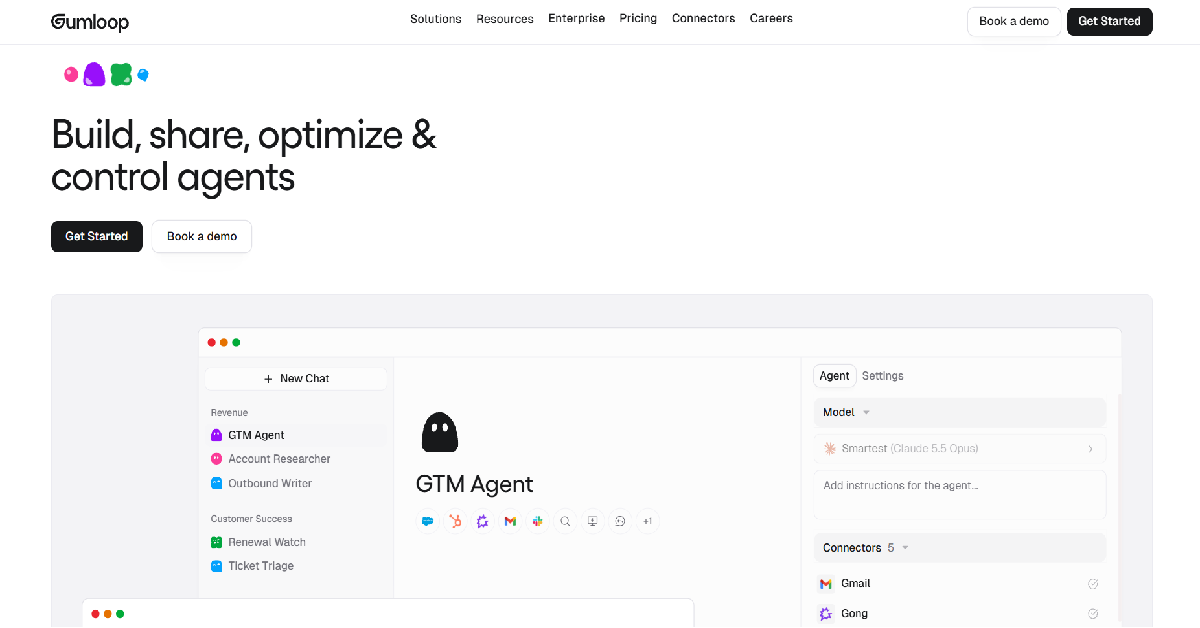
Gumloop takes a different approach by combining workflow automation with artificial intelligence. Instead of relying only on fixed rules it allows users to build workflows that can process information and make decisions using AI models. This makes it useful for tasks such as researching companies, extracting information from documents and organizing large amounts of data.
The platform has attracted attention because it brings AI agents and visual workflow building into the same environment. You can create automations without writing a complete application and connect different steps to produce a finished result. However, building a reliable workflow still requires planning. Gumloop also uses a credit-based pricing system which means the cost of automation can depend on how often workflows run and which features they use.
In this Gumloop review we will look at its features, pricing structure, practical use cases and limitations. We will also compare it with popular alternatives such as Zapier, Make and n8n to help you decide whether it fits your work.
What Is Gumloop?
Gumloop is a no-code AI automation platform that helps people build workflows and AI agents without developing a complete software application. It uses a visual canvas where users connect different components to create a process. These components are called nodes. A node might collect information from a website or ask an AI model to analyze text. Another node can organize the result and send it to a spreadsheet or messaging application.
What makes Gumloop interesting is the combination of traditional workflow automation and AI-powered decision-making. A conventional workflow is useful when every step follows a predictable rule. Gumloop can also handle tasks where information needs to be interpreted before the next step is taken. This makes it suitable for research and document processing as well as marketing operations and internal business tasks.
The platform also supports team collaboration and connections to popular business applications. Its documentation describes integrations with services such as Google, Slack, Salesforce, Airtable and GitHub.
Gumloop at a Glance
| Detail | Information |
|---|---|
| Tool Name | Gumloop |
| Website | gumloop.com |
| Tool Type | AI Automation Platform |
| Main Use | AI Agents and Workflow Automation |
| Free Plan | Available |
| Paid Plan | Pro |
| Starting Paid Price | $37/month |
| No-Code Builder | Yes |
| AI Agents | Supported |
| Team Collaboration | Pro and above |
| API and Webhooks | Supported features |
| Enterprise | Custom arrangements |
How Does Gumloop Work?
Gumloop works by connecting individual tasks into a flow. You begin with a trigger or an input and then decide what should happen to the information. Each node receives data from the previous step and passes its result to the next one. This structure makes it possible to build a process that collects information and transforms it into something useful without manually repeating the same work.
Imagine a marketing team that needs to research potential customers. A Gumloop workflow could begin with a list of company websites. It could extract relevant information from each website and use an AI model to identify the company’s industry. The results could then be organized into a spreadsheet for the sales team to review. This is an example workflow rather than a claim that every step works automatically without configuration.
Gumloop also provides AI agents that can use connected tools to complete tasks. Unlike a strictly fixed workflow an agent can select actions based on its instructions and available tools. This is useful for research tasks where the required steps may vary between requests.
Gumloop Key Features in 2026
1. Visual Workflow Builder
The visual workflow builder is one of Gumloop’s most important features. Users can place nodes on a canvas and connect them to create an automation. Each node has inputs and outputs that determine how information moves through the workflow. This design helps users understand the order of operations and identify where a process may need adjustment.
For example, a workflow could collect information from a webpage and extract selected details before sending the results to Google Sheets. Users can add conditions or additional processing steps when the task becomes more complicated. The builder is accessible without coding although understanding data formats and workflow logic is still helpful.
2. AI Agents
Gumloop supports AI agents that can interact with connected applications and perform tasks based on instructions. This is different from a basic chatbot that only generates text. An agent may use tools to retrieve information or carry out approved operations as part of a broader process.
For example, a research agent could search for relevant information and organize its findings into a structured report. The quality of the output depends on the agent’s instructions and the information returned by its tools. Important results should still be checked before they are used for business decisions.
3. AI-Powered Data Extraction
Data extraction is useful when information exists in different formats and needs to be organized. Gumloop provides AI nodes that can extract specified information from text and other supported inputs. A business could use this capability to identify company names or contact details from a collection of documents.
The advantage is that users do not need to create a separate extraction rule for every possible sentence structure. However, AI extraction is not always perfect. Results can be incomplete when the original information is unclear or poorly formatted.
4. Website Scraping and Research
Gumloop includes tools for collecting information from websites and using that information in automated workflows. This can support competitor research and content monitoring as well as other information-gathering tasks.
For example, an ecommerce team could monitor publicly available product information and organize the results for internal review. Website access restrictions and applicable terms still matter. Businesses should avoid collecting private information or using scraping in ways that violate legal or contractual requirements.
5. AI Model Integration
Gumloop allows users to work with different AI model providers. This gives businesses flexibility when selecting models for particular tasks. A model used for simple classification may not need the same capabilities as one used for complicated document analysis.
Pro users can also connect their own supported AI provider API keys. Gumloop’s July 2026 documentation says this reduces the Gumloop credits charged for the AI model portion by 50%. Users still pay their AI provider directly for token usage and other workflow costs remain applicable.
6. Business App Integrations
Gumloop connects with business applications to move information between systems. These integrations can reduce manual copying and help teams maintain more consistent workflows. Examples include Google Workspace services and tools such as Slack and Airtable.
The platform also supports MCP connections for compatible external tools. This expands the range of actions available to agents. The exact capabilities depend on the connected service and the permissions granted to it.
7. Team Collaboration
Gumloop supports shared workspaces where colleagues can collaborate on agents and workflows. Teams can work with shared credentials and access workflows according to their permissions. This is useful when an automation needs to be maintained by more than one person.
The Pro plan includes collaboration features and an organization-wide credit pool. Administrators can also manage usage restrictions to help control spending.
8. Workflow Templates
Templates provide a starting point for people who do not want to build every workflow from scratch. They can help users understand how different nodes work together and how common automation problems can be solved.
A template may still need customization because every business uses different applications and data structures. It is better to treat templates as examples that can be adapted rather than guaranteed ready-made solutions.

Gumloop Pricing 2026: How Much Does It Cost?
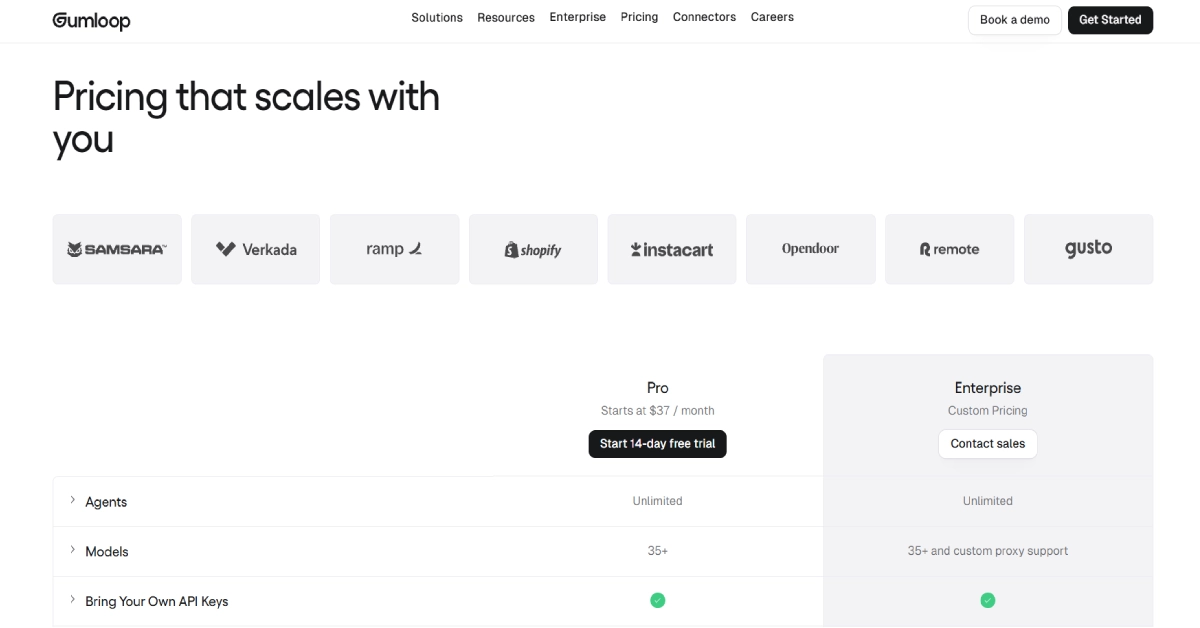
Gumloop uses a credit-based pricing model. The official pricing page currently focuses on Pro and Enterprise subscriptions. A free tier is also documented by the company although the main pricing page does not display its complete limits. Gumloop previously offered Solo and Team plans but combined them into Pro in December 2025. This is important because some older reviews still display the previous pricing structure.
Gumloop Pricing Comparison
| Plan | Price | Included Credits | Best For |
|---|---|---|---|
| Free | $0 | 5,000/month* | Learning and experimentation |
| Pro | Starts at $37/month | 20,000/month | Individuals and teams |
| Enterprise | Custom pricing | Custom allocation | Larger organizations |
*The 5,000-credit Free allowance comes from Gumloop’s December 2025 announcement. The current public pricing page does not independently confirm the Free plan’s full limits.
Gumloop Free Plan
Gumloop’s Free plan gives beginners an opportunity to explore AI automation before committing to a paid subscription. The company announced an increase to 5,000 monthly credits in December 2025. This makes the free offering useful for learning how agents and workflows operate. However, available credits can be consumed quickly when an automation repeatedly calls AI models or uses expensive external tools.
The Free plan is most appropriate for experimenting with smaller tasks. Someone who wants to understand workflow logic or test a simple research process can begin here. Businesses planning frequent automated runs should estimate their usage before relying on the free allowance.
Gumloop Pro Plan: Starting at $37/month
Pro is the main paid subscription. The official pricing page lists a starting price of $37 per month with 20,000 included monthly credits. It supports unlimited agents and seats as well as unlimited teams. Pro also offers more than 35 AI models and allows users to connect their own API keys. The current pricing page additionally lists an 8% orchestration fee.
This plan is attractive to individuals and businesses that need to run regular AI automations. A marketing team could build shared research agents while a sales team could create lead qualification workflows. The main thing to remember is that $37 is the starting subscription price rather than a guarantee that every workload will cost exactly that amount.
Gumloop Enterprise Plan: Custom Pricing
Enterprise is designed for organizations that need additional security controls and customized deployment options. The official website lists features such as role-based access control and SAML support alongside audit logs and custom data retention rules. Virtual private cloud deployment is also listed as an optional capability.
Companies considering Enterprise should request a detailed quotation based on expected usage and technical requirements. They should also confirm which security features are included in their proposed agreement.
How Do Gumloop Credits Work?
Gumloop credits are consumed when workflows and agents perform operations. The amount depends on the task and the resources involved. AI model usage can vary according to token consumption. External tools may have their own credit costs and some workflow operations also consume credits.
For example, a workflow that performs a simple data transformation may use fewer credits than an agent that searches multiple websites and analyzes long documents. Running the same automation hundreds of times can make a substantial difference to monthly usage.
Gumloop provides credit notifications to help users monitor consumption. Pro subscribers can also move to higher credit allocations when their workloads grow.
Gumloop Integrations
Gumloop supports integrations that allow users to connect AI agents and workflows with their existing applications. These connections are important because an automation platform becomes much more useful when it can retrieve information from one service and send results to another.
| Integration | Common Use |
|---|---|
| Google Sheets | Store and organize data |
| Gmail | Email-related workflows |
| Slack | Team notifications |
| Salesforce | CRM workflows |
| Airtable | Database management |
| GitHub | Development workflows |
| Outlook | Email operations |
| Exa | AI-powered web research |
| Gamma | Presentation generation |
| MCP Connectors | External tools and services |
Gumloop also supports Model Context Protocol integrations. These allow compatible tools to be connected to agents and used for specific operations. The Exa integration is one example. It can help agents search the web and retrieve content for research tasks. Gamma is another supported integration that can assist with generating presentations and documents.
Not every connection will support every possible operation. Businesses should review the available permissions and test important workflows before using them with real customer or company information.
Gumloop Pros and Cons
| Pros | Cons |
|---|---|
| Visual workflow builder | Learning curve for complex workflows |
| AI agents and automation together | Credit usage can be difficult to predict |
| Multiple AI model options | Some advanced features require paid access |
| Useful business integrations | Workflows need regular testing |
| Collaboration on Pro | External API costs may apply |
| Free entry option | Not every task benefits from AI |
Real-World Gumloop Use Cases
SEO and Content Research
SEO professionals spend considerable time collecting information about competitors and organizing research. Gumloop can help automate parts of this process. For example, a workflow could gather publicly available webpage information and extract page titles or other relevant details. An AI model could then classify the information and organize it into a spreadsheet.
This does not mean Gumloop can guarantee better search rankings. The platform can help reduce manual research work but it cannot replace keyword validation or editorial judgment. AI-generated findings should be checked before they are used in a published article.
Lead Generation and Sales Research
Sales teams often need to research companies before contacting them. Gumloop can help gather public company information and organize potential leads into a structured format. A team could build an agent that reviews company websites and identifies businesses matching predefined criteria.
The main benefit is reducing repetitive research work. However, extracted contact information should be checked for accuracy and handled according to applicable privacy and marketing rules.
Ecommerce Operations
Online stores may use Gumloop to organize product information and process data from different systems. For example, a workflow could take a product catalog and classify items according to their descriptions. Another workflow could prepare reports from order-related data provided through an authorized integration.
These tasks can be useful when a store manages a large number of products. The automation still needs safeguards because incorrect data updates can create problems for customers and staff.
Internal Business Reporting
Many businesses prepare similar reports every week. Gumloop can help collect information from connected applications and turn it into a consistent format. An agent could also summarize findings and highlight unusual changes that deserve attention.
This can reduce the time spent assembling reports. However, important financial or operational figures should be verified against the original data source.
Gumloop vs Zapier vs Make vs n8n
Gumloop competes with established automation platforms but its emphasis on AI agents makes it different from tools primarily known for connecting applications through predefined workflows.
| Platform | Main Strength | Suitable For |
|---|---|---|
| Gumloop | AI agents and visual automation | AI-heavy research and business workflows |
| Zapier | Large automation ecosystem | Everyday business app connections |
| Make | Visual workflow control | Multi-step automation processes |
| n8n | Technical flexibility and self-hosting options | Developers and technical teams |
Gumloop vs Zapier
Zapier is widely used for connecting business applications through automated triggers and actions. It can be a convenient option when a company needs straightforward integrations between familiar services. Gumloop places greater emphasis on combining AI agents with workflows that process and interpret information.
For example, sending a form submission into a CRM is a relatively conventional automation task. Researching a company and extracting specific information from its website may benefit more from AI capabilities. The best choice depends on the work being automated rather than the number of features listed on a pricing page.
Gumloop vs Make
Make provides a visual environment for creating workflows with multiple steps and conditions. It is useful for businesses that need detailed control over how information moves between applications. Gumloop also offers visual workflow building but adds a strong focus on AI agents and model-powered processing.
Businesses already comfortable with Make may not need to switch platforms for simple tasks. Gumloop becomes more interesting when a workflow involves interpreting documents or performing research that cannot easily be handled by fixed rules.
Gumloop vs n8n
n8n appeals to users who want flexible workflow automation and more control over deployment. It supports self-hosting options and is popular among technical users building customized processes. Gumloop may be easier to approach for someone who wants to create AI agents through a managed visual platform.
Technical teams should compare available integrations and execution costs as well as deployment requirements. Self-hosting can offer additional control but also introduces maintenance responsibilities.
Who Should Use Gumloop?
Gumloop is a useful option for marketing teams and researchers who regularly collect and process information. It can also appeal to sales teams that need structured company research and operations teams that want to automate recurring tasks. Businesses with employees already using spreadsheets and connected applications may find practical opportunities to reduce repetitive work.
Freelancers and small agencies can benefit when they perform similar research or reporting tasks for several clients. Rather than repeating every step manually they can create workflows that produce consistent outputs. However, they should review credit usage carefully because automation costs can increase as client activity grows. Gumloop may be less suitable for someone who only needs one simple connection between two applications. A basic automation platform could be sufficient for that task. It may also be challenging for users who expect every AI workflow to work perfectly without testing.
Is Gumloop Safe for Business Use?
Gumloop offers administrative and security features designed for organizations. Its Enterprise plan lists role-based access control and audit logs along with additional options for data retention and deployment. These features can help companies manage access to their automation environment. security depends on how workflows are configured. An agent connected to business applications should only receive the permissions it needs. Sensitive actions should have suitable approval requirements and businesses should review what information is shared with external AI providers.
Companies working with confidential customer information should examine Gumloop’s current security documentation and contractual terms before deployment. A platform’s security features do not automatically make every workflow compliant with industry regulations.
Is Gumloop Worth It in 2026?
Gumloop is worth considering if your work involves repetitive processes that require both automation and AI-based interpretation. It offers a practical environment for building agents and workflows without creating a complete custom application. The combination of a visual builder and business integrations can make it useful for research and operations tasks.
The main limitation is cost predictability. A subscription may look affordable at first but regular AI calls and external tools can increase credit consumption. This makes testing especially important. Before committing to a paid plan it is sensible to build one useful workflow and measure its actual credit usage over several runs. For teams that frequently handle research or data processing tasks Gumloop can offer meaningful value. For users who only need basic app-to-app automation it may be more functionality than necessary.
Frequently Asked Questions
Is Gumloop free in 2026?
Gumloop has offered a Free plan and announced 5,000 monthly credits for free users in December 2025. The current public pricing page does not show the full Free plan limits, so users should confirm the allowance when signing up.
How much does Gumloop cost?
The official pricing page lists Pro starting at $37 per month with 20,000 included credits. Enterprise pricing is customized.
Does Gumloop require coding?
Basic workflows and AI agents can be created using visual tools. More complex automation may require an understanding of APIs and data structures.
Can Gumloop scrape websites?
Yes. Gumloop includes website scraping capabilities. Users should respect website access rules and applicable legal requirements.
Can Gumloop connect to Google Sheets?
Yes. Google Sheets is supported for reading and organizing data through automation workflows.
Does Gumloop support AI agents?
Yes. AI agents are a central part of Gumloop’s platform and can use connected tools to complete tasks.
Can I use my own OpenAI API key?
Yes. Gumloop supports bring-your-own-key connections on Pro and higher plans. You will still pay the model provider for applicable usage.
Is Gumloop better than Zapier?
Gumloop may be more suitable for AI-heavy research and information processing. Zapier may be simpler for common application integrations. The right choice depends on your workflow.
Can teams collaborate in Gumloop?
Yes. Pro includes team collaboration features and shared organizational credits.
Do Gumloop credits roll over?
Gumloop’s March 2026 billing guidance indicates that standard subscription credits do not roll over monthly. Enterprise arrangements may differ.
Final Verdict: Should You Choose Gumloop?
Gumloop brings AI agents and workflow automation together in a platform that is accessible to people who do not want to build their own applications. Its visual workflow builder makes it possible to connect different tasks while AI-powered nodes help process information that would be difficult to handle through simple rules.
The platform is particularly useful for research and data processing workflows. It also provides collaboration features for teams that want to share agents and automate recurring work. The $37 starting Pro price makes it relatively accessible for experimentation with paid automation although the credit system requires attention.
Gumloop is not a complete replacement for human judgment. Workflows need accurate inputs and careful testing. Businesses should also compare the cost of running their automations against the time they actually save.
Our verdict: Gumloop is a strong option to evaluate for businesses that want to build AI-powered workflows and agents. Start with one practical task and measure its reliability and cost before expanding to more complicated processes.