AI coding assistants have become a regular part of software development. Developers use them to understand unfamiliar code, generate functions and fix errors without spending as much time searching through documentation. For simple tasks, these tools can be remarkably convenient. A developer can describe what needs to change and receive a working suggestion within seconds.
The difficulty begins when a project becomes more complicated. Building a complete feature involves more than writing a few lines of code. Developers need to understand existing architecture and account for requirements that may not be obvious from the original request. They also need to consider how a change affects other parts of the application and whether the finished implementation actually behaves as expected.
This is where Kiro takes a different approach. Rather than treating AI coding as a series of isolated prompts, Kiro emphasizes structured development. It can turn a feature idea into written requirements and an implementation plan before making changes to the codebase. The goal is to give developers a clearer connection between what they intended to build and what the AI eventually produces.
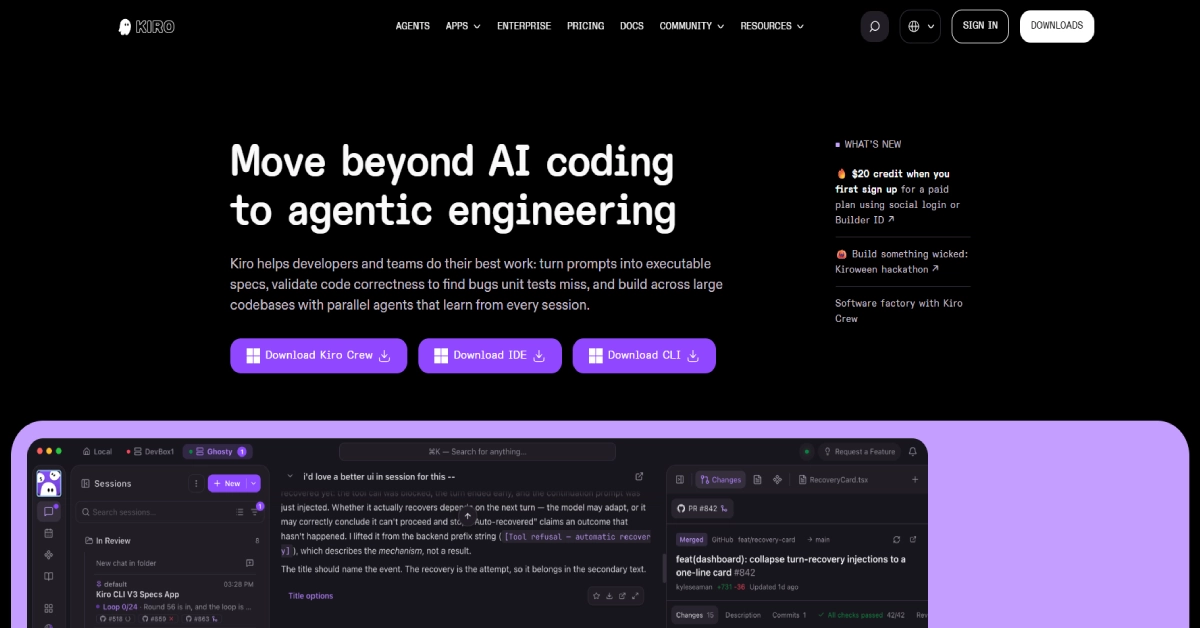
Kiro has also expanded beyond its original desktop IDE. In 2026, the platform includes a command-line interface and web-based agents along with mobile access and multi-agent workflows. Developers can work directly inside an editor or delegate longer tasks to agents running in cloud environments. This makes Kiro relevant not only to individual programmers but also to teams managing larger repositories.
The platform is developed and operated by AWS. That background may appeal to organizations looking for administrative controls and enterprise authentication, although it does not automatically mean that every generated code change is secure or correct. As with any AI development tool, human review remains important. In this Kiro review, we will examine its main features and pricing, including its spec-driven development workflow and autonomous agents. We will also look at its limitations and compare it with alternatives such as Cursor, GitHub Copilot and Windsurf. The goal is to understand where Kiro offers genuine value and where a simpler coding assistant may be sufficient.
What Is Kiro?
Kiro is an AI-powered development environment designed to help software developers plan, write and validate code. Its desktop IDE is built on a Code OSS foundation, which gives it a familiar structure for people who have used Visual Studio Code. However, Kiro adds its own agentic development capabilities rather than functioning as a simple extension inside another editor.
The platform allows users to interact with a project through natural language. A developer can ask the agent to explain a function or modify an existing feature. For larger tasks, Kiro can create a specification that describes the requirements and technical design before breaking the implementation into smaller steps. This distinction is important because AI-generated code often looks reasonable even when it does not match the original business requirement. A written specification provides something more concrete to review before implementation begins. It also creates a reference for checking whether the completed work behaves as intended.
Kiro is available through several interfaces. The IDE provides a traditional coding environment while Kiro CLI supports terminal-based workflows. Kiro Web allows paid users to delegate development tasks to cloud agents, and mobile access can be used to monitor and guide supported cloud sessions. The platform’s current architecture uses a shared agent system across these interfaces. This means project instructions and agent configuration can remain consistent as developers move between different working environments.
Kiro at a Glance
| Detail | Information |
|---|---|
| Tool Name | Kiro |
| Official Website | kiro.dev |
| Developed By | AWS |
| Tool Category | AI Coding Assistant |
| Main Purpose | Spec-driven and agentic software development |
| Desktop IDE | Yes |
| Command-Line Interface | Yes |
| Web Agents | Yes, paid plans |
| Mobile Access | Yes |
| AI Code Generation | Yes |
| Specs and Requirements | Yes |
| Agent Hooks | Yes |
| MCP Integration | Yes |
| Free Plan | Yes |
| Paid Starting Price | $20/month |
| Supported Desktop OS | Windows, macOS and Linux |
How Does Kiro Work?
Kiro works by combining a code-aware AI agent with development tools and project context. When a developer opens a repository, Kiro can use the available files and project instructions to understand the task. The developer can then ask for a quick change or start a structured workflow for a larger feature.
imagine a developer working on a SaaS application that needs a new subscription management page. A basic coding assistant might generate a component based on a short prompt. Kiro’s spec-driven workflow can first help define the expected behavior, including what happens when a subscription is upgraded or canceled. It can then prepare a technical design and divide the implementation into manageable tasks.
The developer can review those requirements before the agent begins writing code. This is useful because mistakes in the initial understanding of a feature can be more expensive than mistakes in individual lines of code. Correcting the plan early may prevent unnecessary implementation work.
Kiro also supports more direct agent interactions. If the task is small, such as fixing a type error or explaining a database query, a developer does not need to prepare a complete specification. The platform offers different levels of structure depending on the complexity of the work.
How to Get Started With Kiro
- Visit the official Kiro website and download the desktop IDE.
- Install the application on Windows, macOS or Linux.
- Sign in using an available authentication method.
- Open an existing project or create a new workspace.
- Import compatible VS Code settings if needed.
- Ask the Kiro agent to explain or modify part of the project.
- For a larger feature, create a specification and review its requirements.
- Let the agent work through implementation tasks and inspect the resulting code changes.
The exact workflow may differ depending on whether you use the IDE, CLI or Web interface.
Kiro Key Features in 2026
1. Spec-Driven Development
Spec-driven development is arguably Kiro’s most distinctive feature. Instead of immediately asking an AI assistant to write code, developers can begin by describing what they want to build. Kiro then helps convert the idea into structured requirements and a technical design before preparing implementation tasks.
This approach addresses a common problem with AI coding. A developer may request a feature in a single paragraph, but the request might leave several important questions unanswered. Should the feature work for users who are not signed in? What should happen when a network request fails? Does the application need to support existing data formats? These details can determine whether an implementation is actually useful.
Kiro’s specification workflow creates an opportunity to clarify such requirements before substantial code changes begin. For example, a team building a customer dashboard could define authentication behavior and error handling before asking the agent to create components and API endpoints. The resulting tasks provide a clearer implementation path than a single broad instruction.
This does not mean every project needs a lengthy specification. Kiro also supports quick workflows for smaller changes. The advantage is having structure available when a feature is complicated enough to benefit from it.
2. AI Coding Agent and Natural Language Chat
Kiro includes a coding agent that can work with project context and respond to natural language instructions. Developers can use it to understand unfamiliar code and investigate errors while also generating or modifying files.
Someone joining an established software project might ask Kiro to explain how authentication works across the repository. The agent can examine relevant files and provide an explanation based on the available code. This may reduce the time needed to understand how different parts of the application fit together.
Kiro can also carry out coding tasks. A developer might request a new API endpoint or ask the agent to refactor repeated logic into a shared utility. The important difference from simple autocomplete is that the agent can coordinate changes across multiple files rather than only suggesting the next few lines. developers should still inspect the results. An agent can misunderstand an existing convention or introduce changes that work locally but create problems elsewhere. The most effective workflow combines AI assistance with code review and testing.
3. Agent Hooks for Automated Development Tasks
Kiro supports hooks that trigger agent actions in response to development events. These can be useful for repetitive tasks that developers would otherwise need to remember and perform manually. a team might configure a hook to review documentation after certain files change. Another hook could help maintain tests or check whether code follows project conventions. This can make routine maintenance more consistent across a repository.
The value of hooks depends on how carefully they are configured. An automated task that runs too frequently can consume credits and create unnecessary work. Teams should begin with narrow triggers and evaluate whether the automation actually improves their development process. Hooks are especially interesting for projects with established coding standards. They allow some of those expectations to become part of the working environment rather than relying entirely on individual developers to remember them.
4. Steering Files and Project Rules
One of the weaknesses of conversational coding assistants is that developers often need to repeat the same instructions. They may repeatedly explain naming conventions and preferred libraries or describe architectural decisions that the agent should already know.
Kiro addresses this with steering files. These files provide persistent guidance about the project and how the agent should behave. A development team can document important rules and make them available during future sessions. a TypeScript project might require strict typing and prohibit unnecessary dependencies. A backend application might use a particular folder structure and error-handling pattern. Steering files allow these requirements to be expressed explicitly.
This is useful because consistency becomes more difficult when several developers and AI agents work on the same repository. A shared set of instructions can reduce repeated explanations and help the generated code follow established patterns. steering files need maintenance. Outdated instructions can lead to outdated recommendations. Teams should review them when architectural decisions change.
5. Kiro CLI for Terminal-Based Development
Not every developer wants to work inside a graphical editor. Many programmers use the terminal for repository management and testing along with scripting and deployment. Kiro CLI brings its agentic capabilities into this environment. Developers can interact with the agent from a command-line interface and use it to investigate problems or work on implementation tasks. This is useful for engineers who already have terminal-based workflows and do not want to switch to a separate editor for every AI interaction.
Kiro CLI also supports integrations with common shell environments and command-line tools. Its agent can work with development commands as part of a larger task, subject to the configured permissions. An October 2026 CLI update introduced additional local sandbox and autonomous execution capabilities in the V3 experience. These controls can help contain agent-run shell commands, although the official documentation warns that sandboxing does not guarantee complete isolation.
6. Kiro Web and Cloud Sessions
Kiro Web allows developers to delegate tasks without keeping a local development environment running. Instead of opening the desktop IDE and supervising every step, a user can start a task in the browser and let the agent work in a managed cloud environment. a developer might ask Kiro to update a set of tests or investigate a repository issue. The cloud agent can continue working while the developer focuses on something else. Depending on the workflow, the resulting changes can be prepared for review through a pull request.
Cloud sessions are particularly useful for longer tasks that do not require constant interaction. They can also support collaboration because the resulting work can be reviewed through familiar development processes. Kiro Web is available on paid plans and uses the same credit allowance as the IDE and CLI. It is not an additional pool of free usage. According to Kiro’s documentation, there is no separate cloud compute charge for these sessions.
7. Kiro Crew and Parallel Agents
Kiro Crew is designed for work that benefits from multiple agents operating across a larger codebase. Rather than assigning every task to a single sequential assistant, developers can coordinate agent activity and review progress from a more centralized interface. This can be useful when a feature involves separate parts of an application. One agent might work on a backend change while another handles related tests. A third task might involve documentation or reviewing the implementation.
Parallel work can reduce waiting time, but it also introduces coordination challenges. Two agents editing the same files can create conflicts, and separately completed tasks may not integrate cleanly. The quality of the final result still depends on clear task boundaries and appropriate review. For individual developers working on small projects, Kiro Crew may be more capability than they need. For teams handling large repositories, it is an important part of Kiro’s broader agentic development approach.
8. Multiple AI Models
Kiro supports a range of AI models rather than relying on a single model provider. Its current model selection includes options from Anthropic and OpenAI alongside open-weight models such as DeepSeek, Qwen and MiniMax.
The default Auto option is designed to choose a model based on the task. Users can also select a specific model when they want more control over performance or cost. This flexibility is useful because different coding tasks have different requirements. A simple documentation update may not need the same level of reasoning as a complicated architectural change. Choosing a lower-cost model for routine tasks can help preserve credits. model selection affects pricing. Some models consume credits at higher multipliers than Auto. Developers should understand these differences before using expensive models for every request.
9. MCP Servers, Skills and Kiro Powers
Kiro supports Model Context Protocol integrations and reusable skills that extend what its agents can do. These capabilities allow developers to connect additional tools and provide domain-specific knowledge. a team may want an agent to understand a particular database or cloud service. Rather than including every detail in a long prompt, the relevant context and tools can be made available through supported integrations.
Kiro Powers packages specialized capabilities so the agent can access relevant expertise when needed. According to the official pricing information, Powers do not carry a separate feature charge, although the agent work still consumes credits.
These features are most valuable when a team has repeatable workflows. They can make agents more useful within an existing development environment rather than treating every task as an isolated conversation.
10. Code Validation and Property-Based Testing
Writing code is only one part of software development. The finished implementation needs to behave correctly across expected and unexpected inputs. Traditional unit tests help, but they may miss cases that were not anticipated when the tests were written.
Kiro emphasizes validation and property-based testing as part of its development approach. Property-based tests examine general rules across many generated inputs rather than checking only a small number of predefined examples. a function that calculates discounts should never produce a negative final price under valid inputs. A property-based test can explore combinations of values to check whether that rule holds.
This does not guarantee that an application is free from defects. The quality of testing still depends on defining the right properties and understanding the intended behavior. Nevertheless, making validation part of the AI development workflow is a useful distinction from tools focused mainly on generating code.
11. VS Code Compatibility
Kiro’s IDE is based on Code OSS, making it familiar to developers who use VS Code. It supports compatible settings and extensions from Open VSX along with themes and other editor preferences.
This can reduce the difficulty of switching tools. Developers do not necessarily need to learn an entirely new editing interface before exploring Kiro’s AI features. compatibility does not mean every VS Code extension will work exactly as expected. Some extensions depend on services or APIs that may not be available in the same way. Developers with specialized setups should verify their essential extensions before migrating.
12. Enterprise Security and Team Management
Kiro includes features intended for organizations that need centralized administration and security controls. Its enterprise capabilities include identity management and single sign-on along with usage reporting and governance features.
These are important for companies that want to adopt AI development tools across multiple teams. Administrators may need to understand how subscriptions are used and manage access when employees join or leave the organization. AWS operates Kiro, but businesses should still evaluate its policies and controls against their own requirements. Sensitive repositories and regulated environments may need additional review before allowing AI agents to access source code or connected systems.
Kiro Pricing 2026: Free vs Pro vs Pro+ vs Pro Max vs Power
Kiro uses credit-based pricing. Each plan includes a monthly credit allowance, and more complex tasks generally consume more credits than simple requests. Different models can also use credits at different rates. The official pricing page currently lists five plans. The rates below are in US dollars per user and exclude applicable taxes.
| Plan | Monthly Price | Included Credits |
|---|---|---|
| Free | $0 | 50 |
| Pro | $20/user | 1,000 |
| Pro+ | $40/user | 2,000 |
| Pro Max | $100/user | 5,000 |
| Power | $200/user | 10,000 |
Kiro Free Plan: $0
Kiro Free includes 50 credits per month and is available as an ongoing free tier. It provides a way to explore the IDE and core agent workflows without committing to a subscription.
The Free tier has restricted model access. The official pricing page currently lists Claude Sonnet 4.5 and selected open-weight models, subject to limits. Premium model access and paid cloud workflows require an upgrade.
Free is most useful for developers who want to understand Kiro’s interface and try a few coding tasks. It may be sufficient for occasional experimentation, but substantial implementation work can consume the allowance quickly.
Kiro Pro: $20 per Month
Kiro Pro costs $20 per user per month and includes 1,000 credits. It also provides access to premium models and supports purchasing additional credits when the included allowance is exhausted.
This is a reasonable starting point for developers who want to use Kiro regularly. It provides significantly more capacity than Free while keeping the monthly subscription relatively accessible. The plan is particularly suitable for developers who want to experiment with spec-driven workflows and occasional cloud sessions. However, heavy use of expensive models can consume credits faster than expected.
READ MORE: CraftPilot Review: Is It Worth It for Etsy Sellers?
Kiro Pro+: $40 per Month
Pro+ costs $40 per user per month and includes 2,000 credits. It offers the same general premium model access with a larger allowance for frequent development work.
This plan may suit developers who use Kiro throughout the working week. Someone regularly generating tests and implementing features may appreciate the additional capacity.
The choice between Pro and Pro+ should be based on actual credit consumption. A developer who rarely uses the full Pro allowance may not gain much value from upgrading.
Kiro Pro Max: $100 per Month
Pro Max costs $100 per user per month and includes 5,000 credits. It is designed for users with more demanding development workloads.
This tier may be relevant to engineers who frequently delegate large tasks or use advanced models for complex implementation work. It also provides more flexibility for experimentation without purchasing add-on credits as often. the larger allowance does not guarantee better results. The quality of a coding task still depends on the instructions and project context along with the selected model and review process.
Kiro Power: $200 per Month
Kiro Power costs $200 per user per month and includes 10,000 credits. It is the highest publicly listed standard tier and is intended for intensive usage.
The plan may be appropriate for developers who rely heavily on Kiro’s agents throughout the month. It could also suit professionals who frequently work on large codebases and want substantial capacity for agentic workflows. For occasional users, Power is unlikely to be necessary. A lower tier provides a more practical way to evaluate whether Kiro fits the development process.
Kiro Add-On Credits
Paid users can purchase additional credits at $0.04 per credit. Kiro offers prepaid packs, allowing users to control how much additional capacity they buy.
Unlike unused monthly subscription credits, which reset at the next billing cycle, purchased add-on credits can roll over and expire after 12 months. 250 additional credits cost $10. This can be useful when a project temporarily requires more agent work than the regular monthly allowance.
Does Kiro Offer a Free Trial?
Kiro provides a perpetual Free tier rather than requiring everyone to begin with a paid trial. The company also advertises a $20 credit toward a first paid subscription upgrade for eligible users signing in through social login or AWS Builder ID.
The credit is a promotional subscription benefit, not a permanent reduction in plan pricing. Eligibility and the actual billing amount depend on the upgrade date and account conditions.

Kiro Pros and Cons
| Pros | Cons |
|---|---|
| Structured spec-driven development | More planning than some quick coding tasks need |
| Free plan available | Free tier has limited credits |
| Familiar VS Code-based IDE | Not every VS Code extension is guaranteed compatible |
| IDE, CLI and Web workflows | Web agents require a paid plan |
| Autonomous and parallel agents | Complex agent tasks can consume many credits |
| Multiple AI model choices | Premium models have different credit multipliers |
| Steering files and hooks | Configuration takes time to learn |
| MCP and skills support | External integrations need careful permission management |
| Property-based testing support | Generated code still needs review |
| AWS-backed enterprise features | Enterprise adoption requires additional evaluation |
Kiro vs Cursor vs GitHub Copilot vs Windsurf
Kiro competes with several popular AI development tools. The main difference is not simply whether each tool can generate code. It is how the tool helps developers move from an idea to a working implementation.
| Tool | Main Strength | Suitable For |
|---|---|---|
| Kiro | Specs, agents and structured development | Developers building complex features |
| Cursor | AI-assisted editing and codebase interaction | Developers wanting an AI-first editor |
| GitHub Copilot | AI assistance in existing development workflows | Teams using familiar IDEs and GitHub |
| Windsurf | Agentic coding inside an editor | Developers wanting integrated AI workflows |
Kiro vs Cursor
Cursor is an AI-first code editor designed to help developers write and modify code with assistance from language models. It offers a familiar editor experience while emphasizing AI-powered interaction with the codebase.
Kiro shares some of these capabilities but places greater emphasis on turning feature ideas into structured specifications. This can be valuable when requirements are complex or when a team needs a clearer record of what the AI is expected to implement. Cursor may appeal to developers who prefer a flexible editing workflow. Kiro is particularly interesting when the planning and validation process matters as much as generating code.
Kiro vs GitHub Copilot
GitHub Copilot provides AI coding assistance across supported development environments. It is useful for developers who want AI capabilities within tools they already use.
Kiro provides its own development environment and agent workflows. Its specification system and cloud sessions make it more than an autocomplete assistant.
The right choice depends on whether a developer wants to enhance an existing setup or adopt a more structured AI development environment.
Kiro vs Windsurf
Windsurf offers an AI-focused coding environment with agentic capabilities. Like Kiro, it aims to help developers work across larger portions of a project rather than generating isolated code snippets.
Kiro distinguishes itself through its emphasis on written specifications and development tasks. Its broader IDE, CLI and Web ecosystem may also appeal to teams that want consistent agent behavior across multiple interfaces. Developers should compare both tools using realistic projects. Interface preferences and the quality of generated changes may matter more than the length of a feature list.
Who Should Use Kiro?
Professional Software Developers
Professional developers may benefit from Kiro when working on features that involve several files and architectural decisions. Its spec-driven workflow can help clarify requirements before implementation begins. a developer modifying an authentication system may need to consider security and compatibility along with error handling. A structured specification can make these requirements more visible before code changes are made.
Kiro may be less necessary for developers who mainly need occasional autocomplete suggestions. Its greatest value appears when AI is used for substantial development tasks rather than only small edits.
Startups and SaaS Teams
Startups often need to build new features quickly while keeping the codebase maintainable. Kiro’s agents may help teams implement well-defined tasks and prepare tests without handling every repetitive step manually.
startups should be careful not to mistake faster code generation for faster product development. Requirements and user feedback still matter. Building an unnecessary feature quickly does not make it valuable. Kiro can support a disciplined development process when teams use its planning tools to clarify what should be built.
Backend Developers
Backend work frequently involves business rules and data validation along with API design and integration testing. These tasks can benefit from explicit requirements and careful validation. Kiro may help developers plan API changes and generate tests while examining how the implementation affects existing code. Its CLI also fits naturally into terminal-based workflows.
Developers should still review database migrations and security-sensitive changes carefully. Autonomous code generation does not remove the risks associated with modifying production systems.
Development Agencies
Agencies often work on several client projects with different coding standards. Kiro’s steering files can help document those differences and guide agent behavior within each repository.
The platform’s team and enterprise capabilities may also support organizations that need administrative oversight. However, agencies should evaluate total per-user costs and usage patterns before adopting a plan across the entire team.
Students and Beginner Programmers
Students can use Kiro to explore code and learn how software features are organized. Its Free plan offers a way to try AI-assisted development without paying immediately.
The specification workflow may also teach beginners to think about requirements before implementation. This can be valuable because understanding a problem is often more important than producing code quickly. Beginners should avoid letting the agent complete every assignment without understanding the result. Learning to debug and reason about code remains essential.
Is Kiro Safe for Professional Development?
Kiro is developed and operated by AWS and offers enterprise features such as centralized identity management and governance controls. These may be useful for organizations with formal security requirements. The platform also provides permissions and sandboxing options for agent actions. Such controls can reduce the risks associated with automated command execution, but they do not eliminate those risks completely.
Developers should review commands that affect important files or external services. Sensitive information should not be placed in prompts or configuration files unnecessarily. Teams should also understand how connected repositories and external integrations are authorized. Generated code should be tested and reviewed before production deployment. This is particularly important for authentication and payment systems or any feature that handles sensitive data.
Is Kiro Worth It in 2026?
Kiro is worth considering for developers who want AI assistance with the complete development process rather than only code generation. Its spec-driven workflow encourages clearer requirements and provides a structured path from planning to implementation.
The platform is particularly interesting for developers working on larger features and teams that want more consistent AI behavior across repositories. Steering files and hooks can support repeatable practices while cloud agents provide another way to delegate longer tasks.
Pricing is also relatively approachable at the entry level. The Free plan offers an opportunity to explore the product while Pro starts at $20 per month. However, credits are consumed according to the work performed, and expensive model choices can increase usage.
The main tradeoff is complexity. A developer who only wants quick code suggestions may prefer a simpler assistant. Kiro becomes more compelling when planning and testing are important parts of the workflow.
Frequently Asked Questions
What is Kiro AI?
Kiro is an AI-powered development platform built by AWS. It includes a coding IDE and CLI along with cloud agents and spec-driven development tools.
Is Kiro free in 2026?
Yes. Kiro offers a perpetual Free plan with 50 credits per month and access to selected AI models subject to restrictions.
How much does Kiro cost?
Kiro Pro costs $20 per user per month. Pro+ costs $40, Pro Max costs $100 and Power costs $200 per user per month.
Is Kiro made by Amazon?
Kiro is developed and operated by AWS, Amazon’s cloud computing business.
Is Kiro based on VS Code?
Yes. Kiro’s desktop IDE is built on Code OSS and supports compatible VS Code settings and Open VSX extensions.
What is spec-driven development in Kiro?
It is a workflow that converts a feature request into structured requirements and technical design documents before generating implementation tasks.
Does Kiro support Claude and GPT models?
Yes. Kiro supports models from Anthropic and OpenAI alongside selected open-weight models. Availability depends on the plan and region.
Is Kiro better than Cursor?
Kiro places more emphasis on structured specifications and multi-stage development. Cursor offers a different AI-first editing experience. The better choice depends on the developer’s workflow and project requirements.
Does Kiro support autonomous coding?
Yes. Kiro includes autonomous agent workflows and cloud sessions that can continue working on tasks without constant developer interaction.
Final Verdict
Kiro takes a thoughtful approach to AI-assisted software development. Instead of treating coding as a sequence of prompts and generated responses, it encourages developers to define what they want before implementing it. That makes the platform particularly interesting for projects where requirements and maintainability matter.
Its ecosystem has also become more capable in 2026. Developers can use the desktop IDE or work through the CLI while delegating longer tasks to cloud agents. The addition of multiple AI models and configurable workflows gives teams more control over how they use the platform.
There are still important limitations. AI-generated code requires review and testing, and credit usage can become significant when developers rely heavily on complex agent tasks. The structured workflow may also feel unnecessary for simple changes.
Our verdict
Kiro is a compelling AI development tool for programmers who want structured planning and agentic coding in one environment. It deserves consideration alongside Cursor and GitHub Copilot, especially for developers working on multi-file features and larger codebases. This review is based on Kiro’s official website and documentation. It does not claim independent hands-on testing.