
Getting visitors to your website is only half the job. The other half is understanding what happens after they arrive. You might have a blog post receiving thousands of visits or a product page attracting plenty of attention. Yet people still leave without clicking the links you expected them to click. Traditional analytics can show where visitors came from and how many pages they viewed. What they often fail to explain is what actually happened during those visits.
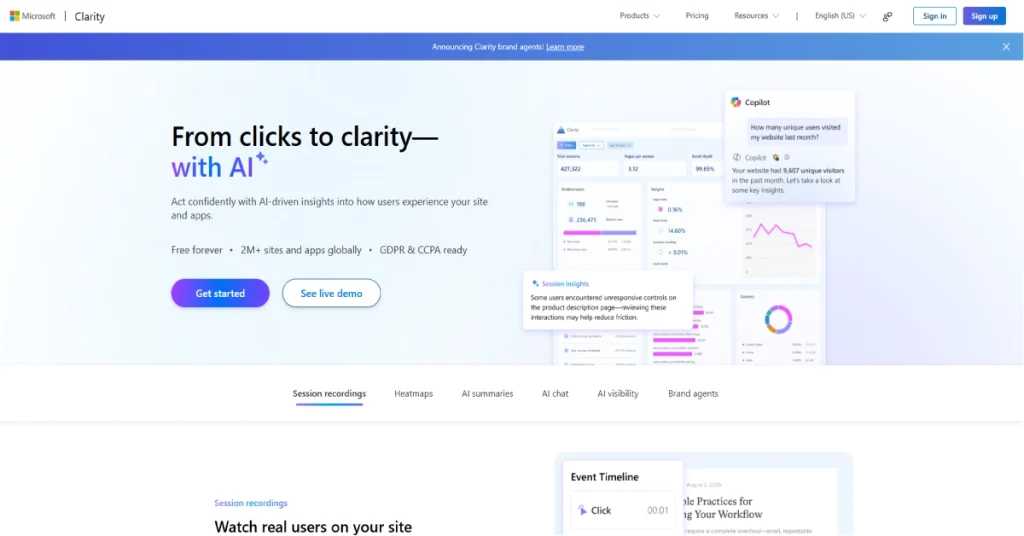
This is where Microsoft Clarity becomes interesting. Instead of showing only charts and traffic numbers, it lets website owners examine how people interact with individual pages. You can watch session recordings and study heatmaps to understand which sections attract attention. You can also investigate confusing buttons and other problems that might be affecting the experience. The best part is that Microsoft offers these tools without charging a monthly subscription.
Microsoft Clarity has also changed considerably in 2026. Alongside its familiar behavior analytics features, Microsoft has expanded the platform with AI-powered summaries and tools for understanding how websites appear in AI-generated answers. That makes it relevant not only to website designers but also to publishers who want to understand changing search behavior. In this Microsoft Clarity review, we’ll look at what the platform does well and where its limitations become noticeable. We’ll also examine whether it’s a sensible choice for bloggers and businesses that already use Google Analytics.
What Is Microsoft Clarity?
Microsoft Clarity is a free website behavior analytics tool developed by Microsoft. It helps website owners understand how visitors interact with their content by collecting information about clicks and scrolling activity. The platform turns those interactions into visual reports that are easier to interpret than raw analytics data. Its main features include session recordings and heatmaps alongside tools for identifying frustrating user experiences.
What makes Clarity useful is the difference between knowing that something happened and seeing how it happened. Suppose your website has a comparison page that receives steady traffic but very few visitors click through to the products. A traditional analytics report might tell you how many clicks were recorded. Clarity can help you investigate whether visitors reached the comparison table and whether the links were easy to find. You may discover that an important section sits too far down the page or that visitors are clicking an element that looks interactive but isn’t.
Clarity is not intended to replace every analytics platform. It works best as an additional source of information that explains visitor behavior. Google Analytics remains useful for measuring traffic acquisition and campaign performance. Clarity helps you examine what happens on the website itself. Used together, the two platforms can give website owners a clearer understanding of where improvements may be needed.
Microsoft Clarity at a Glance
| Detail | Information |
|---|---|
| Product | Microsoft Clarity |
| Developer | Microsoft |
| Official Website | https://clarity.microsoft.com/ |
| Category | Website Behavior Analytics |
| Starting Price | Free |
| Paid Plans | None |
| Session Recordings | Yes |
| Heatmaps | Yes |
| AI-Powered Insights | Yes |
| Funnels | Yes |
| Rage Click Detection | Yes |
| Google Analytics Integration | Yes |
| AI Visibility Reporting | Yes |
| WordPress Support | Yes |
| Mobile App Analytics | Yes |
| Traffic Limits | No general traffic cap |
Microsoft Clarity Features: What Can You Actually Do?
1. Session Recordings
Session recordings are probably the most useful reason to install Microsoft Clarity. They let you replay the interactions that took place during a visitor’s session. Instead of guessing how someone used your website, you can examine their navigation and scrolling activity. You can also see where they clicked and whether they appeared to struggle with particular elements. This is especially helpful when investigating problems that aren’t obvious during your own testing.
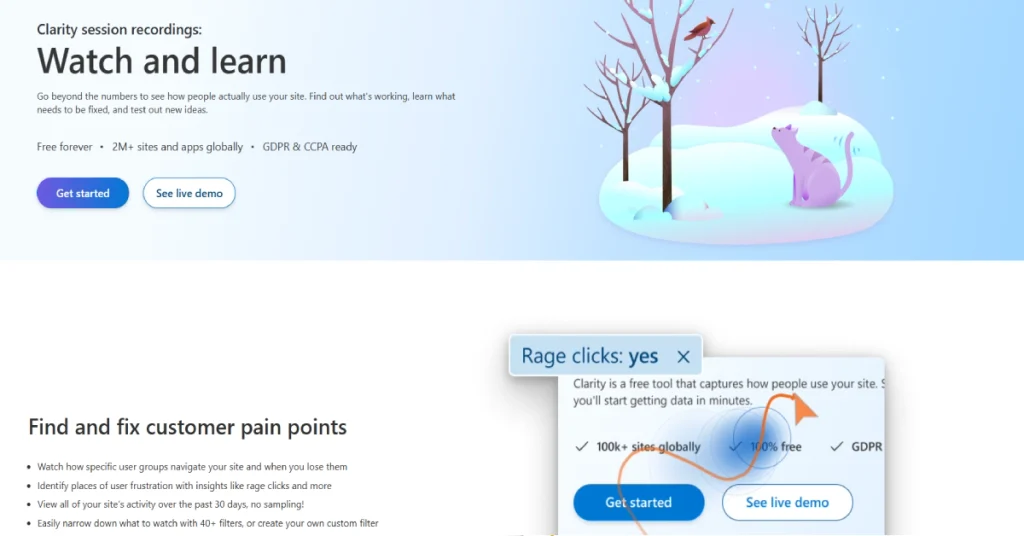
Imagine running an online store where customers frequently leave a product page without adding anything to their cart. Watching relevant recordings might reveal that visitors repeatedly open the size guide or struggle with the product options. Perhaps an important button is difficult to use on a smaller screen. These observations won’t always tell you exactly what someone was thinking, but they provide much better starting points than simply assuming the product page needs a new design.
Microsoft also makes recordings easier to review through filters and AI-generated summaries. You can narrow sessions by factors such as device type and visitor behavior instead of watching random recordings. According to Microsoft’s documentation, Clarity can record up to 100,000 sessions per project per day, although recordings may not be available for every tracked session. The standard recording view covers recent activity, with Microsoft describing a 30-day window for session review. These details are worth knowing because free access does not mean every recording remains available indefinitely.
2. Heatmaps
Heatmaps help you understand how attention and interaction are distributed across a page. Microsoft Clarity provides click maps and scroll maps alongside area and conversion heatmaps. Each offers a different perspective on visitor behavior. Click maps show which parts of a page receive interactions, while scroll maps reveal how far people tend to move down the content. This can be particularly useful for websites with long articles or detailed product pages.
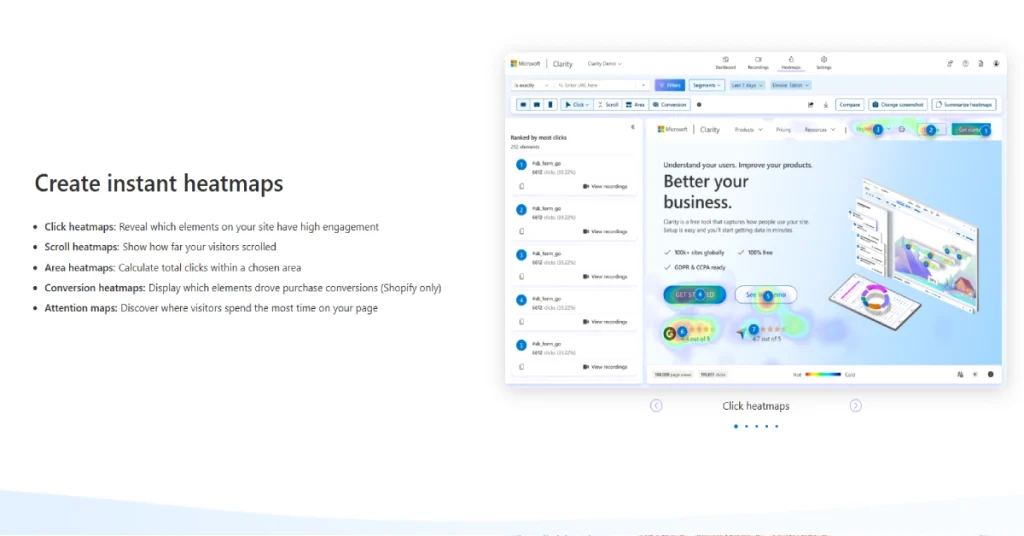
Consider a blog post that contains a comparison table halfway down the page. You may believe that the table is the most valuable part of the article, but a scroll map could show that many readers leave before reaching it. That doesn’t automatically mean the table needs to move. The introduction might be too long or the article might not answer the reader’s question quickly enough. Heatmaps give you evidence to investigate rather than forcing you to rely on assumptions.
Another useful detail is the ability to compare behavior across devices. A page that works comfortably on a desktop computer may be difficult to navigate on a phone. Microsoft says heatmap information can be accessed for up to nine months. This gives website owners time to compare changes and study whether improvements have affected how visitors interact with important sections.
3. Rage Clicks and Dead Clicks
One of the more practical features in Microsoft Clarity is its ability to identify interactions that suggest frustration. Rage clicks happen when visitors repeatedly click the same area within a short period. Dead clicks occur when someone clicks an element without an apparent response. These signals are useful because website owners often overlook small usability problems that real visitors encounter every day.
someone might click a product image several times because they expect it to open a larger view. Another visitor may repeatedly press a button that appears to be working but doesn’t produce a visible result. Clarity helps surface these interactions so you can investigate the affected pages. This can be valuable for websites with complex menus or checkout processes where a minor issue can interrupt the entire experience.
these signals need context. A visitor clicking repeatedly does not always mean the website is broken. Sometimes people simply interact differently from what the designer expected. The sensible approach is to review the relevant recordings and test the page yourself before making changes. Clarity is most useful when its behavioral signals lead to thoughtful investigation rather than immediate conclusions.
4. Microsoft Clarity Copilot and AI Insights
Reviewing visitor behavior manually can become time-consuming once a website receives significant traffic. Microsoft Clarity addresses this through Copilot and other AI-powered analysis features. These tools can summarize recordings and heatmaps while highlighting patterns that may deserve attention. Instead of spending an afternoon watching sessions, you can begin with a summary and then examine the supporting evidence.
This is particularly helpful for small businesses that don’t have a dedicated analytics team. A website owner might notice a decline in engagement but have little time to investigate dozens of individual sessions. AI summaries can help identify common behaviors and suggest where to look next. Microsoft’s AI chat functionality also allows users to ask questions about their data and explore findings in a more conversational way. There is still an important difference between a useful summary and a proven explanation. An AI system might identify repeated scrolling or hesitation, but it cannot always know why someone behaved that way. A visitor may leave because the price is too high or because they were simply comparing options. Clarity’s AI features can make analysis faster, but decisions should still be supported by recordings and business context.
5. Funnels and Conversion Analysis
Getting visitors to a website is important, but most businesses care more about what those visitors eventually do. An online store wants purchases. A SaaS company wants registrations. A service business may want people to complete a contact form. Microsoft Clarity includes funnel analysis to help website owners understand how visitors move through these important steps and where they tend to leave. Suppose a software company has a three-step signup process. Traffic reports show that people visit the registration page, but relatively few complete their accounts. A funnel can help identify which stage loses the most visitors. From there, the team can examine recordings around that step to investigate possible issues. Perhaps the form asks for too much information or an error message isn’t clear enough. Understanding the point where visitors leave makes it easier to decide what needs attention.
Clarity also supports smart events and custom tracking options that help identify meaningful interactions. These features make the platform more useful than a basic recording tool. Nevertheless, Clarity isn’t a complete experimentation platform. If your team wants to run controlled A/B tests and measure statistically reliable results, you may need an additional testing service.
6. AI Visibility and Citations in 2026
One of the most interesting developments in Microsoft Clarity is its expansion into AI visibility reporting. Website owners have traditionally measured search performance through rankings and organic traffic. But people now discover information through AI assistants that may cite websites directly in generated answers. This creates a new question for publishers: Is their content being referenced even when a conventional search click doesn’t occur?
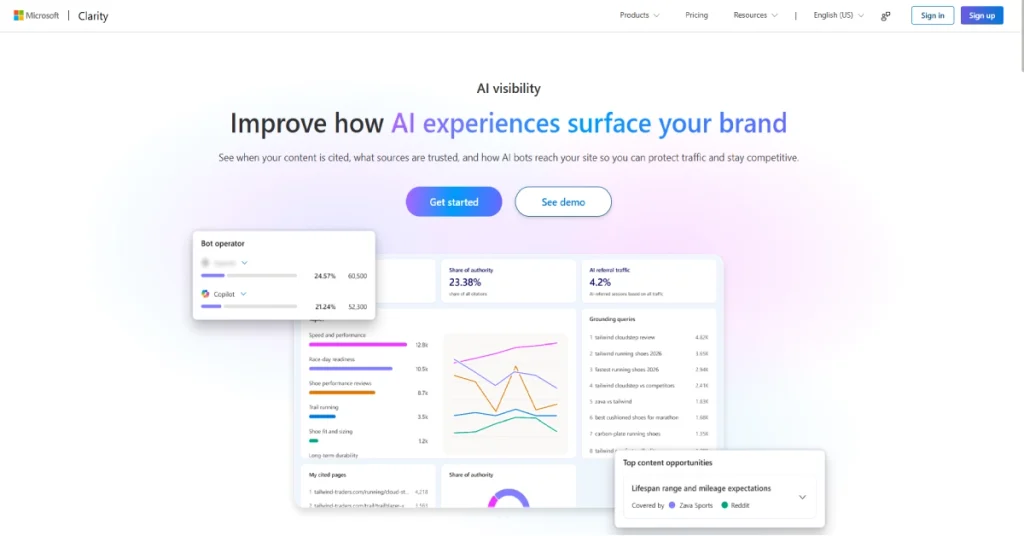
In May 2026, Microsoft made its Citations feature generally available. The dashboard helps website owners examine how their content is referenced in supported AI-generated experiences. It includes information about cited pages and related queries alongside AI referral traffic and competitive citation measurements. For a publisher, this could help reveal which articles are being used as sources and which topics appear to attract attention from AI systems.
Microsoft expanded these capabilities further with Topic Insights in July 2026. This feature helps users explore topics associated with citations and identify areas where competing websites may have stronger visibility. The information can support content planning, but it should not be treated as a complete measurement of every AI mention. Different AI services expose different amounts of data. Clarity’s reporting is best viewed as another useful signal rather than a replacement for Google Search Console or traditional SEO research.
7. Bot Activity and Website Discovery
Clarity’s Bot Activity reporting gives publishers another perspective on how automated systems access their websites. This is increasingly relevant because not every request to a website comes from a human visitor. Search crawlers and AI-related bots may request pages for indexing or other purposes. Understanding that activity can help site owners distinguish ordinary visitor engagement from automated access.
Microsoft expanded its bot activity analysis in May 2026. The newer reporting helps users examine patterns in crawler requests and understand how automated traffic changes over time. For a content-heavy website, this can be useful when investigating which pages receive attention from automated systems. It may also help teams identify unusual patterns that deserve closer examination through their hosting or CDN logs.
There are limitations to keep in mind. Bot reporting depends on the data available through supported integrations and infrastructure. A website may need additional configuration to access certain insights. Also, a crawler visiting a page does not mean the page will be cited in an AI answer. Those are different activities and should be evaluated separately.
8. Google Analytics and Other Integrations
Microsoft Clarity becomes more useful when it is connected to tools that provide additional context. Its Google Analytics integration is especially relevant because the two platforms answer different questions. Google Analytics helps identify where traffic originates and which events are recorded. Clarity helps explain how visitors behave once they reach the website.
Imagine running a paid advertising campaign that sends visitors to a landing page. Google Analytics might reveal that one campaign brings plenty of traffic but relatively few conversions. With Clarity, you can examine how those visitors interact with the landing page. You may find that mobile users struggle with a form or that the main call to action is difficult to locate. This information can help you improve the page without immediately assuming that the advertising campaign itself is the problem.
Clarity also supports integrations with popular website platforms and provides APIs for supported data workflows. WordPress users can install it without building a custom analytics system. More technical teams can use its integration options to incorporate behavioral insights into their existing reporting processes. For most smaller websites, though, the standard dashboard will be enough to get started.
Microsoft Clarity Pricing 2026: Is It Really Free?
Microsoft Clarity remains completely free as of October 2026. There is no advertised Pro subscription or separate paid tier that users must purchase to unlock session recordings and heatmaps. Microsoft also states that there are no general traffic limits and that users can manage unlimited websites and team members. This is a significant advantage compared with many behavior analytics platforms that charge based on session volume or restrict access to recordings.
For a small business, the financial benefit is straightforward. You can begin studying visitor behavior without adding another recurring software bill. An agency managing several client websites can also create multiple projects without paying a separate subscription for each site. That makes Clarity attractive to people who want to explore usability problems before committing money to a more specialized research platform.
free pricing should not be confused with unlimited retention or unrestricted access to every piece of historical data. Microsoft applies specific limits to recordings and retention periods. There are also privacy responsibilities associated with collecting behavioral information. Microsoft explains that Clarity supports its broader work with behavioral insights and machine learning. Businesses should understand those terms before installing the service on a website that handles sensitive information.
| Pricing Detail | Microsoft Clarity |
|---|---|
| Monthly Price | $0 |
| Annual Price | $0 |
| Free Trial | Not required |
| Paid Upgrade | None |
| General Traffic Cap | None advertised |
| Websites | Unlimited |
| Team Members | Unlimited |
| Heatmaps | Included |
| Session Recordings | Included |
| AI Insights | Included |
| Funnels | Included |
| AI Visibility | Available with applicable setup |
Microsoft Clarity Pros and Cons
Microsoft Clarity offers an unusually generous collection of features for a free analytics platform. Session recordings and heatmaps can reveal usability issues that are difficult to identify through traditional reports. The interface is approachable enough for beginners, while filters and custom events give more experienced users room to investigate specific problems. Its newer AI Visibility tools also make it interesting for publishers following changes in search and content discovery.
The drawbacks become more noticeable when a business needs specialized research or advanced experimentation. Clarity doesn’t replace a complete marketing analytics platform, and it doesn’t provide the same direct customer feedback capabilities as dedicated survey tools. Session recordings also require interpretation. Watching a visitor struggle with a page can suggest a problem, but it doesn’t always reveal the reason behind that behavior.
| Pros | Cons |
|---|---|
| Completely free | Not a full Google Analytics replacement |
| Useful session recordings | Recordings have availability and retention limits |
| Multiple heatmap types | Doesn’t explain every visitor’s intent |
| Rage click and dead click insights | No complete built-in A/B testing suite |
| AI-powered summaries | AI conclusions need verification |
| Google Analytics integration | Privacy and consent setup may be required |
| AI citation reporting | AI visibility coverage is not universal |
| Easy WordPress installation | Advanced analysis can take time to learn |
Microsoft Clarity vs Hotjar vs Google Analytics
Microsoft Clarity is frequently compared with Hotjar because both tools help businesses understand how visitors interact with websites. They offer overlapping capabilities such as heatmaps and session recordings. Hotjar has traditionally placed additional emphasis on collecting direct feedback through surveys and research features. This can be valuable when a business needs to understand not only what visitors did but also what they thought about the experience.
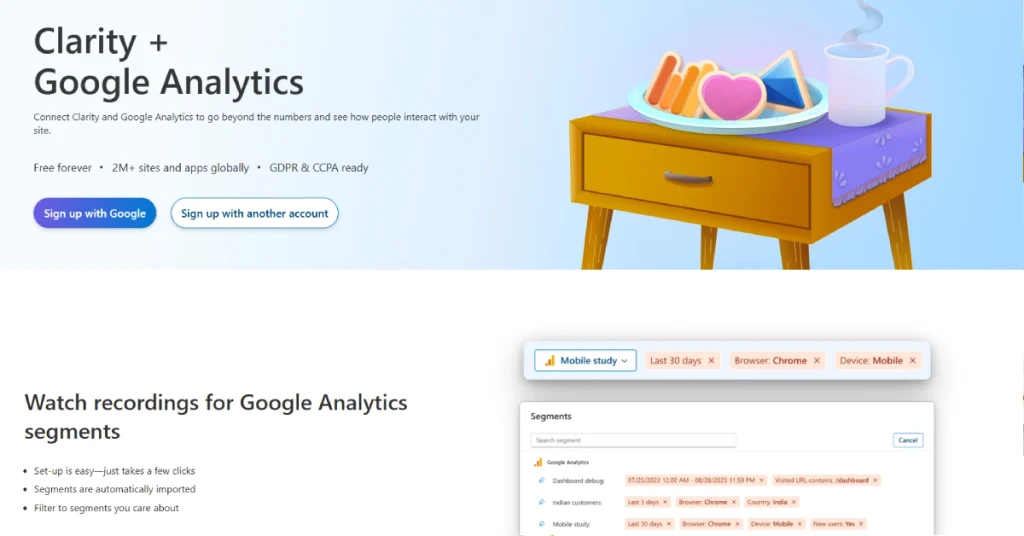
Clarity’s strongest advantage is that its core behavioral analytics features are free. For a blogger or smaller ecommerce store, that can make the choice relatively easy. You can investigate usability problems without paying for a subscription. Hotjar or another specialist platform may still be more appropriate for teams that regularly conduct customer research and need a broader set of feedback tools. The decision depends on whether visual behavior data is enough for your workflow.
Google Analytics serves a different purpose. It provides broader reporting around traffic acquisition and events. Clarity focuses more closely on interactions within individual pages. Rather than treating them as direct replacements, it often makes sense to use Google Analytics for performance measurement and Clarity for investigating user experience.
| Feature | Microsoft Clarity | Hotjar | Google Analytics 4 |
|---|---|---|---|
| Main Purpose | Behavior analytics | Behavior research and feedback | Traffic and event analytics |
| Free Access | Yes | Limited offering | Yes |
| Heatmaps | Yes | Yes | Not native |
| Session Recordings | Yes | Yes | Not native |
| AI Insights | Yes | Feature-dependent | Yes |
| User Surveys | Not a core feature | Yes | Not a core feature |
| Best For | Free visual behavior insights | User research | Marketing measurement |
Who Should Use Microsoft Clarity?
Microsoft Clarity is especially useful for bloggers and content publishers who want to understand whether visitors are actually engaging with their articles. A page may receive steady traffic from Google while important sections remain largely unseen. Scroll maps can help identify where readers stop moving through the content. Session recordings may also reveal whether people struggle with comparison tables or navigation links. These insights are particularly valuable for publishers who rely on affiliate links or newsletter subscriptions because small usability problems can affect the actions they want readers to take.
Ecommerce businesses can benefit in a different way. Online shopping involves several decisions, from browsing products to choosing options and completing checkout. A store owner might notice that visitors regularly add products to their carts but rarely finish purchasing. Clarity can help investigate the journey and identify places where shoppers appear confused. For example, a complicated shipping selection or a poorly positioned checkout button may create unnecessary friction. These observations won’t prove why every customer leaves, but they can guide practical improvements that are worth testing.
SaaS companies and marketing agencies can also find value in the platform. Software teams may use recordings to investigate onboarding problems and understand whether users can navigate important features. Agencies can use visual evidence to explain website issues to clients who might struggle to interpret complex analytics reports. Instead of simply saying that a landing page performs poorly, an agency can demonstrate where visitors hesitate or repeatedly click. For organizations that need formal usability interviews or advanced experimentation, Clarity is better treated as one part of a wider research toolkit.
Is Microsoft Clarity Safe and GDPR Compliant?
Privacy deserves careful attention whenever a tool records website interactions. Microsoft Clarity includes controls for masking sensitive information and managing consent. It does not simply provide unrestricted recordings of everything visitors type. Microsoft states that text entered into input fields is masked, and website owners can configure additional masking for relevant content. These protections help reduce privacy risks, but they don’t remove the responsibility to review how tracking is implemented.
An important change took effect on October 31, 2025. Microsoft began enforcing consent signal requirements for visitors from the European Economic Area, the United Kingdom and Switzerland. Websites receiving visitors from these regions need to pass the appropriate consent status to Clarity through a supported consent management platform or API. Without valid consent, Clarity limits cookie-based functionality and may treat page visits as separate sessions. This can affect recordings and the continuity of visitor journeys.
Microsoft describes Clarity as GDPR compliant in its role as a data controller, but that does not automatically make every website using Clarity compliant. Website owners must still consider their own privacy notices and applicable consent requirements. Microsoft also says Clarity should not be used on websites or applications targeting people under 18. Before installing it on a business website, it is sensible to review Microsoft’s current privacy documentation and make sure sensitive content is appropriately protected.
Roo Code Review: Is This AI Coding Agent Still Worth Using?v
How to Install Microsoft Clarity on WordPress
Installing Microsoft Clarity on WordPress is fairly straightforward, even if you aren’t comfortable editing code. Start by creating an account on the official Clarity website and adding a new project for your domain. Microsoft provides a tracking code that connects the website to your analytics dashboard. WordPress users can add this code through a compatible integration or use the official installation method. Once the script is active, Clarity can begin collecting supported behavioral information.
The installation itself is only part of the setup. If your website receives visitors from regions with consent requirements, make sure your consent management system communicates their choices correctly. You should also review masking settings before allowing recordings to collect data. This is particularly important for websites with customer accounts or forms that may display sensitive information. After completing the setup, open your website on both desktop and mobile devices and check that Clarity is receiving activity.
Once data begins appearing, avoid trying to analyze everything immediately. Choose one important page and one question you want to answer. For example, you might investigate whether visitors reach a pricing table or whether mobile users interact with the main navigation. Review the relevant heatmap and a few recordings before deciding what to change. Starting with a focused question makes Clarity far more useful than browsing the dashboard without a clear purpose.
Does Microsoft Clarity Slow Down a Website?
Website speed is a reasonable concern when adding another tracking script. Microsoft says the Clarity JavaScript loads asynchronously and is designed to avoid interfering with page loading. Heatmaps are generated from information already collected by the tracking system, so they do not require a completely separate tracking script for every page. This approach helps keep the installation relatively lightweight.
That said, website performance depends on many factors. A poorly configured WordPress theme or a large collection of third-party scripts can create problems regardless of which analytics service is installed. It is sensible to measure performance before and after adding Clarity, particularly on mobile devices. Tools such as PageSpeed Insights can help identify whether any noticeable change has occurred.
For most websites, the practical benefits of Clarity are likely to outweigh the small amount of additional tracking code. But the goal should always be to collect information that you will actually use. If your website already has several analytics and advertising scripts installed, review whether each one serves a useful purpose instead of adding tools without considering the overall setup.
Is Microsoft Clarity Worth It in 2026?
Microsoft Clarity is worth considering for almost any website where visitor behavior matters. It addresses questions that ordinary analytics reports often leave unanswered. You can see whether visitors interact with important sections and investigate confusing page elements. For a business that relies on its website to generate sales or leads, those insights can be genuinely useful. The fact that the platform remains free makes it easier to experiment without committing to another subscription.
Its newer AI features also add value for content publishers. Session summaries can make behavior analysis more manageable, while AI citation reporting introduces another way to examine how content appears in emerging discovery channels. These features are not a substitute for careful analysis or a complete SEO strategy. They are useful additions that help website owners ask better questions about their content and visitor experience. The main limitation is that Clarity provides observations rather than guaranteed solutions. A recording may show that visitors struggle with a particular form, but deciding how to improve it still requires judgment. A heatmap may reveal that an important section receives little attention, but moving it higher won’t automatically increase conversions. Clarity works best when its findings lead to thoughtful changes that are subsequently measured.
Frequently Asked Questions
Is Microsoft Clarity completely free?
Yes. Microsoft Clarity is free to use, with no paid subscription required for its core features. Microsoft does not advertise a general traffic cap and allows unlimited websites and team members. However, individual features have operational limits, including recording availability and data retention. Businesses should review those details rather than assuming that all historical information is stored forever.
Is Microsoft Clarity better than Google Analytics?
The two tools are designed for different purposes. Google Analytics is better suited to broader traffic and marketing measurement, while Clarity specializes in showing how visitors interact with pages. If you want to understand why people struggle with a checkout process or ignore an important button, Clarity can provide useful visual evidence. Many website owners benefit from using both.
Can Microsoft Clarity track every visitor session?
Clarity tracks website activity without a general traffic limit, but recordings may not be available for every session. Microsoft’s documentation also identifies a recording limit of up to 100,000 sessions per project per day. Consent choices and privacy settings can affect which information is collected. As a result, website owners should not assume that every visit will produce a complete replay.
Does Microsoft Clarity work with WordPress?
Yes. Clarity supports WordPress and can be installed through a compatible integration or tracking script. Once connected, the dashboard can show visitor recordings and heatmaps. Website owners should verify that tracking works correctly and configure the appropriate consent and privacy settings before relying on the reports.
Can Microsoft Clarity help improve conversions?
Clarity can help identify usability problems that may be preventing visitors from completing important actions. Session recordings and funnels can reveal where people leave a process or appear confused. However, the tool doesn’t automatically increase conversions. Improvements still need to be designed and tested based on the findings.
Does Microsoft Clarity track AI citations?
Yes. Microsoft’s AI Visibility features include citation reporting that helps website owners understand how their content is referenced in supported AI-generated answers. The platform also provides related query information and AI referral insights. Coverage depends on the available data and should not be interpreted as a complete record of every AI mention.
Is Microsoft Clarity safe for ecommerce websites?
Clarity can be used on ecommerce websites, but store owners should pay particular attention to privacy controls. Sensitive information should be masked, and applicable consent requirements must be followed. It’s also important to verify that the implementation does not expose personal or payment-related information through page content or custom tracking.
Is Microsoft Clarity better than Hotjar?
Clarity is especially attractive if you need heatmaps and session recordings without paying a monthly fee. Hotjar may be more appropriate for businesses that place greater emphasis on surveys and direct user feedback. Both can help identify usability problems, but the best choice depends on the type of research your team regularly performs.
Final Verdict: Should You Use Microsoft Clarity?
Microsoft Clarity is one of the most accessible ways to understand how people use a website. Its session recordings and heatmaps make it easier to investigate problems that might otherwise remain hidden behind traffic reports. The platform is approachable enough for beginners while still providing useful filters and analysis features for experienced marketers. Its free pricing is a major advantage, especially for smaller websites that cannot justify another analytics subscription.
The improvements introduced during 2026 make Clarity more relevant than it was when it focused mainly on recordings and heatmaps. AI-powered summaries can reduce the time spent reviewing visitor behavior. AI Visibility and Topic Insights also offer publishers additional information about how their content appears in AI-generated experiences. These additions broaden the product’s usefulness without changing its original purpose.
Our verdict
Microsoft Clarity is worth trying if you want to understand what visitors actually do on your website. It won’t replace every analytics or research tool, but it can help you find usability problems and make better-informed decisions. For bloggers and ecommerce businesses as well as SaaS teams, it offers substantial value without a subscription fee.
Editorial note: This review is based on Microsoft’s official documentation and product announcements available as of October 22, 2026. It does not claim independent hands-on testing or guarantee that using the tool will improve website rankings or conversions.

1 comment