 USD
 INR
 EUR
 GBP
 AED
 AUD
 CAD
 SGD
 JPY
 CNY
 CHF
 SAR
 NZD
 ZAR
 BRL
 MYR
 IDR
 PHP
 THB
 PKR
 BDT
 NPR
 LKR
 KRW
 HKD
 SEK
 TRY
 NGN

Sending an email from an application sounds simple until you actually have to build it. A password reset needs to arrive quickly. A payment receipt needs to look right across different email clients. And when a message fails, you need to know whether the problem is in your code, your domain settings or the receiving mail server.

Resend is built around making those problems easier to manage. It provides an email API, developer tools and a dashboard for sending and monitoring messages. Over time, it has also expanded into newsletters, contact management and automated email workflows.
That makes Resend interesting for more than just developers. A SaaS founder might use it for account notifications, while a small business could manage transactional emails and marketing campaigns from the same platform. But does it offer enough to replace established services such as SendGrid, Mailgun or Amazon SES?
What Is Resend?
Resend is an email delivery platform designed primarily for developers and software teams. Its core product is a REST API that allows applications to send transactional emails such as login codes, order confirmations and account notifications.
It also offers SMTP support, official software development kits and tools for creating email templates. This means developers can integrate email using their preferred programming language rather than building a delivery system from scratch.
More recently, Resend has expanded into email marketing through Broadcasts, Audiences and Automations. Businesses can manage contacts, create campaigns and build recurring communication workflows without relying on a completely separate marketing platform. The service emphasizes straightforward integration and a modern developer experience. That doesn’t remove every challenge involved in email delivery, but it can reduce the amount of infrastructure developers need to maintain.
Resend at a Glance
| Detail | Information |
|---|---|
| Official Website | https://resend.com/ |
| Category | Email API and Email Marketing |
| Starting Price | Free |
| Paid Plans | From $20/month |
| Free Email Allowance | 3,000/month |
| Free Daily Limit | 100 emails |
| Transactional Email API | Yes |
| SMTP Relay | Yes |
| Email Marketing | Yes |
| Email Automations | Yes |
| Inbound Email | Yes |
| React Email Support | Yes |
| API and Webhooks | Yes |
| Enterprise Plan | Available |
What Makes Resend Different?
Resend’s biggest advantage is that it approaches email from a developer’s perspective. Instead of making users navigate a complicated marketing platform to send a basic transactional message, it provides a focused API and documentation.
The platform works with popular development stacks, including Node.js and Python. Developers can use official SDKs to send emails, manage templates and access other supported features. Resend also integrates with React Email, allowing teams to create email templates using React components. For developers already comfortable with React, this can be more convenient than maintaining large blocks of HTML.
Another difference is the combination of transactional and marketing email tools. A growing startup may be able to handle account notifications, newsletters and simple automated campaigns without immediately adding another email provider. The main limitation is that Resend still requires technical setup for many use cases. Businesses looking for a traditional drag-and-drop marketing platform with extensive customer relationship management features may prefer a different service.
Resend Key Features
1. Developer-Friendly Email API
The Email API is the main reason developers choose Resend.
It allows applications to send messages through straightforward API requests. Developers can specify recipients, subject lines and email content, then use the response to confirm whether the request was accepted.
This is useful for common application workflows, including password resets, verification emails, payment confirmations and product notifications. Resend also supports idempotency keys, which help prevent duplicate sends when an application retries the same request. That matters for transactional messages because users shouldn’t receive multiple identical receipts simply because a network request was repeated.
The API includes detailed logs to help developers investigate failed requests and delivery issues.
2. SMTP Relay and Official SDKs
Not every application is designed around a modern REST API. Some content management systems and existing applications rely on SMTP for sending emails. Resend supports SMTP relay, allowing compatible software to send messages through its infrastructure.
It also offers SDKs for popular programming languages. This gives developers flexibility when choosing an integration method. a custom SaaS application might use the API directly, while an existing website could use SMTP through a compatible integration.
3. React Email and Templates
Creating emails that display correctly across Gmail, Outlook and other clients can be frustrating. Different clients interpret HTML and CSS differently, so a design that looks good in a browser may not work in an inbox.
Resend supports React Email, allowing developers to build reusable email templates using React components.
The platform also offers a visual editor for users who prefer working without code. In March 2026, Resend introduced a redesigned editor for templates and broadcasts, with improvements to layout controls and editing tools. This combination makes the platform useful for teams that include both developers and nontechnical staff.
4. Broadcasts and Email Marketing
Resend is no longer limited to one-to-one transactional emails. Its Broadcasts feature allows businesses to send campaigns to groups of contacts.
Users can create newsletters, product announcements and other marketing messages. Campaigns can be prepared through the dashboard or managed programmatically through the Broadcast API.
Resend supports audience segmentation and personalized email content. It also provides engagement reporting to help businesses understand how recipients interact with campaigns. In February 2026, Resend simplified the Broadcast API by allowing developers to create and send a campaign through a single request. Broadcast usage is billed separately from transactional email, so businesses should review both pricing categories before estimating costs.
5. Email Automations
Automations allow businesses to send messages based on defined workflows.
For example, a company might send a welcome email when someone subscribes, followed by an onboarding message later. Another workflow could help introduce new users to important product features.
Resend includes 10,000 automation runs in its free allowance. Additional runs on eligible paid plans cost $0.0015 each. This makes automation accessible to smaller businesses, although more complicated customer journeys may still require specialized marketing software.
6. Inbound Email Support
Resend also supports receiving emails, not just sending them.
Inbound email can be useful for applications that process customer replies or incoming requests. Developers can connect incoming messages to their own workflows and handle relevant information programmatically.
a support application could process incoming customer emails and route them to the correct team. Received emails count toward the transactional email quota, so inbound traffic should be included when estimating monthly usage.
7. Deliverability Tools and Webhooks
An email API is only useful if messages reach their intended recipients.
Resend provides domain authentication support, delivery logs and webhook events. These tools help developers identify problems such as bounced messages and rejected requests.
Webhooks allow an application to react when an email is delivered, opened or bounced, depending on the event being tracked. In August 2026, Resend introduced an Email Metrics API that provides deliverability and engagement information. Businesses can use it to build reports or monitor unusual changes in bounce and complaint rates.
No email provider can guarantee inbox placement. Sender reputation, authentication and message quality still affect deliverability.
8. AI Agent Integrations
Resend has also introduced tools for developers building AI-powered applications.
In April 2026, the company launched an official Model Context Protocol (MCP) server. This allows compatible AI agents to interact with supported Resend services, including emails, contacts and broadcasts.
The company has also introduced a command-line interface and integrations for AI coding environments.
These additions may be useful for teams automating email infrastructure, but access should be configured carefully. Giving an agent permission to send messages or manage contacts can have real consequences if the agent makes a mistake.
Resend Pricing 2026
Resend offers a permanent free plan and several paid subscription options. Transactional email pricing is based primarily on monthly sending volume.
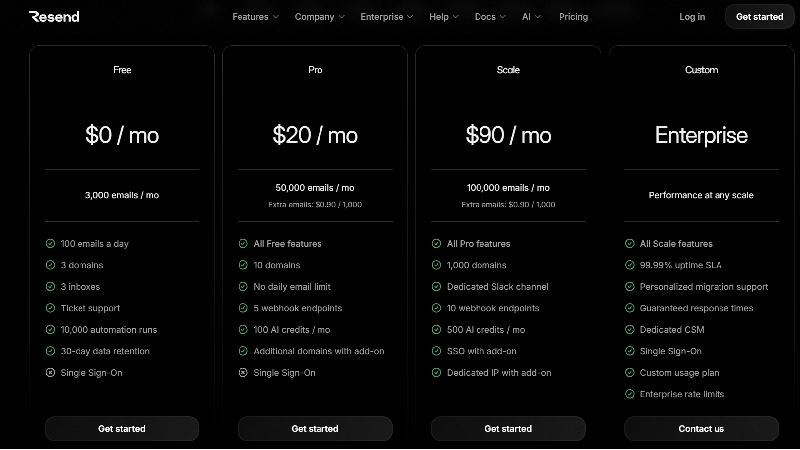
The official pricing page currently lists the following plans:
| Plan | Monthly Price | Email Allowance |
|---|---|---|
| Free | $0 | 3,000 emails |
| Pro | $20 | 50,000 emails |
| Scale | $90 | 100,000 emails |
| Enterprise | Custom | Custom allowance |
Free Plan — $0
The Free plan includes 3,000 emails per month, with a limit of 100 emails per day.
It also supports three domains, making it useful for small projects or developers experimenting with email integration. The daily limit is important. Even if you have unused monthly capacity, you cannot send more than 100 emails in a day on the Free plan.
Pro Plan — $20/Month
Pro includes 50,000 monthly emails and removes the Free plan’s daily sending limit.
It also supports ten domains, five webhook endpoints and 100 AI credits per month.
For a startup or growing application, Pro may provide enough capacity without requiring a large monthly commitment.
Additional transactional emails cost $0.90 per 1,000 emails when eligible pay-as-you-go overages are enabled.
Scale Plan – $90/Month
Scale includes 100,000 monthly emails and supports up to 1,000 domains.
It also provides ten webhook endpoints and 500 AI credits per month, along with additional support options.
Businesses sending larger volumes may also be eligible to purchase dedicated IPs.
Enterprise Plan
Enterprise pricing is customized based on business requirements.
It includes options for higher-volume sending, additional support and service-level commitments. Organizations with strict operational requirements should contact Resend for a tailored quote.
Additional Costs to Consider
Resend offers optional add-ons and usage-based charges.
| Add-On | Price |
|---|---|
| Extra 100 domains | $20/month |
| Dedicated IPs | From $30/month |
| Single Sign-On add-on | $150/month |
| Extra automation runs | $0.0015/run |
| Additional transactional emails | $0.90 per 1,000 on eligible paid plans |
The dedicated IP option has eligibility requirements, including sending volume and plan restrictions.
Resend currently bills subscriptions monthly and does not advertise an annual subscription discount.
Resend Pros and Cons
| Pros | Cons |
|---|---|
| Free plan for small projects | Free plan has a 100-email daily limit |
| Clean developer-focused API | Technical setup may be required |
| SMTP and official SDK support | Marketing pricing is separate |
| React Email integration | Not a full CRM platform |
| Transactional and marketing emails | Deliverability still needs monitoring |
| Useful logs and webhooks | Higher-volume costs require planning |
| Inbound email support | Some advanced features cost extra |
| AI integrations and automation | AI access requires careful permissions |
Resend vs SendGrid vs Mailgun vs Amazon SES
Resend competes with several established email delivery services, but each has a different approach.
| Platform | Main Strength | Best For |
|---|---|---|
| Resend | Developer experience and modern email tools | Startups and SaaS applications |
| SendGrid | Transactional email and marketing services | Businesses needing a mature email platform |
| Mailgun | Email APIs and delivery infrastructure | Technical teams managing email delivery |
| Amazon SES | Infrastructure-focused email sending | AWS-based applications and cost-sensitive high-volume use |
Resend vs SendGrid
SendGrid has a long history in email delivery and provides transactional email alongside marketing capabilities.
Resend places more emphasis on a streamlined API and developer workflow. Teams that want straightforward integration may prefer its approach. SendGrid may be more appropriate for organizations already using its broader email ecosystem.
Resend vs Mailgun
Mailgun is another developer-oriented email platform. Both services provide APIs and tools for managing delivery.
Resend stands out for its modern interface and close relationship with React Email. Mailgun may appeal to teams with existing integrations or more specialized email infrastructure requirements.
The better choice depends on the development stack and operational needs.
Resend vs Amazon SES
Amazon SES is an infrastructure-focused service that can be attractive for applications already running on AWS.
Resend offers a more integrated developer experience, with templates, dashboards and marketing tools available in one platform.
SES may be preferable for teams comfortable managing more of the surrounding infrastructure themselves.
Who Should Use Resend?
Resend is particularly suitable for developers building web applications. Its API and SDKs make it easier to add transactional email without creating a delivery system from scratch.
SaaS startups may also find it useful because they often need several types of email, including account verification and onboarding messages.
Small businesses that want both transactional and basic marketing capabilities can consider Resend, especially if they have access to someone comfortable with technical setup.
However, businesses primarily interested in visual newsletter design and advanced customer segmentation may be better served by a dedicated email marketing platform.
Is Resend Good for WordPress?
Resend can be used with WordPress through a compatible SMTP integration or another supported integration method.
This may help website owners route contact form notifications and other WordPress-generated emails through a dedicated email delivery service rather than relying entirely on their web host’s default mail configuration.
However, using Resend does not automatically fix every WordPress email problem. The sending domain must be verified, DNS authentication needs to be configured correctly, and the plugin must be connected properly.
It’s also important to understand that Resend is an email delivery service, not a complete replacement for a normal email inbox. If you need to read and reply to ordinary business email, you may still need a mailbox provider.
Is Resend Worth It in 2026?
Resend is worth considering if you need to send email from a website or application and want a service built around developer convenience.
The Free plan is generous enough for testing and smaller projects, while Pro offers a straightforward upgrade for growing applications.
Its expansion into Broadcasts and Automations makes it more versatile than a basic transactional email API. The newer AI integrations are also interesting for development teams building automated workflows.
The main limitation is that different email use cases can have different costs. Transactional email allowances should not be confused with marketing email pricing, and heavy users should account for possible overages. For developers who value a clear API and modern tooling, Resend is a strong option.
Frequently Asked Questions
Is Resend free?
Yes. Resend offers a permanent Free plan with 3,000 monthly emails and a daily limit of 100 emails.
How much does Resend cost?
Transactional email plans start at $20 per month for Pro, which includes 50,000 monthly emails. Scale costs $90 per month.
Can Resend send marketing emails?
Yes. Resend supports marketing campaigns through Broadcasts, Audiences and Automations.
Does Resend support SMTP?
Yes. Resend provides SMTP relay support for compatible applications and websites.
Is Resend good for Next.js?
Resend is suitable for modern JavaScript applications, including Next.js projects. Its Node.js SDK and React Email support are particularly useful in that ecosystem.
Can Resend receive emails?
Yes. Resend supports inbound email workflows. Received messages count toward the transactional email allowance.
Is Resend better than SendGrid?
Resend may be more appealing to developers who prioritize a simple API and modern interface. SendGrid may suit organizations requiring its established email services and integrations.
Does Resend guarantee email delivery?
No email provider can guarantee that every message reaches the inbox. Authentication, sender reputation and content quality remain important.
Final Verdict
Resend has developed into a capable email platform that covers more than transactional sending. Its clean API and developer tools make it appealing to startups and software teams, while Broadcasts and Automations add useful marketing capabilities.
The Free plan makes it easy to explore the service, and the $20 Pro tier is a reasonable starting point for applications that need more sending capacity. The biggest consideration is whether its developer-focused approach matches your needs. For a business looking for a full marketing suite with extensive CRM features, another platform may be more suitable.
Our verdict
Resend is worth trying if you want a modern email API with useful delivery tools and room to grow into marketing automation. It is especially attractive for developers building SaaS products and web applications.
Editorial note: This review is based on official Resend documentation and pricing as of October 22, 2026. It does not claim independent hands-on testing.