AI coding tools have changed quickly over the past two years. What started with autocomplete suggestions has developed into software that can understand a project, edit multiple files and work through complex programming tasks. Windsurf became popular by bringing those capabilities into an editor that felt familiar to developers.
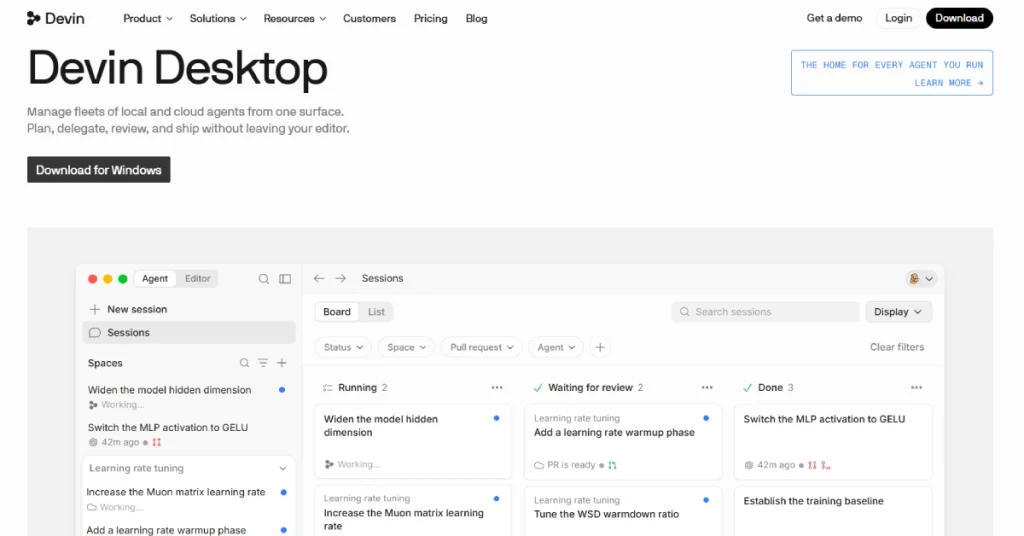
But anyone searching for Windsurf in 2026 will notice something different. The editor has been renamed Devin Desktop, following its acquisition by Cognition, the company behind the Devin AI coding agent. The familiar editing environment remains, but the product is now positioned as a workspace for managing both local and cloud coding agents.
That change matters when deciding whether Windsurf is still worth using. Its original appeal was a combination of intelligent autocomplete and Cascade, an agent that could work across a codebase. The newer experience puts more emphasis on delegating tasks, reviewing changes and coordinating agents. In this Windsurf review, we’ll look at what the editor offers today, how much it costs and where it stands against alternatives such as Cursor and GitHub Copilot.
What Is Windsurf?
Windsurf, previously associated with Codeium, is an AI-powered code editor built to help developers write, understand and modify software. It became known for features such as Windsurf Tab and Cascade, which went beyond ordinary code suggestions by using information from the wider project.
In 2026, Windsurf Editor became Devin Desktop. Cognition has kept the editor foundation while adding a central interface for managing coding agents. Developers can still work directly with code, but they can also assign tasks to agents and monitor their progress.
The new direction is aimed at developers who want AI to handle more substantial work rather than simply suggest the next line of code.
Windsurf at a Glance
| Detail | Information |
|---|---|
| Product Name | Devin Desktop (formerly Windsurf) |
| Developer | Cognition |
| Category | AI Coding Assistant |
| Original Focus | AI-powered code editing |
| Current Focus | AI editor and coding agent management |
| Free Plan | Yes |
| Pro Price | $20/month |
| Max Price | $200/month |
| Team Plans | Available |
| Code Completion | Yes |
| Local Coding Agents | Yes |
| Cloud Agents | Available on paid plans |
| Official Website | https://devin.ai/desktop |
What Happened to Windsurf in 2026?
The biggest change is the transition from Windsurf to Devin Desktop. Cognition introduced the new name in June 2026 and made the updated application available through the existing editor’s update process. According to the official product FAQ, existing settings, extensions and ongoing work carry over during the transition. Users do not need to rebuild their development environment simply because the product has changed names.
The newer interface introduces an Agent Command Center, where developers can manage multiple coding tasks from one place. The original editor remains available for writing and reviewing code. For existing Windsurf users, this is more than a branding change. The product’s emphasis has moved from a single AI-assisted editing experience toward coordinating different agents. Older tutorials focused heavily on Cascade may therefore describe workflows that no longer match the current default experience.
Windsurf Features: What Can It Do Today?
1. AI Code Completion With Tab
Windsurf built much of its reputation around intelligent code completion. Its Tab feature helps developers write code by predicting useful changes based on the current file and surrounding context.
Unlike basic autocomplete, the system can suggest larger edits that fit the developer’s recent activity. For example, after changing the structure of a function, it may suggest corresponding adjustments elsewhere in the file.
This is useful for repetitive programming work, especially when writing similar components or updating existing code. Developers still decide whether to accept each suggestion, so the feature works best as an assistant rather than an automatic replacement for careful programming. The current Free plan includes unlimited Tab completions, making it possible to use this part of the editor without a paid subscription.
2. Devin Local Coding Agent
Devin Local is central to the newer desktop experience. It allows developers to assign coding tasks to an AI agent working in their local development environment. Instead of asking for a small code snippet, a developer can describe a larger task, such as adding validation to a form or investigating a failing test. The agent can examine the relevant code and work through changes.
This can reduce the amount of repetitive navigation required for multi-file tasks. However, the results still need inspection. An agent may produce code that appears correct but overlooks an edge case or conflicts with an existing project convention. The practical benefit comes from delegating well-defined tasks and reviewing the results rather than assuming the agent will make every decision correctly.
3. Agent Command Center
The Agent Command Center is one of the most significant additions to Devin Desktop. It provides a central place to view tasks assigned to different agents.
Developers can see which tasks are running, which are waiting for review and which have been completed. This is especially useful when working on several independent changes. a developer might assign one agent to update tests while another investigates a bug. Instead of switching between unrelated chat sessions, they can review progress from a shared workspace.
This workflow may be unnecessary for someone making occasional small edits. For developers who regularly delegate substantial work, however, it can make agent activity easier to organize.
4. Local and Cloud Agents
Devin Desktop supports both local development agents and cloud-based workflows. Local agents operate closer to the developer’s current environment, while cloud agents can handle tasks without requiring the same level of direct supervision.
The advantage is flexibility. A developer can keep interactive debugging work local while delegating a longer, clearly defined task to a cloud agent.
Cloud execution is particularly interesting for work such as preparing tests or investigating repository issues. Still, developers need to review changes before merging them into important branches. Access to Devin Cloud is included with paid plans, rather than the basic Free tier.
5. Multiple AI Models
The current platform supports models from major providers, including OpenAI, Anthropic and Google, alongside open-source alternatives and Cognition’s own coding models. This gives developers more choice when balancing capability and usage. A straightforward refactoring task may not require the same model as a complicated debugging problem.
The ability to choose models is valuable, but it also affects usage consumption. More demanding tasks and higher-cost models can use allowances more quickly. Developers should monitor usage rather than assuming a fixed number of agent requests is included each month.
READ MORE: Kiro Review 2026: Is This AI Coding IDE Worth It?
6. Codebase Understanding and Fast Context
AI coding assistants are much more useful when they can identify how files relate to one another. Devin Desktop includes Fast Context, which is designed to find relevant files and code locations quickly.
Imagine working on a large application where a payment calculation is spread across several modules. Finding the correct implementation manually can take time, particularly when the project is unfamiliar. A context-aware agent can help locate relevant code and explain how different pieces connect. This may speed up debugging and onboarding, although developers should verify the explanation against the actual implementation.
7. Multi-Agent Workspaces
Devin Desktop introduces Spaces for organizing related agent tasks and sharing project context. These workspaces are intended to make it easier to coordinate changes across a repository.
A development team might use separate agents for backend updates, frontend components and testing. Keeping those tasks organized can make progress easier to review. The tradeoff is complexity. Parallel agents may edit overlapping files or make incompatible assumptions. Clear task boundaries and version control remain essential.
8. Extensions and Developer Integrations
The editor continues to support a familiar development environment with extensions and language tooling. Its broader ecosystem also includes integrations with services such as GitHub, Jira, Linear and Slack through supported tools and protocols.
These connections can help agents work with information outside the code editor. For example, an issue tracker may provide the requirements for a development task. integrations require appropriate permissions. Teams should avoid granting broad access when a narrower permission would be sufficient.
Windsurf Pricing 2026
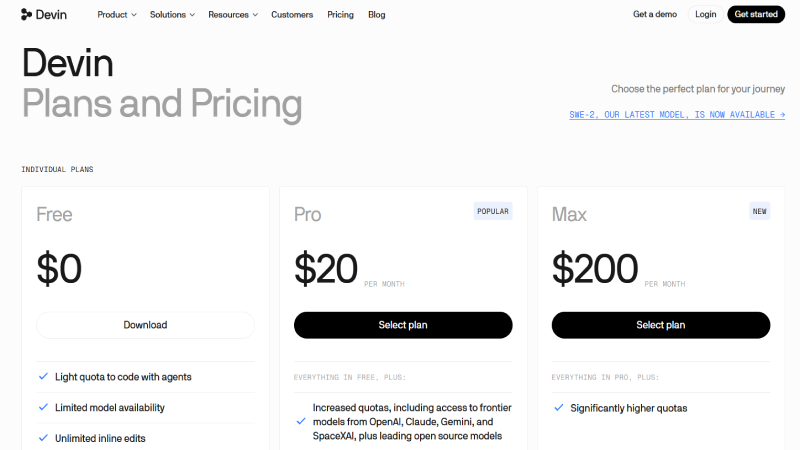
Windsurf’s current pricing is published under Devin Desktop. The official plans include Free, Pro, Max, Teams and Enterprise.
| Plan | Price | Main Benefits |
|---|---|---|
| Free | $0 | Light agent quota, limited models, unlimited Tab completions |
| Pro | $20/month | Higher agent quotas, more models and Devin Cloud |
| Max | $200/month | Significantly higher usage allowance |
| Teams | $80/month team fee + $40/month per full developer seat | Collaboration, administration and centralized billing |
| Enterprise | Custom | Advanced security, administration and deployment options |
Free Plan
The Free plan is a reasonable starting point for developers who want to explore the editor. It includes unlimited inline edits and Tab completions alongside a limited allowance for coding agents.
The biggest restriction is agent usage. Someone who only wants AI-assisted editing may find the free tier useful, but developers running substantial autonomous tasks will likely need more capacity.
Pro Plan: $20 per Month
Pro includes larger agent allowances and access to additional AI models. It also unlocks Devin Cloud, allowing developers to delegate work beyond the local editor.
At $20 per month, Pro competes directly with entry-level paid plans from several AI coding tools. Its value depends on whether the agent workflows fit your development style.
Max Plan: $200 per Month
Max is intended for developers who need significantly more agent usage. It includes the Pro capabilities with a much larger allowance.
For occasional users, the price is difficult to justify. It makes more sense for professionals who frequently run complex coding tasks and regularly reach lower-tier limits.
Teams and Enterprise
Teams has an $80 monthly team fee plus $40 per month for each full developer seat. It adds collaboration and administrative capabilities, including centralized billing.
Enterprise pricing is customized for organizations requiring additional controls, support and deployment options.
How Do Usage Limits Work?
Devin’s pricing documentation explains that paid plans use allowances that refresh on daily and weekly schedules. The amount consumed depends on the model, task complexity and reasoning involved.
Paid users who exceed their included allowance can purchase additional usage at API pricing. This means the advertised subscription price may not be the final cost for a heavy user. It is worth reviewing usage during the first month before choosing a higher plan.
Windsurf Pros and Cons
| Pros | Cons |
|---|---|
| Free plan with unlimited Tab completions | Free agent usage is limited |
| Familiar code editor | Product changes may confuse existing users |
| Supports local and cloud agents | Agent output still requires review |
| Multi-agent task management | Can be excessive for simple projects |
| Multiple model options | Usage costs vary by task and model |
| Useful codebase context tools | Advanced workflows have a learning curve |
| Team and enterprise options | Max plan is expensive |
Windsurf vs Cursor vs GitHub Copilot
Windsurf’s closest competitors include Cursor and GitHub Copilot, but each product approaches AI-assisted programming differently.
| Tool | Main Focus | Best For |
|---|---|---|
| Windsurf / Devin Desktop | AI editor and multi-agent management | Developers delegating multiple coding tasks |
| Cursor | AI-first code editing | Developers wanting a streamlined AI editor |
| GitHub Copilot | AI assistance across supported IDEs | Developers staying in existing workflows |
| Kiro | Spec-driven AI development | Teams prioritizing requirements and structured implementation |
Windsurf vs Cursor
Cursor is a strong alternative for developers who want AI integrated directly into their editing workflow. Both products support code-aware assistance and agentic tasks.
Devin Desktop places particular emphasis on coordinating local and cloud agents from one workspace. That may appeal to developers who increasingly treat coding as a process of assigning and reviewing tasks. Cursor may be more appealing to someone who prefers to remain closely involved in each edit. The better option depends on how much work you want to delegate.
Windsurf vs GitHub Copilot
GitHub Copilot is useful for developers who want AI assistance inside familiar development environments. It can fit into an existing workflow without requiring a complete editor migration.
Devin Desktop offers a more integrated agent-management experience. Its value is greater when developers want to assign larger tasks rather than primarily receive code suggestions. For teams already standardized on a particular IDE, switching costs may be an important part of the decision.
Windsurf vs Kiro
Kiro emphasizes planning and specification-driven development. It is particularly interesting when developers want written requirements and implementation tasks before the AI starts coding.
Devin Desktop focuses more on coordinating agents and managing the resulting work. Both can support substantial development tasks, but their workflows reflect different priorities.
Who Should Use Windsurf?
Windsurf, now Devin Desktop, is most suitable for developers who want more than autocomplete. Its strongest appeal is the ability to manage agent-based work while retaining a full code editor for manual changes. Independent developers may benefit from the Free or Pro plan, particularly when building applications that involve repeated debugging and refactoring. Startups may find the multi-agent interface useful for organizing work across several parts of a product.
Larger engineering teams should evaluate the collaboration and administrative features, along with the cost of providing seats to multiple developers. Beginners can also experiment with the Free plan, but they should be careful not to rely on AI-generated code without understanding it. Learning to debug and test software remains important.
Is Windsurf Safe for Professional Coding?
Devin Desktop includes enterprise-oriented controls and integration options, but security depends on how the product is configured and used. An agent that can edit files or run development commands has meaningful access to a project. Developers should review proposed changes, protect credentials and avoid giving external tools unnecessary permissions.
Businesses working with confidential repositories should examine the provider’s current data policies and enterprise terms before adopting the product. AI coding agents can make mistakes even when their suggestions look convincing. Tests and code review are still necessary before production deployment.
Is Windsurf Worth It in 2026?
Windsurf is still worth considering, but the reason to choose it has changed.
The original editor attracted developers looking for an intelligent coding companion. Devin Desktop builds on that foundation with a stronger focus on coordinating agents and delegating work.
For someone who regularly handles multi-file changes or wants to manage several coding tasks at once, the newer approach could be valuable. The Free plan also makes it easy to explore the interface before paying. developers who mainly want quick autocomplete and occasional code explanations may not need the full agent-management experience. A simpler assistant could be enough.
Pricing is another consideration. Pro starts at $20 per month, but heavy agent usage may require extra spending. The $200 Max tier is aimed at a much more intensive workflow.
Frequently Asked Questions
Is Windsurf still available in 2026?
The Windsurf Editor has been renamed Devin Desktop. Its editor foundation remains available through the new product.
Is Windsurf free?
Yes. Devin Desktop offers a Free plan with unlimited Tab completions and a limited agent quota.
How much does Windsurf cost?
Pro costs $20 per month, while Max costs $200 per month. Team and Enterprise options are also available.
Is Windsurf now called Devin Desktop?
Yes. Cognition officially identifies Devin Desktop as the new name for Windsurf.
What happened to Windsurf Cascade?
Cascade was a major part of the original Windsurf experience. The newer product emphasizes Devin Local and broader agent management, so older Cascade tutorials may not reflect the current default workflow.
Is Windsurf better than Cursor?
Neither is automatically better. Devin Desktop is particularly interesting for multi-agent coordination, while Cursor remains a strong option for AI-first editing.
Can beginners use Windsurf?
Yes. Beginners can try the Free plan, although they should review and understand AI-generated code rather than accepting every suggestion.
Does Windsurf support cloud coding agents?
Yes. Paid Devin Desktop plans include access to Devin Cloud.
Final Verdict
Windsurf’s transition to Devin Desktop makes it one of the more interesting products in the AI coding market. It retains the familiar editor experience while introducing tools for coordinating local and cloud agents. The biggest advantage is flexibility. Developers can write code themselves, accept intelligent completions or delegate larger tasks to agents. That combination may suit professionals who want to spend more time reviewing solutions and less time performing repetitive edits.
The main drawbacks are the changing product experience and usage-based limitations. Developers should also be realistic about what autonomous coding can achieve without supervision.
Our verdict
Windsurf, now Devin Desktop, is worth trying if you want an AI-powered editor with serious agent-management capabilities. Start with the Free plan, evaluate the quality of its coding assistance on your own projects and upgrade only when the additional capacity is genuinely useful.
Editorial note: This review is based on official product information and pricing as of October 18, 2026. It does not claim independent hands-on testing.